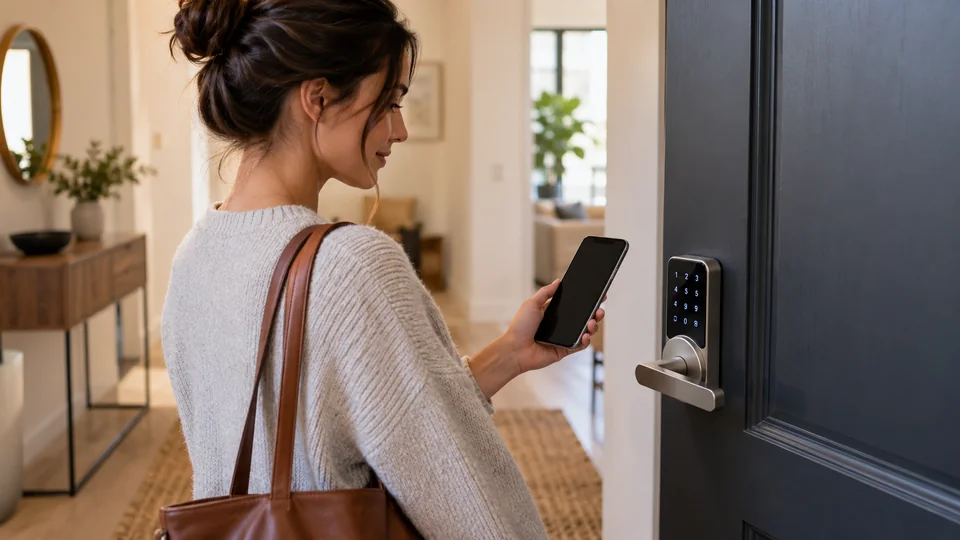
A smart lock without a hub connects directly to your home network or works through its own onboard controls, which can make installation simpler and reduce another device competing for space near the router. The catch is that “hub-free” can mean different things. A lock may offer direct Wi-Fi access for its own app while still requiring a Thread border router, Apple Home hub, or another controller for advanced smart-home features.
Door fit matters just as much as connectivity. A replacement deadbolt may suit a standard front door, while a complete lever lock changes the hardware on both sides of the door. Fingerprint readers, PIN codes, physical keys, emergency USB power, guest codes, battery warnings, and access logs each solve different problems. A lock that looks ideal on a product page can become a poor match if the door thickness, backset, Wi-Fi range, or existing hardware is wrong.
The selections below focus on locks with direct Wi-Fi or self-contained entry methods, while clearly identifying products whose broader ecosystem features need a hub. The comparison weighs hub requirements, access methods, installation details, battery arrangements, and practical limitations rather than treating every smart lock as interchangeable.
Quick Answer
Best Overall: The ULTRALOQ Bolt SE offers the broadest hub-free package here, with built-in Wi-Fi, fingerprint entry, passcodes, app control, voice support, physical keys, and scheduled or temporary access sharing. Its Matter over Thread functions require a compatible controller, but the lock’s direct Wi-Fi operation does not.
Best Established Wi-Fi Deadbolt: The Schlage Encode keeps the setup straightforward with built-in Wi-Fi, a touchscreen keypad, up to 100 access codes, app control, and a physical backup key.
Best for Fingerprint Entry: The eufy Security Smart Lock C220 combines direct Wi-Fi access, fingerprint unlocking, keypad entry, Apple Watch access, voice control, and an emergency power design.
Best for Apple Home Key: The Aqara Smart Lock U100 supports Apple Home Key and local fingerprint, keypad, and physical-key entry. Some Apple Home and Aqara app features require a hub, so it is best for buyers who want local entry first and are comfortable adding a controller later.
Best Smart Locks Without a Hub Comparison Table
| Product | Best For | Lock Type | Hub-Free Connection |
|---|---|---|---|
| ULTRALOQ Bolt SE | Overall hub-free use | Fingerprint deadbolt | Built-in 2.4 GHz Wi-Fi |
| Schlage Encode | Established Wi-Fi deadbolt | Touchscreen deadbolt | Built-in Wi-Fi |
| eufy Security Smart Lock C220 | Fingerprint access | Fingerprint deadbolt | Built-in Wi-Fi |
| Philips Upgraded Wi-Fi Smart Lock | Lever-handle replacement | Smart lever and deadbolt | Built-in 2.4 GHz Wi-Fi |
| Philips Wi-Fi Smart Deadbolt | Multiple entry methods | Fingerprint deadbolt | Built-in Wi-Fi |
| Wyze Auto-Lock Bolt v2 | Emergency power flexibility | Fingerprint deadbolt | Built-in Wi-Fi |
| eufy Security Smart Lock C34 | Apple Home integration | Keypad deadbolt | Direct app operation, Apple Home features vary |
| Aqara UWB Smart Lock U400 | Hands-free Apple access | Fingerprint deadbolt | Local entry without controller, Matter needs one |
| Aqara Smart Lock U100 | Apple Home Key | Fingerprint deadbolt | Local entry, hub needed for some smart features |
The detailed reviews explain which locks genuinely operate without a hub, which features depend on a controller, and what to check before replacing your existing hardware.
1. ULTRALOQ Bolt SE — Best Overall

The Bolt SE earns the top position because its core remote functions come from built-in Wi-Fi rather than a separate bridge. A household can lock, unlock, share credentials, view activity, and receive notifications through the app, provided the lock has a suitable 2.4 GHz connection. That is the distinction many buyers are seeking here. The Matter over Thread feature is useful for broader smart-home integration, but it is a separate operating path and requires a compatible Thread border router.
Entry flexibility is another strong point. The lock supports up to 50 fingerprints and 50 passcodes, along with smartphone access, a web portal, shared eKeys, voice control, and two mechanical keys. A family member can use a fingerprint, a dog walker can receive a scheduled code, and someone carrying groceries can use the app or voice assistant. The listing also describes a claimed battery life of up to 18 months, automatic locking, low-battery alerts, and an IP65 exterior, although actual runtime depends on use and conditions.
Pros
- Built-in 2.4 GHz Wi-Fi supports app-based remote access without a hub.
- Supports fingerprints, passcodes, app access, voice control, eKeys, and physical keys.
- Scheduled and temporary access sharing suits family, service providers, and guests.
- Matter over Thread support provides a broader ecosystem path when a compatible controller is available.
- The listing identifies auto-lock, low-battery alerts, weather resistance, and an ANSI/BHMA certification claim.
Cons
- Matter over Thread functions require a compatible Thread border router.
- The door sensor is not included, and the lock supports 2.4 GHz Wi-Fi only.
This is the strongest fit for someone who wants a feature-rich deadbolt that can function directly through Wi-Fi today while leaving a Matter option open for later. Check the door preparation and router placement before ordering, since the listing recommends keeping the router within about 70 feet and does not establish compatibility with every door configuration. Buyers who want a completely controller-free Apple Home or Matter setup should use the direct Wi-Fi functions rather than assuming Thread adds those features automatically.
To buy this product, click here.
2. Schlage Encode Smart WiFi Deadbolt — Best Established Wi-Fi Deadbolt
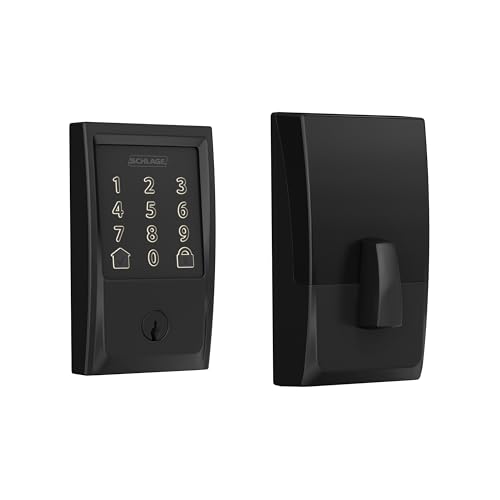
The Schlage Encode takes a more focused approach than the ULTRALOQ. It is a touchscreen deadbolt with built-in Wi-Fi, app control, voice compatibility through Alexa and Google Home, and a physical backup key. Instead of adding fingerprint access or Matter over Thread, it concentrates on familiar keypad operation, remote control, and access-code management. That makes it appealing for a front door where different people need separate codes and the owner wants a clear access history.
Up to 100 access codes gives the Encode room for a large household, recurring visitors, or several managed doors. The Schlage Home app can provide lock history, notifications, and remote locking or unlocking when connected to a secure Wi-Fi network. The listing also identifies a customizable alarm for door movement and forced-entry attempts, one-touch exterior locking, and auto-lock timing. Installation details are unusually useful here: the lock is listed for 1-3/8-inch to 1-3/4-inch doors with a 2-3/8-inch or 2-3/4-inch backset.
Pros
- Built-in Wi-Fi enables remote app control without a separate hub.
- Supports up to 100 access codes with activity history and customizable notifications.
- Includes a physical backup key and one-touch touchscreen locking.
- Listed door thickness and backset requirements give buyers useful installation checkpoints.
- Includes auto-lock, a touchscreen low-battery indicator, and a BHMA residential security, durability, and finish rating claim.
Cons
- Entry is based on keypad, app, voice, and key access, with no fingerprint reader listed.
- The lock uses four AA batteries and the listing gives a claimed runtime of up to six months with typical use.
The Encode fits buyers who prefer a conventional keypad deadbolt from a widely recognized lock brand and do not need biometric access. It is also a sensible choice for people who want installation dimensions spelled out before purchase. A touchscreen can be less convenient than a fingerprint reader for someone arriving with wet or gloved hands, while the Wi-Fi connection and app account remain important for remote features. Those trade-offs are straightforward, which helps the Encode rank highly for uncomplicated hub-free operation.
To buy this product, click here.
3. eufy Security Smart Lock C220 — Best for Fingerprint Access

The C220 is built around quick local entry, with a fingerprint reader, keypad, physical key, and app access all in the same deadbolt. Its listing also names Apple Watch access and Alexa or Google voice control, giving the lock several ways to handle the moment when a phone is buried in a bag or a code is awkward to enter. Since Wi-Fi is built in, the app can manage the lock remotely without a bridge. That is a clean arrangement for someone who wants direct connectivity rather than another small box plugged into the router.
Installation is described as a 15-minute process without drilling, and the lock is intended for most standard deadbolts. The listing gives a bore fit under 54 mm after removing the spacer, so buyers should measure their existing door rather than treating “standard” as universal. Eight AA batteries are listed with a claimed runtime of up to eight months, and the exterior carries an IP53 rating. A BHMA Grade 3 claim and an unusual-attempt alarm add useful information, but neither removes the need to check the door frame, deadbolt alignment, and account security.
Pros
- Built-in Wi-Fi enables remote app control without a bridge.
- Fingerprint, keypad, app, Apple Watch, voice, and physical-key access are supported.
- Listing information describes installation without drilling and compatibility with many standard deadbolts.
- Eight AA batteries are listed with a claimed runtime of up to eight months.
- The product information includes an IP53 rating, a BHMA Grade 3 claim, and an unusual-attempt alarm.
Cons
- The bore and existing deadbolt must match the listed compatibility requirements.
- IP53 protection is more limited than the higher weather-resistance claims listed for some other models.
The C220 is a strong match for a front door where fingerprints are the preferred everyday credential and remote access is still important. It also fits naturally into a broader eufy setup if a compatible eufy doorbell is already installed, since the listing describes shared routines within the eufy Security app. Buyers who want extensive scheduled guest codes should verify the exact app capabilities they need, because the product description describes multiple entry methods more clearly than it describes advanced credential scheduling.
To buy this product, click here.
4. Philips Upgraded Wi-Fi Smart Lock with Handle — Best Complete Lever Replacement

A deadbolt is the wrong shape of solution for some doors, especially interior offices, bedrooms, and entrances that use a lever handle as part of the daily grip-and-turn motion. This Philips model includes a handle and places the fingerprint reader on that handle, so a thumb touch and lever movement become one fluid action. The listing describes support for up to 50 fingerprints, up to 100 passwords, app access, voice control, and a physical key, creating a complete replacement approach rather than a keypad mounted onto an existing deadbolt.
Its direct 2.4 GHz Wi-Fi connection supports remote locking, unlocking, alerts, and event history through the Philips Home Access app. The access-management information is particularly useful for busy homes or small rental operations: permanent, scheduled, and temporary codes are listed, along with offline one-time passwords. Auto-lock can be set from five to 180 seconds, while Passage Mode and Privacy Mode address doors that need to remain open temporarily or block outside entry during quiet periods.
Pros
- Includes a complete handle assembly with fingerprint access on the lever.
- Built-in 2.4 GHz Wi-Fi supports remote control and notifications without a hub.
- Supports up to 100 passwords plus permanent, scheduled, temporary, and offline one-time options.
- Provides a physical key, app, voice, password, and fingerprint entry methods.
- Passage Mode, Privacy Mode, activity logs, and adjustable auto-lock add practical control.
Cons
- A lever replacement requires checking door preparation and existing hardware compatibility rather than assuming a deadbolt fit.
- The product description does not provide the same detailed door-thickness dimensions listed for some other Philips models.
This lock makes sense for buyers who specifically need a lever-style assembly and want fingerprint entry at the point where the hand already rests. It is a poor substitute for a straightforward deadbolt replacement if the door is prepared only for a standard deadbolt. The large code capacity and temporary credentials are helpful for shared access, but the installation decision comes first. Measure the door and confirm the latch arrangement before focusing on the app features.
To buy this product, click here.
5. Philips Wi-Fi Smart Deadbolt — Best for Multiple Entry Methods

This Philips deadbolt covers the everyday entry scenarios that tend to collide at a busy front door. One person may prefer a fingerprint, another may remember a PIN, and a visitor may need a temporary code. The lock also supports app control, voice commands through Alexa or Google Assistant, and a physical key. Its backlit touchscreen should be easier to use after dark than an unlit keypad, while the built-in Wi-Fi keeps remote status checks and unlocking available without a separate hub.
The listing describes up to 100 custom passcodes, temporary and scheduled code sharing, real-time alerts, access history, auto-lock, an anti-tamper alarm, and low-battery warnings. Those features make the lock more useful for a home with cleaners, relatives, or short visits than a basic keypad with one shared code. The fingerprint recognition claim is listed at 0.3 seconds. Buyers should also verify the door preparation and battery arrangement before ordering.
Pros
- Built-in Wi-Fi provides remote access without a separate hub.
- Supports fingerprint, passcode, app, voice, and physical-key entry.
- Up to 100 custom passcodes and temporary or scheduled code sharing support varied access needs.
- Backlit touchscreen, auto-lock, access history, and real-time alerts add useful daily controls.
- Anti-tamper and low-battery alerts provide additional status information.
Cons
- The listing does not provide detailed door-thickness, backset, or bore dimensions in the product description.
- Remote functions depend on the Wi-Fi connection and the Philips app.
This model is a practical fit for buyers who want several entry methods in one conventional front-door deadbolt. It has more access-management detail than many basic Wi-Fi locks, but the available product information is less specific about physical door fit. Confirm the lock preparation before purchase, particularly if the existing deadbolt is unusual. Choose it for credential flexibility, not because the published fingerprint speed represents a guaranteed result in every condition.
To buy this product, click here.
6. Wyze Auto-Lock Bolt v2 — Best for Emergency Power Flexibility

The Wyze Bolt v2 stands out at the moment a smart lock’s batteries are nearly empty. Its listing describes a USB-C port that can accept power from a common power bank, giving the owner a way to wake the lock for entry instead of waiting for a battery replacement. That port is emergency power access, not evidence that the internal batteries recharge through USB-C. The distinction is small on a product page and very important at a dark front door.
Normal entry includes fingerprint, code, app, and physical-key options. The fingerprint scanner uses scratch- and smudge-resistant tempered glass, while the listing describes an adaptive learning function that improves recognition over repeated touches. Built-in Wi-Fi supports remote checking and management through the Wyze app, and a compatible Wyze video doorbell can provide an in-app path to unlock after visually checking a visitor. Eight AA batteries are listed with a claimed runtime of up to eight months.
Pros
- USB-C emergency power input can work with a common power bank when the batteries are depleted.
- Supports fingerprint, code, app, and physical-key entry.
- Built-in Wi-Fi enables remote app management without a hub.
- Tempered glass is described as scratch- and smudge-resistant.
- Eight AA batteries are listed with a claimed runtime of up to eight months.
Cons
- The USB-C port provides emergency power access and should not be treated as normal battery charging.
- Some visitor-management functions described in the listing depend on pairing with a Wyze video doorbell.
The Bolt v2 suits anyone who wants a clear fallback for a depleted battery and prefers several local entry methods. It is also a reasonable fit for an existing Wyze setup, where the lock and doorbell can work together inside the same app. Buyers who want advanced code scheduling or broad ecosystem compatibility should verify those specific functions before ordering, since the product description emphasizes entry flexibility and emergency power more than detailed credential administration.
To buy this product, click here.
7. eufy Security Smart Lock C34 — Best for Apple Home Integration

The C34 is the keypad-focused choice in this group. It supports Apple Home, Google Home, Alexa, and SmartThings according to the listing, while app, keypad, physical-key, and voice entry cover the practical basics. The product information says no additional hub is required for its straightforward setup, which gives it a useful advantage for someone who wants a simpler Apple-oriented installation without immediately building a larger controller-based system.
There is an important distinction around remote control. The listing also describes remote operation through a HomePod or other hub, along with notifications, event logs, and remote unlocking. That means local keypad and key operation can stand alone, while some Apple Home remote functions may rely on the home’s controller arrangement. The C34 uses eight AA batteries with a claimed runtime of up to eight months based on typical usage, and installation is described as a 15-minute process without drilling for standard doors in the United States and Canada.
Pros
- Supports Apple Home, Google Home, Alexa, and SmartThings according to the listing.
- Keypad, app, physical-key, and voice entry provide practical alternatives.
- The listing states that no additional hub is required for setup.
- Standard-door installation is described as a 15-minute process without drilling.
- Eight AA batteries are listed with a claimed runtime of up to eight months.
Cons
- Remote control through Apple Home or another platform may require a HomePod or compatible hub.
- No fingerprint entry is listed.
The C34 is best for buyers who value Apple Home compatibility but are comfortable separating basic local entry from remote ecosystem control. It can unlock the door with a code or key without relying on a hub, yet the fuller Home experience may involve a controller. That makes it less direct than a built-in Wi-Fi lock for remote access, but it is a useful fit for a household already using eufy, Apple Home, or another supported platform.
To buy this product, click here.
8. Aqara UWB Smart Lock U400 — Best for Hands-Free Apple Access

The U400 is an unusual fit for this roundup because its most advanced features are controller-dependent, while its basic lock functions remain available through local methods. The headline feature is UWB hands-free unlocking, which can detect an approaching compatible device and unlock as the user arrives. The listing limits that function to particular iPhone and Apple Watch combinations with the required software and a Thread-enabled Apple Home hub. It is therefore better understood as a high-end ecosystem lock with local fallbacks than as a completely hub-free smart-home device.
Those local fallbacks are substantial. Fingerprint, touchscreen passcode, physical key, voice control, app access, and NFC card support are listed, although the NFC card is sold separately. Matter over Thread is also supported, but a Thread-enabled Matter controller is required for each relevant ecosystem. The removable rechargeable battery is listed for up to six months per charge, and USB-C can recharge it while the lock remains online or after removing the battery. The exterior is described as IP65-rated, with a BHMA certification claim and a rekeyable cylinder.
Pros
- Offers fingerprint, passcode, physical-key, app, voice, and optional NFC entry.
- UWB hands-free unlocking provides a distinctive Apple-focused access method.
- Matter over Thread supports multiple ecosystems when compatible controllers are available.
- Removable rechargeable battery and USB-C charging provide more flexible power management.
- The listing identifies IP65 exterior protection, a BHMA certification claim, and a rekeyable cylinder.
Cons
- UWB, Apple Home Key, and Matter ecosystem functions require compatible controllers and supported devices.
- The rechargeable battery is listed with a claimed runtime of up to six months per charge, shorter than some replaceable-battery claims here.
The U400 belongs on this list for buyers who want advanced Apple and Matter options while retaining fingerprint, code, and key access during a controller outage or before the smart-home system is complete. It is not the cleanest answer for someone who specifically wants every remote function to work without a hub. Check the supported phone, watch, software, controller, and door requirements carefully, since the UWB experience depends on a more specific setup than ordinary Wi-Fi app control.
To buy this product, click here.
9. Aqara Smart Lock U100 — Best for Apple Home Key
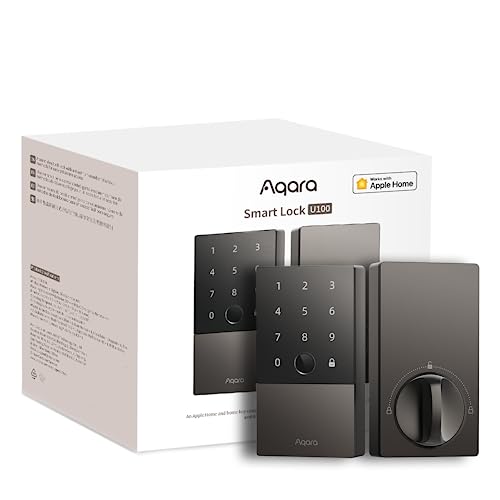
The U100 is the clearest Apple Home Key choice in this group, with support for tapping an iPhone or Apple Watch to unlock. It also keeps the door usable through a fingerprint reader, touchscreen keypad, one-time local passwords, and a mechanical key. That mix matters because a person can use Apple Home Key every day while a guest receives a local code and a family member uses a fingerprint. The lock does not require a hub for those basic local entry methods.
The hub limitation appears in the broader feature set. The listing says an Apple Home hub is needed to share Apple Home Keys, while remotely configurable passwords through Aqara Home require an Aqara Zigbee 3.0 hub. Alexa, Google Home, IFTTT, and Aqara automations are also described with the hub-based setup. Four AA batteries are listed with a claimed runtime of up to eight months, and an emergency USB-C port is included. The lock also lists auto-lock through a built-in gyroscope, Do Not Disturb mode, IP65 protection, and local AES-encrypted fingerprint storage.
Pros
- Supports explicit Apple Home Key access through compatible iPhone and Apple Watch devices.
- Fingerprint, touchscreen keypad, one-time local passwords, and physical-key entry work as useful alternatives.
- Auto-lock can use the lock’s built-in gyroscope after the door closes.
- Four AA batteries are listed with a claimed runtime of up to eight months, plus emergency USB-C power.
- The listing identifies IP65 protection and local AES-encrypted fingerprint storage.
Cons
- Apple Home Key sharing and several remote or ecosystem functions require a compatible hub.
- The NFC card is sold separately, and the product description does not establish universal door compatibility.
The U100 is worth choosing only if Apple Home Key is more important than completely hub-free ecosystem management. Its local fingerprint, keypad, key, and one-time password options make the lock usable without a controller, but the most useful shared-access and automation features need additional hardware. Buyers seeking direct Wi-Fi remote control should choose one of the built-in Wi-Fi models above instead. Buyers already invested in Apple Home may accept the extra controller requirement for the tap-to-unlock experience.
To buy this product, click here.
Buying Guide
Confirm What “Without a Hub” Means for Your Setup
A built-in Wi-Fi lock can often connect directly to the router for app-based remote access, as seen with the ULTRALOQ, Schlage, eufy C220, and Philips models. That does not mean every smart-home feature is controller-free. Thread and Matter products may need a border router or Matter controller, while Apple Home remote functions can depend on a HomePod or Apple TV. Write down the functions you actually need. Local keypad and fingerprint access may be enough if the main goal is leaving keys behind.
Check the Existing Door Before Comparing Apps
A smart lock is still a mechanical replacement, so the door preparation must match. The Schlage Encode lists compatibility with 1-3/8-inch to 1-3/4-inch doors and two backset options. The Philips 4200 information lists 1-3/8-inch to 1-3/4-inch door thickness, while the eufy C220 refers to standard deadbolts and a bore under 54 mm after spacer adjustment. These details are useful starting points, not permission to skip measurement. Check the deadbolt, bore, backset, latch alignment, door swing, and frame clearance.
Choose a Deadbolt or Lever Assembly Deliberately
Most products here replace or fit a deadbolt. The Philips Upgraded Wi-Fi model includes a handle and is a different installation decision. A lever assembly can suit an office, bedroom, or entrance built around a handle, but it may not fit a door prepared only for a conventional deadbolt. A complete hardware replacement also changes the interior and exterior appearance, so confirm that the included configuration matches the door rather than shopping by connectivity alone.
Match the Entry Method to Daily Use
Fingerprint access is useful for someone who wants quick entry without memorizing a code, but a keypad remains valuable for visitors and family members. Physical keys matter during battery depletion or electronics problems. The Wyze model adds emergency USB-C power, while the Aqara locks offer rechargeable or replaceable-battery arrangements depending on the model. A voice assistant can be useful with hands full, but it should not replace a dependable local entry method.
Read Access-Management Claims Carefully
Code quantity is only one part of guest management. The Philips Upgraded model lists permanent, scheduled, temporary, and offline one-time passwords. The ULTRALOQ lists scheduled and temporary eKeys and passcodes. The Schlage Encode lists up to 100 access codes with history and notifications. Those details matter for cleaners, relatives, tenants, and short visits. A keypad alone does not prove that codes expire automatically or that every user can be identified individually.
Separate Battery Runtime From Emergency Access
Advertised battery life is a claim based on expected use, not a guarantee for every household. Frequent unlocking, weak connectivity, temperature, and app activity can affect the interval between replacements or charges. Keep the low-battery alerts enabled and understand whether the emergency port charges the internal battery or merely powers the lock temporarily. The Wyze listing describes power-bank access through USB-C, while the Aqara U400 describes USB-C charging for its removable rechargeable battery.
Check Which Parts Are Exposed to Weather
Exterior ratings can help with a front entry, but an IP rating applies to the specified product protection and does not make every installation universally weatherproof. The ULTRALOQ lists IP65, the Aqara U400 and U100 list IP65-related exterior protection, and the eufy C220 lists IP53. Consider whether the keypad is under a porch, directly exposed to rain, or installed in a location with unusual cold or heat. The eufy C220 and Aqara U100 provide operating-temperature information in their listings, while other models may require more confirmation.
Best Smart Locks Without a Hub FAQ
Can a smart lock work without a hub?
Yes, but the answer depends on the specific function. Locks with built-in Wi-Fi, such as the ULTRALOQ Bolt SE, Schlage Encode, and eufy C220, can use direct Wi-Fi for app access. A lock may still need a hub or controller for Matter, Thread, Apple Home remote features, or advanced Aqara functions. Local PIN, fingerprint, and key entry often remain available without one.
Does Matter over Thread mean the lock is hub-free?
No. Matter is the interoperability standard, while Thread is the network technology. A Matter over Thread lock needs a compatible Thread border router or Matter controller for that ecosystem connection. The ULTRALOQ can use built-in Wi-Fi for its direct app functions, but its listed Matter over Thread features require a compatible controller.
Do Apple Home and Apple Home Key mean the same thing?
No. Apple Home compatibility allows a product to participate in Apple’s smart-home app or ecosystem, while Apple Home Key refers to tap-based access with a compatible iPhone or Apple Watch. The Aqara U100 and U400 explicitly list Apple Home Key. The eufy C34 lists Apple Home support, but the product description does not identify Apple Home Key support.
Will these locks fit any front door?
No. Door thickness, deadbolt preparation, bore size, backset, latch alignment, and frame clearance all matter. Some products list specific dimensions, while others use broader phrases such as “standard door.” Measure the existing hardware and compare it with the exact product requirements. A smart lock’s app compatibility does not establish mechanical fit.
Are fingerprint smart locks safer than keypad locks?
Neither method is automatically safer in every situation. A fingerprint reader can make daily entry convenient and reduce code sharing, while a keypad makes guest access easier. Security also depends on the mechanical lock, account protection, credential management, battery condition, and how access is revoked. Choose the method that supports controlled access for the people who use the door.
What happens if the smart lock battery dies?
The backup method varies. Several models include a physical key, while the Wyze Bolt v2 lists USB-C emergency power from a power bank. The Aqara U400 uses a removable rechargeable battery and USB-C charging. Keep the physical key accessible outside the locked home or store an appropriate power bank nearby, and pay attention to low-battery notifications before the lock reaches that point.
Can a hub-free lock provide temporary guest codes?
Some can. The ULTRALOQ listing describes scheduled and temporary eKeys and passcodes, while the Philips models list temporary or scheduled code options. The exact creation, expiration, and management process depends on the app. Do not assume every keypad supports time-limited credentials simply because it has multiple user codes.
Final Verdict
The ULTRALOQ Bolt SE is the strongest overall match for a hub-free smart lock because its built-in Wi-Fi supports remote access, activity history, notifications, access sharing, and several local entry methods without requiring a separate bridge. It also leaves a Matter over Thread path open for buyers who later add a compatible controller. The Schlage Encode is the cleaner choice for a keypad-first household that values clearly listed door dimensions, up to 100 access codes, a physical key, and a focused Wi-Fi setup.
The eufy C220 deserves attention if fingerprint entry is the daily priority, while the Philips Upgraded model is the better hardware direction for a complete lever replacement. The Wyze Bolt v2 offers a useful emergency-power fallback, and the eufy C34 fits Apple Home users who can separate local entry from controller-dependent remote features. The Aqara U100 and U400 are specialized choices for Apple Home Key, UWB, and Matter users, but their hub requirements make them less direct answers to this search. Match the lock to the door first, then choose the access method and ecosystem that will still be practical when the Wi-Fi, battery, or controller is unavailable.
