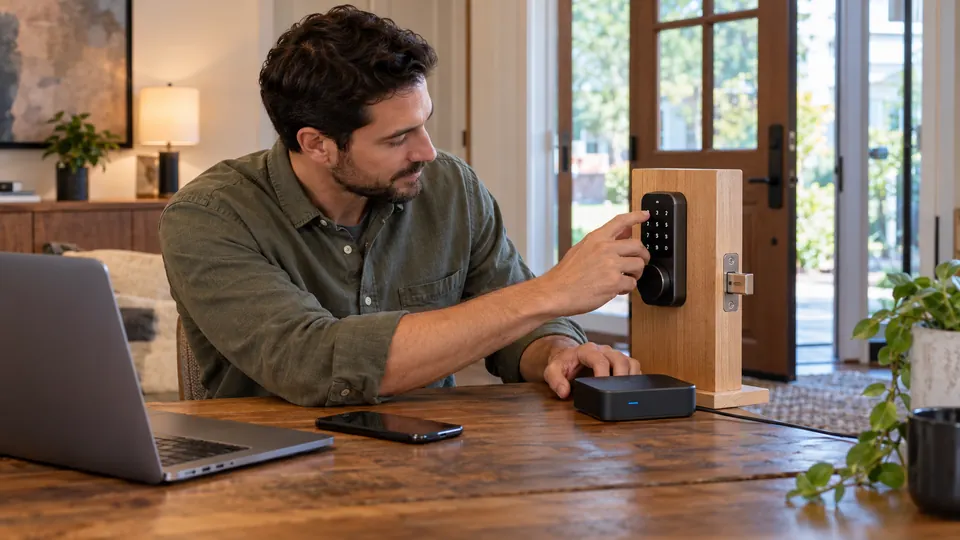
A smart lock can be a useful Home Assistant device, but the lock itself is only one part of the decision. The important question is whether it exposes useful controls and status information through a connection method, such as Matter over Thread, rather than simply offering a mobile app or Alexa support. A lock may work well as a standalone product while offering little practical value inside a Home Assistant dashboard.
Connectivity deserves careful attention before installation. Matter and Thread are different technologies, and neither one automatically guarantees that every lock function will appear in Home Assistant. Wi-Fi models may provide remote control through a manufacturer app without offering a Home Assistant integration. Door fit matters too. A deadbolt that accepts the right battery and protocol can still be a poor purchase if the door thickness, bore, backset, or latch alignment does not match.
The products below are ranked by their smart-home relevance, access options, installation information, and practical limitations. The Aqara U400 leads because the product description explicitly identifies Home Assistant support and Matter over Thread. The remaining choices can still make sense for buyers who value a reliable standalone lock, Apple Home, Matter, or app-based access, but their Home Assistant compatibility should be confirmed before ordering.
Quick Answer
- Best Overall: Aqara U400, because its listing explicitly names Home Assistant support, Matter over Thread, fingerprint entry, Apple Home Key, and multiple backup methods.
- Best Matter Alternative: ULTRALOQ Bolt SE, which combines Matter over Thread with built-in Wi-Fi, fingerprint access, temporary codes, and physical keys. The listing does not specifically document Home Assistant support.
- Best Apple Home and Matter Option: Aqara U100, with Apple Home Key, Matter over Thread, fingerprint entry, and local one-time passwords. Its listing describes Aqara, Apple Home, Google, Alexa, and IFTTT support, but does not specifically identify Home Assistant.
- Best Standalone Wi-Fi Choice: eufy Security Smart Lock C220, which offers built-in Wi-Fi, fingerprint access, app control, and a physical key, although direct Home Assistant integration is not in the product description.
Best Smart Locks for Home Assistant Comparison Table
| Product | Best For | Connectivity | Access Methods |
|---|---|---|---|
| Aqara U400 | Home Assistant and Matter support | Matter over Thread | Fingerprint, code, app, Apple Home Key, key |
| ULTRALOQ Bolt SE | Matter-focused smart homes | Wi-Fi and Matter over Thread | Fingerprint, code, app, voice, key |
| Aqara U100 | Apple Home Key households | Matter over Thread, Aqara Zigbee hub | Fingerprint, Home Key, code, app, key |
| eufy Security Smart Lock C220 | Standalone Wi-Fi operation | Built-in Wi-Fi | Fingerprint, keypad, app, voice, key |
| SMONET Smart Front Door Lock Set | Mixed-device households | Built-in Wi-Fi | Home Key, fingerprint, code, app, card, key |
| Schlage Encode | Established keypad access | Built-in Wi-Fi | Keypad, app, voice, key |
| Philips Wi-Fi Smart Deadbolt | Flexible code and fingerprint entry | Built-in 2.4 GHz Wi-Fi | Fingerprint, code, app, voice, key |
| Philips 4200 Series Wi-Fi Deadbolt | Complete lock and handle replacement | Built-in 2.4 GHz Wi-Fi | Fingerprint, code, app, voice |
| Wyze Auto-Lock Bolt v2 | Fingerprint entry and app control | Built-in Wi-Fi | Fingerprint, code, app, key |
The detailed reviews explain which products have a path toward Home Assistant, which are primarily ecosystem or app locks, and what installation trade-offs deserve attention.
1. Aqara U400 — Best Overall

The Aqara U400 is the strongest match for this roundup because the supplied listing explicitly names Home Assistant alongside Apple Home, Alexa, and Google. It uses Matter over Thread, giving it a smart-home foundation rather than relying solely on a proprietary Wi-Fi app. That distinction matters for a Home Assistant installation where lock status, commands, and automations need a supported route into the controller.
Its access hardware is equally flexible. A household can use fingerprint recognition, a touchscreen code, a physical key, app control, voice control, Apple Home Key, or an optional NFC card. The removable rechargeable battery is rated by the listing for up to six months per charge, and the USB-C port can recharge it while the lock remains available. Apple Home Key and UWB features have specific Apple hub, phone, and watch requirements, so those functions should be treated as optional ecosystem features rather than assumptions about every installation.
Pros
- Home Assistant support is explicitly identified in the product information.
- Matter over Thread offers a multi-ecosystem connection method.
- Provides fingerprint, code, app, Apple Home Key, NFC card, voice, and physical-key access.
- Uses a removable rechargeable battery with USB-C charging and low-battery alerts.
- The listing identifies BHMA certification and an IP65-rated exterior.
Cons
- Thread-enabled Matter controllers are required for the relevant ecosystems.
- UWB unlocking depends on specific Apple hardware and software requirements.
This is the best starting point for a Home Assistant user who wants the clearest connection path in this group. It also suits households that want Apple Home Key or fingerprint entry at the door. Buyers who want a simpler Wi-Fi lock with no controller planning may find the setup more involved, while anyone considering the UWB function should verify device support before purchase.
To buy this product, click here.
2. ULTRALOQ Bolt SE — Best Matter Alternative

ULTRALOQ gives Matter-focused households an appealing combination of wireless options. The listing describes built-in Wi-Fi for remote app access and Matter over Thread for Matter-compatible apps. It also states that a Thread Border Router is required for the Matter connection. That requirement is easy to miss, yet it is central to planning a Home Assistant installation. Matter support is documented, but direct Home Assistant support is not specifically named in the product description.
Daily access is well covered. The lock accepts fingerprints, passcodes, smartphone control, shared eKeys, voice commands, and two mechanical keys. Permanent, scheduled, and temporary access credentials are supported through the app, which gives it more guest-management depth than a keypad that merely stores several static codes. The listing claims up to 18 months of battery life, though actual runtime will vary with use and connection conditions. A door sensor is not included, so the lock itself should not be treated as a complete open-door monitoring system.
Pros
- Supports Matter over Thread as well as built-in 2.4 GHz Wi-Fi.
- Offers fingerprint, passcode, app, voice, eKey, and physical-key access.
- Supports permanent, scheduled, and temporary shared credentials.
- Stores up to 50 fingerprints and 50 access codes according to the listing.
- Includes auto-lock, low-battery alerts, and an IP65 weather-resistant design.
Cons
- A compatible Matter over Thread hub is required for Matter operation.
- Home Assistant support is not explicitly identified in the supplied listing.
Choose this model if Matter is your preferred route and you want Wi-Fi app access available as a second path. It is especially useful for households sharing access with guests or service providers. A buyer seeking a confirmed Home Assistant integration should place the U400 ahead of it, while a buyer without a Thread Border Router should account for that additional equipment before ordering.
To buy this product, click here.
3. Aqara U100 — Best for Apple Home Key
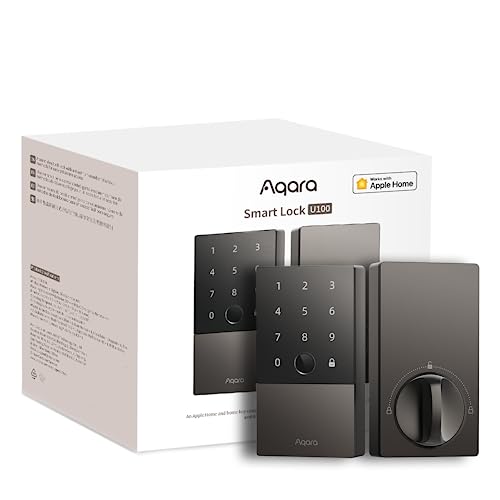
The U100 is a sensible choice for a Home Assistant household that also uses Apple devices, although the product description does not explicitly confirm a Home Assistant integration. Its clearest strength is Apple Home Key. A compatible iPhone or Apple Watch can be tapped at the lock, and the listing says Home Keys can work even when the phone or watch battery is depleted. Sharing Apple Home Keys requires an Apple Home Hub, so the feature has an ecosystem requirement that belongs on the installation checklist.
Fingerprint entry supports up to 50 fingerprints, and the lock also provides one-time local passwords, remotely configurable passwords through the Aqara app, and a mechanical key. Remote password management requires an Aqara Zigbee 3.0 hub. That makes the U100 more dependent on supporting hardware than its keypad appearance might suggest. Its four AA batteries are listed for up to eight months, while the USB-C port provides emergency charging rather than ordinary battery replacement.
Pros
- Explicitly supports Apple Home Key on compatible Apple devices.
- Offers fingerprint entry for up to 50 fingerprints.
- Provides local one-time passwords and physical-key backup.
- Supports Matter over Thread and wider ecosystem connections through equipment.
- Includes IP65 protection, auto-lock, Do Not Disturb mode, and emergency USB-C power.
Cons
- The product description does not specifically identify Home Assistant support.
- An Aqara Zigbee hub is required for remotely configurable passwords and some integrations.
The U100 fits a front door where Apple Home Key is a priority and the owner is comfortable adding the required hub for broader Aqara functions. It is less compelling for someone buying solely for Home Assistant, since the direct integration path is not here. Check controller requirements and the existing door preparation before treating its Matter label as a guarantee that every lock function will appear in Home Assistant.
To buy this product, click here.
4. eufy Security Smart Lock C220 — Best Standalone Wi-Fi Choice

The C220 is aimed at buyers who want a self-contained Wi-Fi smart lock rather than a Matter or Thread project. Its built-in Wi-Fi supports remote control through the eufy Security app without a bridge, and the lock can be linked with other eufy devices such as a compatible doorbell. The listing does not document direct Home Assistant support, so this is best viewed as a capable standalone lock that may require separate compatibility confirmation before joining a Home Assistant setup.
Fingerprint entry, a keypad, app control, Apple Watch access, voice commands, and a physical key give the lock a broad everyday access menu. The listing states that eight AA batteries provide around eight months of operation, with actual life varying according to use. Installation is described as a 15-minute process without drilling, and the lock fits most standard deadbolts with a bore under 54 mm after removing the spacer. That is useful, but the existing deadbolt and door preparation still need to match.
Pros
- Built-in Wi-Fi provides remote app control without a bridge.
- Offers fingerprint, keypad, app, Apple Watch, voice, and physical-key access.
- Includes an unusual-attempt alarm and IP53 protection.
- The listing identifies BHMA Grade 3 certification.
- Supports a stated installation approach that avoids drilling for compatible doors.
Cons
- Direct Home Assistant integration is not in the product description.
- Compatibility depends on the existing deadbolt and bore configuration.
This model suits a buyer who values straightforward app-based remote access and fingerprint entry more than protocol flexibility. It can be a reasonable standalone front-door lock, especially in an existing eufy setup. Home Assistant users should verify whether the desired entities and commands are available before purchase, since app compatibility alone does not establish a supported integration.
To buy this product, click here.
5. SMONET Smart Front Door Lock Set — Best for Mixed Access Methods

SMONET brings a complete handle set and a particularly broad collection of entry methods. Apple Home Key is joined by fingerprint recognition, touchscreen codes, an app, IC cards, voice control, a mechanical key, and the interior thumb turn. That range can be handy in a household where one person prefers a phone, another uses a fingerprint, and visitors receive codes or cards. Built-in Wi-Fi supports remote app control without an extra gateway according to the listing.
The model is more interesting as a flexible front-door replacement than as a confirmed Home Assistant lock. The product description names Apple Home, Siri, Alexa, and Google Assistant, but it does not specifically name Home Assistant or Matter. It also includes a matched exterior pull handle and interior lever, which means the installation decision involves replacing more hardware than a simple deadbolt-only swap. Verify door preparation, handing, and clearance before ordering.
Pros
- Explicitly supports Apple Home Key and several other entry methods.
- Built-in Wi-Fi enables app-based remote control without an additional gateway.
- Stores up to 50 fingerprints, 50 passcodes, and 50 IC cards according to the listing.
- Includes the deadbolt, exterior pull handle, and interior lever as one set.
- Offers anti-peep keypad input, auto-lock, privacy mode, and Type-C emergency power.
Cons
- Home Assistant and Matter support are not explicitly documented.
- A complete handle-set replacement requires more door-hardware checks than a deadbolt-only installation.
SMONET makes sense for a mixed-device household that wants Apple Home Key plus physical and biometric alternatives. It may also suit a front door where the existing handle needs replacement. A Home Assistant-focused buyer should rank it below the Matter models because the product description does not establish a direct integration path.
To buy this product, click here.
6. Schlage Encode Smart WiFi Deadbolt — Best for Keypad Access
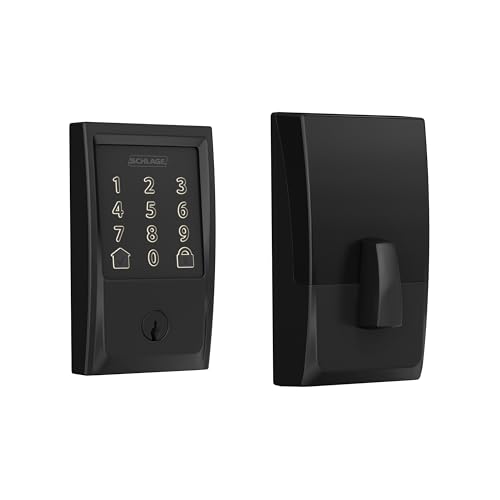
The Schlage Encode takes a more focused approach than the fingerprint-equipped locks above. Its main access method is a touchscreen keypad, supported by app control, Alexa, Google Home, and one physical backup key. The listing states that up to 100 access codes can be managed through the Schlage Home app, along with lock history and notifications. Those features are useful for regular household access, but the product description does not identify Home Assistant support.
Installation information is clearer than many generic listings. The lock fits doors from 1 3/8 to 1 3/4 inches thick and supports 2 3/8 or 2 3/4 inch backsets. Its Snap ’n Stay feature is intended to hold the lock in place during installation, and the product uses four included AA batteries. A built-in alarm can respond to door movement and forced-entry attempts, although that should not be treated as a guarantee against intrusion.
Pros
- Built-in Wi-Fi supports remote app control and monitoring.
- Manages up to 100 access codes through the Schlage Home app.
- Provides lock history, notifications, auto-lock, and one-touch locking.
- Includes a physical backup key and four AA batteries.
- Lists specific door thickness and backset compatibility.
Cons
- Direct Home Assistant integration is not in the product description.
- There is no fingerprint access or Matter support identified for this model.
This is a strong choice for someone who prefers dependable keypad entry and clear door-dimension guidance. It is less suitable for a buyer who expects native Home Assistant controls or biometric access. Before purchase, compare the stated backset and door-thickness requirements with the existing door rather than relying on the phrase “standard door.”
To buy this product, click here.
7. Philips Wi-Fi Smart Deadbolt — Best for Flexible Code Management

This Philips deadbolt combines built-in Wi-Fi with fingerprint, app, physical-key, voice, and passcode access. The listing says it can create up to 100 custom passcodes and share one-time or scheduled codes, which makes the lock more useful for cleaners, family members, and occasional visitors than a keypad with one permanent PIN. Remote access uses the Philips app and a 2.4 GHz network, so the lock should be positioned within the stated connection range of the router.
The hardware fits doors from 1 3/8 to 2 inches thick according to the listing, a broader stated thickness range than the Schlage model. Correct latch installation remains important, since the product information specifically directs the installer to route the cable beneath the latch and align the tailpiece. Away Mode can restrict entry methods while the household is traveling. Home Assistant compatibility is not documented, so the lock ranks as a feature-rich Wi-Fi option rather than a confirmed integration.
Pros
- Offers fingerprint, passcode, app, voice, and physical-key entry.
- Supports up to 100 custom passcodes plus one-time and scheduled codes.
- Built-in Wi-Fi enables remote control without an extra hub.
- Includes Away Mode, access history, notifications, and adjustable auto-lock.
- Lists compatibility with doors from 1 3/8 to 2 inches thick.
Cons
- Home Assistant support is not explicitly identified.
- Only 2.4 GHz Wi-Fi is supported, and batteries are not included.
This Philips model suits buyers who want a conventional deadbolt with rich app-managed code options and no separate gateway. It deserves a lower Home Assistant ranking because Wi-Fi app control is not the same as a Home Assistant integration. Check the door thickness and latch alignment carefully, especially if replacing older hardware with a different tailpiece arrangement.
To buy this product, click here.
8. Philips 4200 Series Wi-Fi Deadbolt With Handle — Best Complete Handle Set
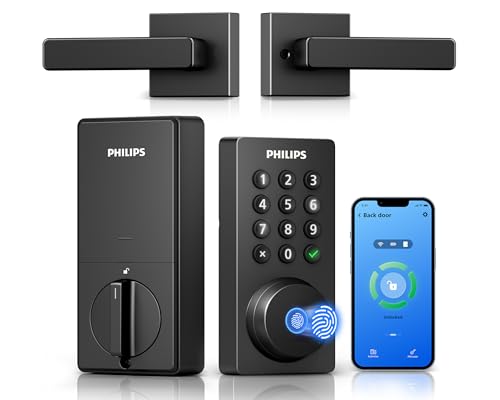
The Philips 4200 Series differs from the previous Philips pick by including a matching handle set. That makes it useful for a front-door upgrade where the existing lever also needs replacement. The lock provides fingerprint entry, app control, voice control, and permanent, one-time, periodic, and recurring PIN codes. Remote operation uses built-in 2.4 GHz Wi-Fi and the Philips Home Access app.
The listing identifies a 1 3/8 to 1 3/4 inch door-thickness range and says the default configuration is for right-opening doors, with a reset required for left-opening doors. Those details matter more here because a complete handle installation introduces handing and alignment concerns alongside the deadbolt fit. The listing claims up to six months of battery life, but batteries are not included and standard alkaline cells are specified. Direct Home Assistant support is not documented.
Pros
- Includes a coordinated deadbolt and door-handle set.
- Supports fingerprint, app, voice, and several types of PIN codes.
- Offers one-time, recurring, periodic, and permanent access options.
- Provides remote status, access history, and adjustable auto-lock.
- Lists compatibility with doors from 1 3/8 to 1 3/4 inches thick.
Cons
- Home Assistant integration is not explicitly documented.
- The default handing is for right-opening doors and batteries are not included.
This model is best for a door that needs a coordinated handle and deadbolt replacement rather than a deadbolt-only swap. It gives households useful access flexibility, but its Wi-Fi app features should not be mistaken for confirmed Home Assistant entities or automations. Verify handing, door thickness, and cable placement before installation.
To buy this product, click here.
9. Wyze Auto-Lock Bolt v2 — Best for Fingerprint Entry

Wyze focuses on quick access through a fingerprint scanner, with keypad, app, and physical-key alternatives close behind. The listing describes a scratch- and smudge-resistant tempered-glass scanner and an AI learning function that adjusts recognition over repeated use.
Built-in Wi-Fi supports remote management in the Wyze app, and the lock can connect with a Wyze video doorbell for access from a live feed. The listing states that eight AA batteries provide up to eight months of use and that a USB-C port can accept power from a power bank if the batteries run out. That port is emergency power access, not a replacement for normal battery maintenance. Home Assistant support, Matter, and Thread are not identified in the product description.
Pros
- Provides fingerprint, keypad, app, and physical-key entry.
- Includes built-in Wi-Fi for remote Wyze app control.
- Uses an emergency USB-C power input when the batteries are depleted.
- Includes eight AA batteries according to the listing.
- Offers anti-peep keypad protection and IP53 protection.
Cons
- Home Assistant, Matter, and Thread support are not documented.
- Its broader smart-home functions depend primarily on the Wyze app and ecosystem described in the listing.
The Bolt v2 is a reasonable standalone fingerprint lock for buyers already using Wyze devices. It ranks last here because the product description does not establish a Home Assistant connection method. Choose it for its access hardware and emergency power option, not on the assumption that a Wi-Fi radio will automatically expose lock controls to your smart-home controller.
To buy this product, click here.
Buying Guide
Confirm a Home Assistant Connection
Start with the integration path, not the number of unlocking methods. The U400 is the clearest match in this group because its product information explicitly names Home Assistant and Matter over Thread. The ULTRALOQ and Aqara U100 listings describe Matter-related capabilities, but they do not specifically identify Home Assistant. The Wi-Fi locks list app, Alexa, Google, or Apple functions without documenting Home Assistant support. A lock can be excellent at standalone access and still be a poor fit for the automations you want.
Separate Matter From Thread
Matter is the interoperability standard, while Thread is the low-power network technology used by some Matter devices. A Thread Border Router or another compatible controller may be required. The U400 and ULTRALOQ listings both describe Matter over Thread, but the required controller remains part of the setup. Do not treat the presence of Thread alone as proof that a lock will appear in Home Assistant.
Decide Which Home Assistant Functions Matter
A lock showing in a dashboard is only useful if it exposes the controls you need. Decide whether you want lock and unlock commands, lock status, notifications, access automations, or presence-related routines. The product description does not provide a detailed list of Home Assistant entities for these models, so confirm the exact functions before purchasing. Remote app access, voice control, and Home Assistant control are separate capabilities.
Match the Door Before Comparing Protocols
Measure the door and inspect the existing deadbolt before choosing a lock. The Schlage listing gives specific thickness and backset ranges. The Philips models identify door-thickness ranges, while the eufy C220 describes compatibility with standard deadbolts and bores under 54 mm after spacer removal. Complete sets such as the SMONET and Philips 4200 also require attention to handle handing, latch alignment, and exterior clearance.
Plan for the Controller and Battery
A Matter or Zigbee lock may need a controller, while a Wi-Fi lock may depend on the manufacturer’s app and network. The Aqara U100 requires an Aqara Zigbee hub for remotely configurable passwords, and Apple Home Key sharing requires an Apple Home Hub. Battery designs also vary. The U400 uses a removable rechargeable battery, the U100 uses four AA batteries, and the Wyze model provides USB-C emergency power. Emergency power does not remove the need to monitor and replace or recharge the normal power source.
Choose Access Methods That Fit the Household
Fingerprint entry can be convenient for daily arrivals, while codes are easier to share with visitors. Physical keys remain useful during electronic problems, and temporary or scheduled credentials matter if cleaners, guests, or service providers need controlled access. The ULTRALOQ, Philips, and SMONET listings describe several types of temporary or recurring access. A lock that stores many static codes may offer less useful management than one with fewer credentials but clearer scheduling and revocation tools.
Treat Security Claims With Appropriate Restraint
Look for practical features such as physical-key backup, low-battery alerts, access history, auto-lock, and hardware grades. Those features help with operation and access management, but they do not guarantee protection against forced entry or account compromise. Proper latch alignment, a sound door frame, strong account credentials, and timely firmware maintenance remain important parts of a smart-lock installation.
Best Smart Locks for Home Assistant FAQ
Which Product Has the Clearest Home Assistant Support?
The Aqara U400 has the clearest match because its the product description explicitly lists Home Assistant support and Matter over Thread. The listing does not provide a detailed list of exposed entities or automations, so confirm the specific controls you need before ordering.
Does Matter Guarantee Home Assistant Compatibility?
No. Matter can provide an interoperability path, but the exact device, controller, firmware, and exposed functions still matter. Matter over Thread also requires suitable Thread equipment. A Matter label should be treated as a useful compatibility signal, not proof that every lock feature will be available in Home Assistant.
Can a Wi-Fi Smart Lock Work With Home Assistant?
It may, but Wi-Fi alone does not establish an integration. The Philips, eufy, Schlage, SMONET, and Wyze listings describe Wi-Fi and manufacturer-app features without explicitly documenting Home Assistant. Confirm a supported integration and the available lock entities rather than assuming that internet connectivity creates local or cloud control in Home Assistant.
Is a Hub Required for These Locks?
Requirements differ. The U400 needs a Thread-enabled Matter controller for its relevant Matter ecosystem connections. The ULTRALOQ listing requires a Matter over Thread hub for Matter operation. The U100 requires an Aqara Zigbee hub for remotely configurable passwords, and its Apple Home Key sharing requires an Apple Home Hub. Several Wi-Fi models advertise app access without an extra gateway, but that does not necessarily apply to Home Assistant control.
Do These Locks Support Physical Keys?
The U400, U100, eufy C220, ULTRALOQ Bolt SE, Schlage Encode, Philips Wi-Fi Smart Deadbolt, SMONET lock set, and Wyze Bolt v2 list physical-key backup or mechanical-key access. The Philips 4200 feature list emphasizes app, fingerprint, code, and voice access and does not clearly identify a physical key, so confirm the exact package if mechanical backup is important.
What Should I Check Before Installing a Deadbolt Smart Lock?
Check door thickness, backset, bore size, latch alignment, handing, and the space around the interior and exterior hardware. Also confirm whether the product replaces the existing deadbolt or includes a handle assembly. A lock can meet the connectivity requirements and still fail to fit the door preparation.
Which Lock Is Best for Apple Home Key and Home Assistant Together?
The Aqara U400 is the strongest option because its listing identifies both Apple Home Key and Home Assistant, along with Matter over Thread. The Aqara U100 also supports Apple Home Key and Matter-related features, but the product description does not specifically name Home Assistant. Verify the required Apple and Thread controllers for either model.
Final Verdict
The Aqara U400 is the strongest overall choice for this roundup because it is the only product here whose the product description explicitly identifies Home Assistant support while also offering Matter over Thread. Its fingerprint reader, Apple Home Key, touchscreen code, physical key, rechargeable battery, and outdoor rating give it useful flexibility beyond the smart-home connection itself. The main trade-off is setup complexity, since Thread controllers and specific Apple equipment may be required for selected functions.
The ULTRALOQ Bolt SE is the most compelling Matter alternative, especially for households that value temporary codes and several access methods. The Aqara U100 is better suited to Apple Home Key users who accept the Aqara hub requirements. Buyers who care more about standalone Wi-Fi app operation than confirmed Home Assistant integration can look at the eufy C220 or Schlage Encode. Before ordering any of them, verify the integration path, required controller, and exact door preparation. Those checks matter more than a long feature list on the product page.
