A Google Home smart lock should make the front door feel like part of the home rather than a separate gadget that happens to use an app. The useful question is not simply whether a lock can respond to Google Assistant. It is whether the lock fits your existing deadbolt, offers the entry methods your household will actually use, and gives you the right balance of local keypad access, remote control, guest management, and battery backup.
Connectivity deserves careful attention. A built-in Wi-Fi lock can provide remote access without an extra gateway, while a Matter over Thread model may need a compatible Matter hub or Thread border router for some functions. Google Home support also does not mean every feature appears in the same way inside the Google Home app. A physical key, fingerprint reader, scheduled code, access history, and auto-lock setting can matter more than a long compatibility list, especially when a child arrives home first or a guest needs entry while you are away.
The nine locks below cover several sensible routes into a Google-centered smart home. Some are straightforward Google Home and Matter choices, while others add fingerprint entry, built-in Wi-Fi, broader ecosystem support, or a complete handle set. Door measurements and connectivity requirements should guide the final decision, so the comparison starts with the distinctions that matter most.
Quick Answer
Best overall: The Yale Smart Lock Deadbolt with Google Matter is the clearest fit for a Google Home installation because its listing specifically identifies Google Home, Matter, Google Assistant voice control, keypad entry, app control, and a physical key. It does require a Matter hub for remote access through that setup.
Best built-in Wi-Fi option: The Schlage Encode Smart WiFi Deadbolt combines Google Home support with direct Wi-Fi access through the Schlage Home app, up to 100 access codes, entry history, customizable notifications, and a physical backup key.
Best for fingerprint entry: The ULTRALOQ Bolt SE adds fingerprint access, passcodes, app control, built-in Wi-Fi, Matter over Thread, and two mechanical keys. It is a strong fit for households that want several ways to open the door, although its Matter functions require compatible equipment.
Best for a complete entry upgrade: The SMONET Smart Front Door Lock Set includes a deadbolt, exterior pull handle, and interior lever, with Google Assistant support, built-in Wi-Fi, fingerprint access, passcodes, and a backup key.
Best Smart Locks for Google Home Comparison Table
| Product | Best For | Lock Type | Entry Methods | Connectivity |
|---|---|---|---|---|
| Yale Smart Lock Deadbolt | Google Home and Matter users | Deadbolt | App, code, voice, key | Matter over Thread |
| ULTRALOQ Bolt SE | Fingerprint and multi-method entry | Deadbolt | Fingerprint, code, app, voice, key | Wi-Fi and Matter over Thread |
| Schlage Encode Smart WiFi | Direct Wi-Fi remote access | Deadbolt | Code, app, voice, key | Built-in Wi-Fi |
| Philips Wi-Fi Smart Deadbolt | Fingerprint and scheduled codes | Deadbolt | Fingerprint, code, app, voice, key | Built-in 2.4 GHz Wi-Fi |
| Fingerprint Smart Door Lock | Handle-style access and rentals | Handle lock | Fingerprint, code, app, fob, key | Bluetooth, optional Wi-Fi gateway |
| Aqara Smart Lock U100 | Fingerprint entry with Google through Aqara | Deadbolt | Fingerprint, code, app, key | Matter over Thread and Aqara hub support |
| LNDU WiFi Smart Lock | Multi-platform households | Deadbolt | Home Key, fingerprint, code, app, voice | Built-in Wi-Fi |
| SMONET Front Door Lock Set | Replacing the full entry hardware | Deadbolt and handle set | Fingerprint, code, app, voice, key | Built-in Wi-Fi |
| Google Nest x Yale Lock | Google and Nest-centered homes | Keypad deadbolt | Code, app, scheduled codes | Nest ecosystem |
The detailed reviews explain how each lock handles Google Home compatibility, installation, access methods, and the compromises that may affect your door.
1. Yale Smart Lock Deadbolt — Best Overall
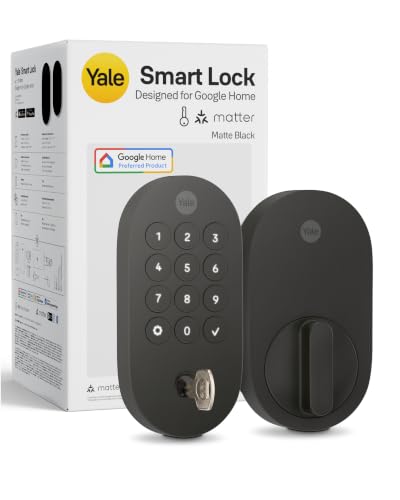
The strongest reason to start with this Yale deadbolt is that Google Home is central to its stated design rather than an incidental compatibility checkmark. The listing identifies Google Home control, Google Assistant voice commands, Matter support, keypad codes, phone access, and a physical backup key. That combination covers the moments people actually encounter at a front door, from unlocking with a phone to entering a code while carrying groceries.
Matter over Thread gives this lock a path into a broader smart home, but the equipment distinction matters. The listing says remote access through Matter requires a compatible Matter hub, sold separately. Buyers who already have a suitable Google Home controller or Matter setup may find that arrangement appealing, while someone expecting the lock itself to provide every remote function should plan carefully. The published information also identifies Grade 2 certification and an operating range of -22°F to 140°F, which gives the lock useful environmental context for an exterior door.
Pros
- Explicitly designed for Google Home and Matter smart home systems.
- Offers app, keypad, Google Assistant, and physical-key entry.
- Supports access sharing and activity tracking through Yale Access or Google Home.
- Matter over Thread is described as energy-efficient for longer battery intervals.
- Listing identifies Grade 2 certification and operation from -22°F to 140°F.
Cons
- A compatible Matter hub is required for remote access through Matter.
- The product description does not specify the door thickness or backset range.
This is the most balanced choice for a Google Home installation that values broad everyday access rather than a biometric feature above everything else. The keypad and physical key also give the household alternatives if a phone battery is low or a voice command is inconvenient. Confirm the door measurements and hub requirements before ordering, especially if the lock will be part of a new Matter setup rather than an existing one.
To buy this product, click here.
2. ULTRALOQ Bolt SE — Best for Fingerprint Access

A fingerprint reader changes the rhythm of a busy entryway. Instead of finding a phone, remembering a code, or reaching for a key, an enrolled user can use a finger at the lock. The ULTRALOQ Bolt SE also supports up to 50 fingerprints and up to 50 passcodes according to the listing, with app, web portal, eKey sharing, voice control, and two mechanical keys filling out the access choices.
Its connectivity is unusually flexible for this group. Built-in 2.4 GHz Wi-Fi supports remote management without a hub through the listed app functions, while Matter over Thread supports compatible Matter ecosystems with a Thread border router. Those are separate routes, not one universal connection. The lock also includes auto-lock, low-battery alerts, and a weather-resistant IP65 design claim. A door sensor is not included, so the lock should not be treated as a complete open-door monitoring system.
Pros
- Supports fingerprint, passcode, app, voice, eKey, and mechanical-key entry.
- Stores up to 50 listed fingerprints and 50 access codes.
- Built-in Wi-Fi enables listed remote access without a hub.
- Also supports Matter over Thread with a compatible border router.
- Includes auto-lock, low-battery alerts, and two mechanical keys.
Cons
- Matter remote functions require a compatible Matter over Thread hub.
- A door sensor is not included.
This model suits a household that wants Google Assistant compatibility without giving up biometric entry. It is also useful where different people prefer different credentials, such as a code for a guest and a fingerprint for a regular resident. The main setup decision is whether your priority is built-in Wi-Fi app control or Matter integration, since the equipment and app path differ. Verify the existing door preparation before treating the advertised DIY installation as a guaranteed fit.
To buy this product, click here.
3. Schlage Encode Smart WiFi Deadbolt — Best for Direct Wi-Fi Access

The Schlage Encode takes a more direct route than the Matter-based Yale. Its built-in Wi-Fi connects the lock to the Schlage Home app, where the listing says users can lock or unlock remotely, manage up to 100 access codes, view history, and receive customizable notifications. Google Home and voice control are supported when paired with the Schlage Home app and a voice-enabled device, making this a practical choice for someone who wants remote app access without planning around a separate Matter hub.
Hardware details are clearer here than on several competing listings. The lock is listed for doors from 1-3/8 to 1-3/4 inches thick with a 2-3/8 or 2-3/4-inch backset. The listing also identifies four AA batteries, a claimed typical battery life of up to six months, a physical backup key, auto-lock settings, and a touchscreen with one-touch locking. Those details help with planning, although the dimensions still need to be compared with the actual door before purchase.
Pros
- Built-in Wi-Fi supports remote control through the Schlage Home app.
- Stores up to 100 listed access codes.
- Provides entry history and customizable notifications.
- Supports Google Home and voice control through the listed app setup.
- Includes a physical key, auto-lock options, and forced-entry alarm features.
Cons
- Published typical battery life is up to six months, so replacements may be more frequent than Thread-based alternatives.
- Listed door compatibility is limited to the stated thickness and backset ranges.
The Schlage makes sense for a front door where remote app access and access-code management matter more than fingerprint entry or Matter interoperability. Its door dimensions are helpful, and the key backup keeps a depleted battery from becoming the only entry problem. Buyers building a Matter-first home may prefer the Yale or ULTRALOQ instead, while Google Home users who want a familiar Wi-Fi arrangement have a clearer path here.
To buy this product, click here.
4. Philips Wi-Fi Smart Deadbolt — Best for Scheduled Codes

Some households need a lock that handles more than the daily in-and-out routine. The Philips Wi-Fi Smart Deadbolt lists support for up to 100 custom passcodes, along with one-time and scheduled codes for guests, cleaners, or renters. That gives the keypad a practical role in access management, while the app, fingerprint reader, physical key, and Google Assistant support provide alternatives for regular users.
Its built-in Wi-Fi is limited to 2.4 GHz, and the listing recommends keeping the router and lock within 65 feet for better remote control. That is useful setup information, but it also means the lock’s remote behavior depends on a suitable home network. The model supports auto-lock from 10 to 180 seconds and an Away Mode that disables listed unlock methods except the master code. Batteries are not included, and the listing specifies AA alkaline batteries, so those details belong on the installation checklist.
Pros
- Supports Google Assistant voice control through the listed account setup.
- Offers fingerprint, code, app, and physical-key entry.
- Lists up to 100 custom passcodes plus one-time and scheduled codes.
- Includes configurable auto-lock and an Away Mode.
- Provides access history and real-time notifications through the app.
Cons
- Requires a 2.4 GHz network and a suitable router position for remote control.
- Batteries are not included, and the lock does not include a door sensor.
This Philips model is a strong match for a Google Home household that frequently shares access and wants code scheduling in the feature mix. It may be more lock than necessary for a single-user entry, especially if fingerprint and remote access are rarely used. Measure the door carefully within the listed 1-3/8 to 2-inch thickness range, and follow the installation instructions around the latch cable and tailpiece.
To buy this product, click here.
5. Fingerprint Smart Door Lock with Handle — Best for Handle-Style Entry

A deadbolt replacement is not the only way to add electronic entry. This product combines a handle, keypad, fingerprint reader, app, fob, and physical key, which can be useful for a door where the handle assembly is part of the access decision. The listing describes a reversible handle for left- and right-handed doors and installation without extra drilling on most standard doors, though the actual door preparation still needs confirmation.
Google Assistant compatibility is tied to the optional Sifely Wi-Fi Gateway for voice control and remote access. Without that gateway, the listed Bluetooth app functions cover local unlocking, access records, and user management. That distinction is important for a Google Home buyer. The lock offers a path toward Google voice commands, but the gateway is optional hardware rather than something to assume is included.
Pros
- Combines a handle assembly with fingerprint, keypad, app, fob, and key entry.
- Supports reversible installation for left- and right-handed doors.
- Lists guest code generation and access records for rental use.
- Can provide remote access through the optional Sifely Wi-Fi Gateway.
- Offers a broader entry format than a keypad-only deadbolt.
Cons
- Google Assistant control and remote access require the optional Wi-Fi Gateway.
- The listing does not provide detailed door dimensions or specific Google Home feature limits.
This lock belongs on the shortlist for a handle-style installation or a rental door where fingerprints and guest codes are useful. It is less straightforward for someone who wants a Google Home connection immediately out of the box, since the gateway requirement changes the setup. Check the handle, latch, and door preparation rather than assuming a standard deadbolt hole will be enough.
To buy this product, click here.
6. Aqara Smart Lock U100 — Best for Fingerprint and Matter Expansion

The Aqara U100 brings several access methods into a deadbolt format, including a fingerprint reader for up to 50 fingerprints, touchscreen passwords, one-time local passwords, a mechanical key, and Apple Home Key. Its Google Home relevance comes through the listed third-party ecosystem support with an Aqara Zigbee 3.0 hub, so the hub is part of the compatibility picture rather than a minor accessory.
The Matter and Apple details should be separated rather than treated as one universal feature. The listing identifies Matter over Thread and Google support through the Aqara hub, while Apple Home Key sharing requires an Apple Home Hub. The lock also lists auto-lock using a built-in gyroscope, Do Not Disturb mode, four included AA batteries, USB-C emergency charging, IP65 protection, and a stated operating range from -31°F to 151°F. Those features make it flexible, but the ecosystem setup is more involved than a simple built-in Wi-Fi lock.
Pros
- Supports Google ecosystem integration through an Aqara Zigbee 3.0 hub.
- Provides fingerprint, password, one-time local password, and key entry.
- Stores up to 50 listed fingerprints.
- Includes auto-lock, Do Not Disturb mode, and USB-C emergency power.
- Lists IP65 protection and a broad operating-temperature range.
Cons
- Google integration and remotely configurable Aqara passwords require the listed Aqara hub.
- NFC cards are sold separately.
The U100 is a thoughtful option for a Google Home installation that already uses Aqara hardware or plans to build around its hub. Fingerprint access and one-time local passwords add useful flexibility for guests, while the physical key and emergency power provide separate recovery paths. Buyers seeking the simplest Google Home setup may find the required hub less appealing than built-in Wi-Fi alternatives.
To buy this product, click here.
7. LNDU WiFi Smart Lock — Best for Multi-Platform Homes

The LNDU deadbolt aims at a household that uses more than one smart home platform. Its listing identifies Google Home, Apple HomeKit, and Amazon Alexa support, plus Apple Home Key, fingerprint access, passcodes, app control, and voice commands. That breadth can be useful in a home where one person carries an iPhone and another prefers Google Assistant, although platform support should still be checked feature by feature rather than assumed to be identical.
Built-in Wi-Fi provides remote control without a hub according to the listing. The lock also includes anti-peep password entry, local fingerprint storage, auto-lock, and an exterior IP65 rating claim. Door fit is among the clearer parts of the published information: the stated door thickness is 1-3/8 to 2-1/8 inches, with 1-1/2 or 2-1/8-inch bore options and a 2-3/8 or 2-3/4-inch backset. Those measurements make a tape measure essential before ordering.
Pros
- Supports Google Home, Alexa, Apple HomeKit, and Apple Home Key.
- Combines fingerprint, passcode, app, and voice entry.
- Built-in Wi-Fi is listed for remote control without a hub.
- Provides anti-peep passwords and local fingerprint storage according to the listing.
- Publishes door thickness, bore, and backset ranges for installation planning.
Cons
- The listing does not identify the exact Google Home functions available for every feature.
- Compatibility depends on matching the stated door measurements.
This lock is appealing for a mixed-platform home where Google compatibility is important but not exclusive. Its installation dimensions are more useful than vague “standard door” language, and the built-in Wi-Fi keeps the hardware list shorter. It may be a poor fit if your door falls outside the stated ranges or if you want a Google-specific product with clearly Matter behavior rather than broad platform claims.
To buy this product, click here.
8. SMONET Smart Front Door Lock Set — Best for a Complete Hardware Replacement

Replacing a front-door lock can leave the deadbolt and handle looking mismatched. The SMONET set addresses that specific project by combining the smart deadbolt with an exterior pull handle and interior lever handle. It lists support for left- or right-handed doors, fingerprint entry, up to 50 passcodes, up to 50 fingerprints, IC cards, app control, Google Assistant, and a physical key.
Built-in Wi-Fi supports remote app control, activity logs, alerts, and shared access without an extra gateway for those listed functions. The lock also includes an anti-peep keypad, auto-lock, privacy mode, passage mode, low-battery alerts, and Type-C emergency power. Its exterior is described as IP64 weather-resistant. Since this is a complete handle set rather than a deadbolt-only replacement, installation planning should include the existing handle and latch arrangement, not merely the deadbolt bore.
Pros
- Includes a smart deadbolt, exterior pull handle, and interior lever handle.
- Supports Google Assistant and several non-voice entry methods.
- Built-in Wi-Fi supports remote app control, logs, alerts, and shared access.
- Stores up to 50 listed fingerprints and 50 passcodes.
- Includes privacy mode, passage mode, auto-lock, and Type-C emergency power.
Cons
- A complete handle set may require more installation planning than a deadbolt-only replacement.
- The listed IP64 rating is lower than the IP65 claims on some competing models.
This set is most useful when the front entry needs a coordinated hardware change rather than a smart deadbolt alone. It gives a Google Home user a broad selection of access methods and built-in Wi-Fi, while the included handle components can simplify a full visual update. Confirm the door and latch compatibility before ordering, since the product description does not provide a full dimensional chart.
To buy this product, click here.
9. Google Nest x Yale Lock — Best for Nest-Centered Homes

The Google Nest x Yale Lock is the most directly branded choice for a Nest-centered front door. It replaces an existing deadbolt with a keypad deadbolt, supports phone unlocking and unique passcodes, and can send alerts for locking, unlocking, or tampering. Privacy Mode disables keypad unlocking when you do not want a code to open the door, which is a useful household control that many basic keypad locks omit.
The listing also describes scheduled passcodes, one-touch locking, auto-lock, and integration with Nest Hello and Nest Cams. This model does not offer a fingerprint reader or a physical key in the product description, so its access plan is built around keypad codes and the Nest app. The listing recommends measuring backset, cross bore, and door thickness before purchase. That advice matters because a branded ecosystem cannot compensate for a deadbolt that does not fit the door.
Pros
- Built around Google Nest door access and the Nest app.
- Supports unique and scheduled passcodes for family and guests.
- Includes Privacy Mode to disable keypad code entry.
- Provides tamper, lock, and unlock alerts according to the listing.
- Works with listed Nest Hello and Nest Cam equipment.
Cons
- The product description does not list fingerprint entry or a physical key backup.
- Door backset, cross bore, and thickness must be checked before ordering.
This lock is best suited to someone who wants a keypad deadbolt that fits naturally into a Google Nest setup and does not need biometric access. Its scheduled codes and Privacy Mode are useful for a household with recurring visitors, while the Nest connections can keep the front-door controls in one ecosystem. Buyers who want Matter flexibility, fingerprint entry, or a key backup should look higher in the ranking.
To buy this product, click here.
Buying Guide
Confirm Whether Google Home Control Needs a Hub
Google compatibility appears in several different forms across these locks. The Yale model uses Matter over Thread and identifies a compatible Matter hub as necessary for remote access through Matter. Aqara’s U100 uses its listed Aqara Zigbee 3.0 hub for Google ecosystem integration and remotely configurable passwords. The ULTRALOQ supports both built-in Wi-Fi app control and Matter over Thread, but the Matter route requires a compatible Thread border router.
Built-in Wi-Fi models take a different path. Schlage, Philips, LNDU, and SMONET list direct Wi-Fi-based remote functions, although each still depends on its own app and account setup. Before choosing, write down which device will provide the connection, which app will manage users, and which functions you expect to appear in Google Home.
Measure the Door Before Comparing Smart Features
A smart lock can support Google Assistant perfectly and still be the wrong purchase if its mechanical hardware does not fit. The Schlage listing identifies a 1-3/8 to 1-3/4-inch door thickness and 2-3/8 or 2-3/4-inch backset. Philips lists a 1-3/8 to 2-inch thickness range, while LNDU lists thickness, bore, and backset measurements. The Nest x Yale listing specifically tells buyers to check backset, cross bore, and thickness.
Measure the current deadbolt, door thickness, bore opening, and backset before ordering. A handle set such as the SMONET model also requires attention to the existing handle and latch arrangement. “Standard door” language should be treated as a starting point, not a guarantee.
Choose the Entry Methods Your Household Will Actually Use
Keypad entry is convenient for guests and family members who do not want another app. Fingerprint access can be quicker for regular users, but it is useful only if the lock’s placement and enrollment process suit the people entering the home. Physical keys remain valuable as a separate fallback, while emergency USB power addresses a different problem: powering the lock temporarily when its batteries are depleted.
The Yale, Schlage, Philips, ULTRALOQ, LNDU, and SMONET products list physical keys. The Nest x Yale listing centers on keypad and app entry instead. Compare those recovery methods before deciding that voice control or a smartphone is enough.
Separate Remote Access From Local Operation
Remote unlocking depends on a connection between the lock, a network or hub, and the relevant app or ecosystem. Local keypad, fingerprint, and physical-key functions may continue to serve a different role if the internet or smart home controller is unavailable. A Matter hub requirement, a 2.4 GHz Wi-Fi requirement, and an optional gateway are different setup conditions.
For example, the fingerprint handle lock uses Bluetooth app functions and lists remote access and Google Assistant support with an optional Sifely Wi-Fi Gateway. The Philips model uses built-in 2.4 GHz Wi-Fi and recommends a router within 65 feet. Those details should shape installation plans before the lock is mounted.
Look Beyond the Number of Access Codes
A high code count is useful, but the management features matter more than the number alone. Philips lists one-time and scheduled codes, while the Nest x Yale model lists unique and scheduled passcodes. Schlage lists up to 100 access codes with history and notifications. ULTRALOQ lists permanent, scheduled, and temporary eKeys and passcodes.
Ask whether you need a code that expires, a record showing which person entered, a notification when the lock is used, or simply one shared family PIN. These are different access-management needs, and a keypad by itself does not establish all of them.
Check Exterior Protection and Battery Details
Exterior smart locks face rain, heat, cold, and battery drain at the door. ULTRALOQ lists an IP65 design and operation suitable for exterior doors. LNDU lists IP65 protection for the exterior part, while SMONET lists IP64 weather resistance. Yale identifies an operating range from -22°F to 140°F, and Aqara lists IP65 protection with a stated range from -31°F to 151°F.
These claims describe the product description, not a guarantee for every installation environment. Also check whether batteries are included. Aqara lists four AA batteries included, Schlage lists four AA batteries, and Philips says batteries are not included and specifies AA alkaline batteries.
Best Smart Locks for Google Home FAQ
What Is the Best Smart Lock for Google Home?
The Yale Smart Lock Deadbolt with Google Matter is the strongest overall match in this group because its listing directly identifies Google Home, Matter, Google Assistant voice control, keypad entry, app control, and a physical key. Remote access through Matter requires a compatible Matter hub, so the best choice can change if you want built-in Wi-Fi instead.
Does a Matter Smart Lock Work With Google Home Without a Hub?
Do not assume that it does. The Yale listing says remote access through Matter requires a compatible Matter hub, and the ULTRALOQ listing says its Matter over Thread functions require a compatible Thread border router. Matter and Thread describe different parts of the connection, so check the exact controller requirements for the model and setup you plan to use.
Which Google Home Smart Locks Have Fingerprint Entry?
The ULTRALOQ Bolt SE, Philips Wi-Fi Smart Deadbolt, fingerprint handle lock, Aqara U100, LNDU lock, and SMONET lock set list fingerprint access. Fingerprint capacity and ecosystem requirements differ. For example, ULTRALOQ and Aqara list up to 50 fingerprints, while some of the other listings do not provide a precise capacity.
Can These Locks Be Unlocked With a Physical Key?
The Yale, ULTRALOQ, Philips, fingerprint handle, Schlage, Aqara, LNDU, and SMONET listings identify a physical key or backup key. The product description for the Google Nest x Yale Lock focuses on keypad and app entry and does not list a physical key. Confirm the exact product configuration before relying on key-based emergency entry.
Do Google Home Smart Locks Need Wi-Fi?
Not every model uses Wi-Fi in the same way. Schlage, Philips, LNDU, and SMONET list built-in Wi-Fi. Yale and ULTRALOQ list Matter over Thread, with hub or border-router requirements for relevant remote functions. The fingerprint handle lock lists Bluetooth operation and an optional Wi-Fi Gateway. Local keypad, fingerprint, or key entry may be separate from remote access, so identify the function you need before treating Wi-Fi as mandatory.
Are Smart Locks Compatible With Any Front Door?
No. Compatibility depends on the existing deadbolt or handle preparation, door thickness, bore, backset, latch, and available clearance. Schlage, Philips, and LNDU publish useful dimensions, while the Nest x Yale listing specifically calls for checking backset, cross bore, and thickness. Measure the door and compare those measurements with the exact listing before purchasing.
Which Lock Is Best for Temporary Guest Access?
ULTRALOQ lists permanent, scheduled, and temporary eKeys and passcodes. Philips lists one-time and scheduled codes, Schlage lists access codes with history and notifications, and the Nest x Yale model lists unique and scheduled passcodes. The fingerprint handle lock also lists guest code generation and access records. Compare expiration, scheduling, and activity-history features rather than choosing by keypad appearance alone.
Final Verdict
The Yale Smart Lock Deadbolt with Google Matter is the strongest overall recommendation for a Google Home installation because the product description aligns its core functions directly with the search intent. It offers Google Home and Matter support, Google Assistant control, keypad entry, app access, activity management, and a physical key. The main condition is the compatible Matter hub required for remote access through that connection, plus the need to verify the door hardware before installation.
Choose the Schlage Encode if built-in Wi-Fi, access history, up to 100 codes, and a physical key matter more than Matter over Thread. The ULTRALOQ Bolt SE is the better fit for fingerprint entry and a wide range of credentials, while Philips is compelling for scheduled and one-time codes. SMONET makes more sense for a complete handle-and-deadbolt replacement, and Aqara suits a Google Home setup already using its hub. The right final choice is the one whose connection method, entry options, and mechanical dimensions match the door and the people who use it.
