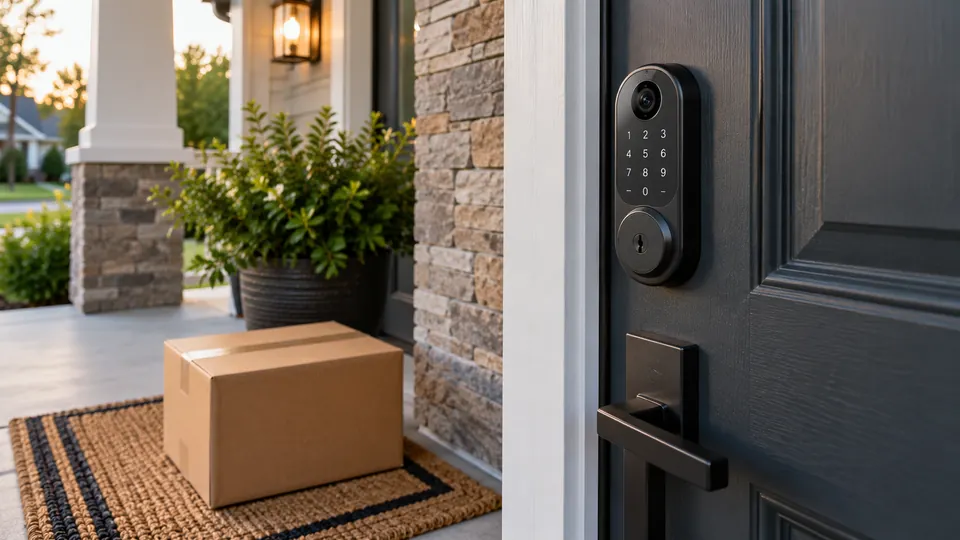
A camera-equipped smart lock has to solve two problems at the same doorway. It should control entry reliably, and it should give you a useful view of visitors, deliveries, and activity outside. The best designs combine those jobs in one exterior unit, while weaker choices may offer a camera that is difficult to use, a lock that demands extensive door modification, or remote features that depend on a subscription.
Look closely at the locking format before focusing on biometric features or video resolution. A standard deadbolt replacement is a different installation project from a mortise lock, and a handle-based model may require measurements that a typical deadbolt does not. Camera storage, app requirements, emergency power, physical-key backup, weather protection, and smart-home compatibility also vary sharply. A lock that suits a busy family may be a poor fit for a rental property or a door with unusual preparation.
The products below prioritize integrated cameras, useful entry methods, connectivity, and practical backup access. The strongest options combine a complete locking system with a clear visitor-viewing experience, while the more specialized models serve buyers who value local biometric storage, indoor screens, broad access methods, or straightforward replacement of a compatible deadbolt.
Quick Answer
Best overall: myQ Secure View 3-in-1 Smart Lock offers see access methods below. See connection requirements below.
Best for local storage and indoor viewing: eufy Security Video Smart Lock FamiLock S3 Max offers see access methods below. See connection requirements below.
Best for mortise-door biometric access: YINTIN 3D Face Recognition Smart Lock offers see access methods below. See connection requirements below.
Best for solar-assisted video access: Lockly Vision Elite offers fingerprint, pin genie, app, offline codes and physical key. Lockly Home connected-access system; confirm included hub setup.
Best Smart Locks With Camera Comparison Table
| Product | Best For | Camera and Video | Entry Methods |
|---|---|---|---|
| myQ Secure View 3-in-1 | Best overall integrated system | 2K HDR, color night vision, two-way audio | Face, fingerprint, PIN, app, key |
| eufy FamiLock S3 Max | Local storage and indoor viewing | 2K HD, 150-degree view, internal screen | Palm vein and other supported methods |
| YINTIN 3D Face Recognition Smart Lock | Mortise-door biometric access | Video doorbell, night vision, indoor screen | Face, palm vein, fingerprint, PIN, card, app, key, remote |
| CEMANTA 5-in-1 Smart Lock | Multiple entry methods | HD camera, snapshots, two-way audio | Fingerprint, passcode, IC card, app, key |
| UMIKSMART WiFi Smart Door Lock | Handle-based replacement | HD camera and doorbell | Fingerprint, PIN, IC card, app, key |
| eufy Video Smart Lock S330 | eufy 3-in-1 deadbolt system | 2K HD camera and video doorbell | Fingerprint, app, voice assistant, keypad, key |
| eufy Video Smart Lock E40 | Face recognition and 2K video | 2K camera, doorbell, two-way visitor interaction | Facial recognition and app access |
| Lockly Vision Zeno | Apple Home Key with a video doorbell | 2K night vision, doorbell and two-way audio | Apple Home Key, fingerprint, PIN Genie, app and physical key |
| Lockly Vision Elite | Solar-assisted video access | HD camera, night vision, doorbell and two-way audio | Fingerprint, PIN Genie, app, offline codes and physical key |
The detailed reviews explain where each design fits, what its camera and access features actually provide, and which installation details deserve attention before ordering.
1. myQ Secure View 3-in-1 Smart Lock — Best Overall

The myQ Secure View is the most complete match for shoppers who want one exterior device to handle entry and visitor awareness. Its three-part design combines a smart deadbolt, video doorbell, and 2K HDR camera. That means someone checking a package from work can use the myQ app to see the visitor, communicate through two-way audio, and manage the door without moving between separate devices.
Its five entry methods also make daily use flexible. Face access and fingerprint access reduce the need to reach for a phone, while a PIN, app control, and physical key cover guests and backup situations. The rechargeable battery is listed for four to six months, although actual runtime depends on use. Smart detection features for people, faces, packages, vehicles, and custom zones require a subscription, so buyers should separate the basic camera and lock functions from the optional detection layer.
Pros
- Combines a deadbolt, doorbell, and 2K HDR camera in one unit.
- Offers face, fingerprint, PIN, app, and physical-key entry.
- Color night vision and wide-angle video support day and night viewing.
- Rechargeable battery removes the need for routine disposable-battery changes.
- Supports remote locking, unlocking, visitor alerts, and two-way audio through the app.
Cons
- Smart detection and some automation features require a subscription.
- The optional myQ Chime is sold separately for in-home audio alerts.
This is the strongest starting point for a household that wants the camera and lock experience to feel like one product rather than two systems mounted beside each other. It is also a sensible fit for people who want several ways to enter, including a physical key. Buyers who dislike subscriptions should review which alerts and detection tools remain available without one, and buyers with a nonstandard door should confirm the deadbolt fit before installation.
To buy this product, click here.
2. eufy Security Video Smart Lock FamiLock S3 Max — Best for Local Storage and Indoor Viewing

The FamiLock S3 Max takes a different approach to convenience by putting a video screen on the inside of the lock. Someone in the kitchen can check the front entrance without finding a phone, which may be useful in a busy home or for occupants who prefer a dedicated display. The 2K camera uses a 150-degree head-to-toe view, a useful perspective for seeing a visitor and a package near the threshold in the same frame.
Palm-vein recognition is the headline access method, and the listing says biometric data is stored locally on the lock. The lock also supports Wi-Fi, 16GB built-in storage, Matter, and Apple Home integration. Matter does not carry the camera stream, however, so the eufy app remains important for full video functions. The rechargeable battery is listed for up to four months, with four AAA batteries providing additional emergency functionality.
Pros
- Includes a 2K camera with a broad 150-degree head-to-toe viewing angle.
- Provides an internal video screen for checking the entrance without a phone.
- Uses palm-vein recognition with local biometric storage.
- Includes 16GB of built-in storage.
- Supports Matter and Apple Home integration, with the stated camera-stream limitation.
Cons
- Camera streams are not supported through Matter and require the eufy app for full video use.
- It is not compatible with HomeBase 2.
This model suits a buyer who values privacy-conscious local storage and wants an indoor viewing option for children, older occupants, or anyone who does not want to reach for a smartphone. It is a more involved system than a basic keypad deadbolt, and the HomeBase 3 and Matter details should be checked against the existing setup before purchase. The internal display is the feature that most clearly separates it from the other choices here.
To buy this product, click here.
3. YINTIN 3D Face Recognition Smart Lock — Best for Mortise-Door Biometric Access

YINTIN packs an unusually broad collection of entry methods into a mortise-style lock. Face recognition, palm-vein recognition, fingerprint access, a passcode, key card, app, mechanical key, and remote unlocking give different household members several ways to enter. Someone carrying grocery bags might prefer face access, while a visitor can use a code or card instead.
The four-inch indoor screen adds a practical video feature. It lets occupants view the entrance from inside, while infrared night vision supports evening checks. The listing also identifies IP67 protection, rechargeable power, USB-C emergency power, and local storage for biometric data. The major installation warning is the mortise format. The larger lock body may require matching openings or modification, so this is not a casual substitute for a standard deadbolt.
Pros
- Offers eight entry methods, including three biometric options.
- Includes a four-inch indoor color screen for visitor viewing.
- Provides video doorbell functions, two-way talk, remote access, and night vision.
- Lists IP67 protection and local biometric storage.
- Includes mechanical-key and USB-C emergency-access options.
Cons
- The mortise design may require different door preparation from a standard deadbolt.
- Door thickness, lock-body openings, and hole positions must be matched before ordering.
This is a specialized choice for a compatible mortise door, especially where biometric variety and an indoor display matter more than a simple retrofit. It should be skipped by anyone expecting a straightforward standard-deadbolt replacement. Measure the existing lock case and door preparation first, because the broad access list cannot compensate for a lock body that does not physically fit.
To buy this product, click here.
4. CEMANTA 5-in-1 Smart Lock With Camera — Best for Flexible Entry Methods

CEMANTA focuses on practical access flexibility. Fingerprint recognition, passcodes, IC cards, app control, and a mechanical key cover the common moments that make a single entry method inconvenient. The virtual-code feature lets users place extra digits before or after the actual passcode, which can help obscure the code when someone is nearby at a shared entrance.
The integrated camera sends snapshots when the doorbell is pressed, and the listing describes live view, playback, two-way audio, remote unlocking, and a voice changer. App notifications can cover tampering, forced entry, and low battery. Alexa compatibility is also listed, though the product description does not establish that every lock function is available through voice control. The rechargeable battery and weather-resistant construction make it suitable for an exposed entrance when the door hardware is compatible.
Pros
- Combines fingerprint, passcode, IC card, app, and key access.
- Includes a camera, doorbell, snapshots, live view, and two-way audio.
- Virtual-code entry can help conceal the actual passcode from observers.
- Provides tamper, forced-entry, and low-battery notifications through the app.
- Lists weather resistance for outdoor front-door use.
Cons
- The product description does not specify door dimensions or backset compatibility.
- Alexa support is listed, but the exact voice-controlled functions are not identified.
CEMANTA is a useful fit for a household that wants several credential types without moving to a mortise installation. It may also suit a rental or shared entrance where cards and codes are more convenient than handing out keys. Before ordering, confirm the door preparation and app requirements, because the product information does not provide enough dimensions to guarantee fit on every standard-looking door.
To buy this product, click here.
5. UMIKSMART WiFi Smart Door Lock With Camera — Best for a Reversible Handle Design

UMIKSMART is built around a handle-style installation rather than a conventional deadbolt-only format. Its reversible handle can be adjusted for left- or right-handed doors, which gives it a different hardware profile from the other options. The listing specifies compatible door thickness from 35 to 55 millimeters and 60 or 70-millimeter backset options, making measurement especially important before purchase.
Entry choices include fingerprint, PIN, IC card, TUYA WiFi app, and mechanical key. The integrated HD camera and doorbell let users check the visitor before unlocking, while the app supports access management and temporary codes. A rechargeable battery, low-battery alerts, and Type-C emergency power add useful backup layers. Installation involves aligning the latch and spindle, connecting the cable, and adjusting the handle direction carefully.
Pros
- Reversible handle supports compatible left- and right-handed installations.
- Lists specific door-thickness and backset requirements for fit checking.
- Provides fingerprint, PIN, IC card, app, and mechanical-key access.
- Includes an HD camera, doorbell, and remote visitor viewing.
- Offers temporary codes, low-battery alerts, and Type-C emergency power.
Cons
- It requires handle, spindle, latch, thickness, and backset compatibility checks.
- The TUYA app and rechargeable battery are central to its connected operation.
This is the most logical pick for someone specifically replacing a compatible handle assembly and wanting camera functions at the same time. It is less suitable for a buyer who has only measured a deadbolt bore and has not checked the full handle preparation. The listed dimensions are helpful, but they should be compared with the existing door before any installation work begins.
To buy this product, click here.
6. eufy Security Video Smart Lock S330 — Best for a eufy 3-in-1 Deadbolt System

The eufy S330 brings the familiar three-part combination of smart lock, camera, and video doorbell into a deadbolt format. Its 2K HD camera is paired with fingerprint recognition, which creates a straightforward routine for a resident who wants to touch the lock to enter and use the same exterior unit to monitor visitors.
The listed entry methods are fingerprint, eufy app, Alexa or Google voice assistants, keypad, and traditional keys. Built-in 8GB storage and SD-card expandability give the video side more flexibility than a camera that only sends a live notification. The product title also identifies a chime as included. The available information does not provide detailed door dimensions, so compatibility should be confirmed against the existing front-door deadbolt before purchase.
Pros
- Combines fingerprint access, a 2K camera, and a video doorbell.
- Supports app, voice assistant, keypad, and traditional-key entry.
- Includes 8GB built-in storage with SD-card expansion listed.
- Includes a chime according to the product title.
- Fits naturally into an existing eufy security setup.
Cons
- The product description does not identify detailed door thickness or backset requirements.
- Full video and connected functions depend on the eufy app and compatible setup.
The S330 is a sensible choice for buyers already using eufy products and wanting a combined lock and camera rather than a separate doorbell. It has a clearer storage story than some basic camera locks, but buyers with an unusual door should not assume compatibility from the deadbolt label alone. Confirm the physical fit and review which functions require the app or connected services.
To buy this product, click here.
7. eufy Video Smart Lock E40 — Best for Face recognition and 2K video
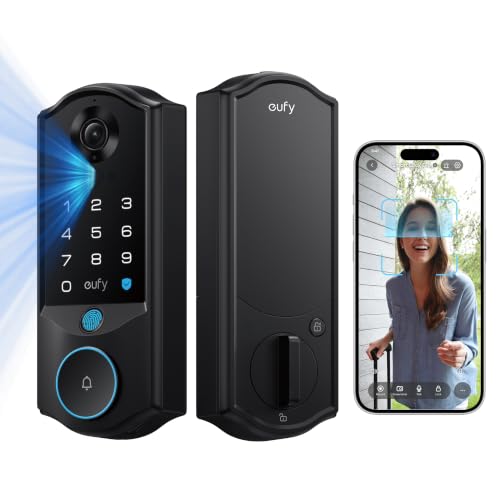
eufy Video Smart Lock E40 is a useful choice for face recognition and 2k video. 2K camera and doorbell combine visitor viewing with entry control. Facial recognition offers hands-free arrival. A 135-degree vertical view helps show visitors and packages.
For everyday entry, it offers facial recognition and app access. Wi-Fi and Matter; use eufy app for camera functions. 15,000 mAh main battery plus 800 mAh backup; up to 6 months. Designed for compatible US and Canadian single-cylinder deadbolts; check faceplate and bore requirements.
Pros
- 2K camera and doorbell combine visitor viewing with entry control.
- Facial recognition offers hands-free arrival.
- A 135-degree vertical view helps show visitors and packages.
- Main and backup batteries provide separate power reserves.
- 32 GB local storage avoids a required monthly video-storage subscription.
Cons
- Camera streaming is not available through Matter.
- Does not fit mortise locks or every nonstandard deadbolt preparation.
Choose this lock when visitor video and entry control need to share the same doorway. Measure camera sight lines as well as the deadbolt preparation, and check that a storm door will not block the lens or handle.
To buy this product, click here.
8. Lockly Vision Zeno — Best for Apple Home Key with a video doorbell

Lockly Vision Zeno is a useful choice for apple home key with a video doorbell. 2K night-vision camera shows visitors at the door. Built-in doorbell and two-way talk support remote conversations. Apple Home Key enables iPhone and Apple Watch entry.
For everyday entry, it offers apple home key, fingerprint, pin genie, app and physical key. Built-in Wi-Fi; Lockly Home app and supported voice platforms. Two rechargeable batteries; up to 6 months between charges. Fits supported right- or left-swing doors 1-3/8 to 3-1/8 inches thick; confirm the complete door preparation.
Pros
- 2K night-vision camera shows visitors at the door.
- Built-in doorbell and two-way talk support remote conversations.
- Apple Home Key enables iPhone and Apple Watch entry.
- Fingerprint and scrambled PIN entry offer phone-free alternatives.
- Offline Access Codes and temporary eKeys support guest access.
Cons
- Check clearance carefully when a storm door is present.
- Advanced Apple access requires compatible Apple devices and setup.
Choose this lock when visitor video and entry control need to share the same doorway. Measure camera sight lines as well as the deadbolt preparation, and check that a storm door will not block the lens or handle.
To buy this product, click here.
9. Lockly Vision Elite — Best for Solar-assisted video access

Lockly Vision Elite is a useful choice for solar-assisted video access. HD camera provides day and night visitor viewing. Two-way audio lets you speak with a caller. Fingerprint entry provides a quick phone-free option.
For everyday entry, it offers fingerprint, pin genie, app, offline codes and physical key. Lockly Home connected-access system; confirm included hub setup. Rechargeable power with solar-assisted charging. Fits supported left- or right-swing doors 1-3/8 to 2 inches thick; check the latch and exterior clearance.
Pros
- HD camera provides day and night visitor viewing.
- Two-way audio lets you speak with a caller.
- Fingerprint entry provides a quick phone-free option.
- Solar-assisted charging supports the rechargeable power system.
- Offline Access Codes let approved guests enter without an active internet connection.
Cons
- Solar charging depends on light reaching the panel.
- Not suitable for storm doors or round latch holes.
Choose this lock when visitor video and entry control need to share the same doorway. Measure camera sight lines as well as the deadbolt preparation, and check that a storm door will not block the lens or handle.
To buy this product, click here.
Buying Guide
Match the camera to the doorway
A lock camera needs an unobstructed view. Check lens height, visitor distance, night lighting and any storm-door interference before fitting the lock.
Plan video and lock connectivity separately
Keep a strong supported Wi-Fi signal at the door. Matter lock control does not automatically include camera streaming, recordings or two-way talk; use the model app for its full video features.
Choose power and storage around daily traffic
Motion detection and frequent visitor calls can increase charging frequency. Compare the main and backup power systems, local storage and app alerts, then keep a physical or emergency-power fallback available.
FAQ
How do I choose the right model for my door?
Choose this lock when visitor video and entry control need to share the same doorway. Measure camera sight lines as well as the deadbolt preparation, and check that a storm door will not block the lens or handle.
Will remote access work without extra hardware?
Use the connection path in the comparison table. Built-in Wi-Fi, Bluetooth, a proprietary hub and Matter controllers have different requirements. Local PIN, fingerprint or key entry does not make a Bluetooth-only lock independently accessible over the internet.
What should I do before giving a guest access?
Set up a separate credential using the lock’s supported options, confirm it opens the door, and remove or expire it after use. Keep the backup entry method available to someone you trust.
How can I avoid a battery-related lockout?
Act on low-battery alerts, use the specified cells or charging method, and keep the mechanical key or supported emergency-power source outside the locked area. Confirm the backup procedure before depending on it.
Final Verdict
myQ Secure View 3-in-1 Smart Lock is the first option to consider for overall. Choose eufy Security Video Smart Lock FamiLock S3 Max when local storage and indoor viewing is the priority, or compare Lockly Vision Elite for solar-assisted video access.
Choose this lock when visitor video and entry control need to share the same doorway. Measure camera sight lines as well as the deadbolt preparation, and check that a storm door will not block the lens or handle.
