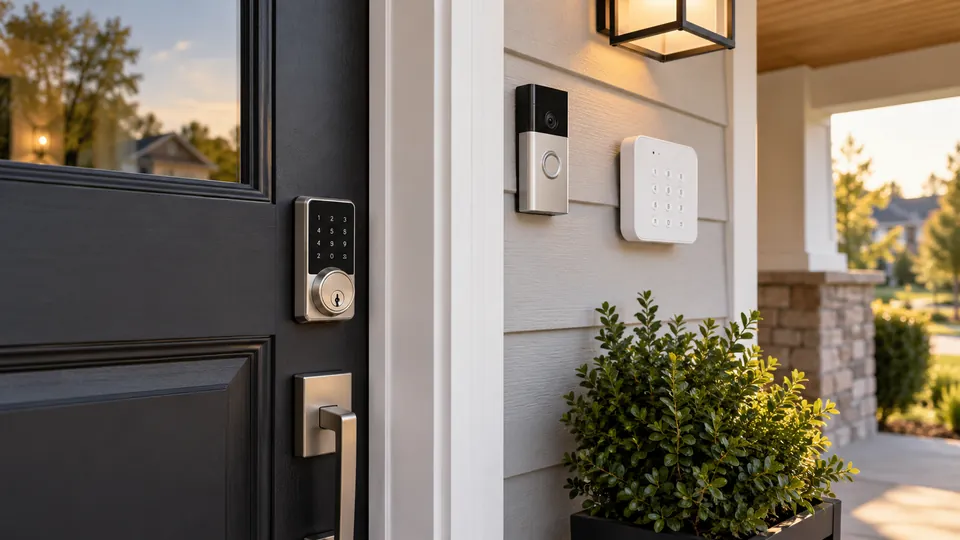
A Ring setup can show who is at the door, send an alert, and connect entry events with the rest of a home security routine. The lock still has to handle the physical job at the door, though. For this category, the important question is whether a lock works with Ring or Ring Alarm directly, rather than simply supporting Alexa, Wi-Fi, or a manufacturer app. That distinction can determine whether you get a useful one-app experience or end up managing separate systems.
The strongest options here provide Ring compatibility, dependable keypad access, remote control, or a practical path into a Ring Alarm setup. Some alternatives offer useful fingerprint entry, physical keys, or built-in cameras, but those features do not automatically create Ring integration. Door preparation matters just as much. A lock that fits a 1-3/8 to 1-3/4-inch door may not suit a thicker door, and a Z-Wave lock requires the appropriate Ring Alarm hub rather than a direct Wi-Fi connection.
Quick Answer
Best Overall: The Schlage Encode Smart WiFi Deadbolt is the strongest all-around choice because its listing specifically identifies Ring compatibility, built-in Wi-Fi, remote control, access-code management, and a physical key backup.
Best for Ring Alarm: The Kwikset HomeConnect 620 uses Z-Wave and is specifically described as compatible with Ring Alarm. It requires a Ring Alarm smart hub, but it offers up to 250 user codes and a claimed 12-month battery life.
Best Fingerprint Alternative: The eufy Security Smart Lock C220 combines fingerprint, keypad, app, voice, Apple Watch, and physical-key entry with built-in Wi-Fi. Its Ring compatibility is not identified in the product description, so it suits buyers who can accept a separate ecosystem.
Best Smart Locks for Ring Comparison Table
| Product | Best For | Lock Type | Ring Relevance | Connectivity |
|---|---|---|---|---|
| Schlage Encode Smart WiFi Deadbolt | Best overall Ring-compatible choice | Deadbolt | Ring compatible | Built-in Wi-Fi |
| Kwikset HomeConnect 620 | Ring Alarm households | Z-Wave deadbolt | Ring Alarm compatible | Z-Wave hub required |
| Wyze Auto-Lock Bolt v2 | Fingerprint entry with app control | Deadbolt | Ring support not identified | Built-in Wi-Fi |
| eufy Security Smart Lock C220 | Multiple entry methods | Deadbolt | Ring support not identified | Built-in Wi-Fi |
| Philips Wi-Fi Smart Deadbolt | Fingerprint and scheduled codes | Deadbolt | Ring support not identified | 2.4 GHz Wi-Fi |
| Philips WiFi Keypad Deadbolt with Handle | Complete deadbolt and handle set | Deadbolt with lever | Ring support not identified | 2.4 GHz Wi-Fi |
| Philips WiFi Keypad Door Lock with Handle | Satin nickel hardware replacement | Deadbolt with lever | Ring support not identified | 2.4 GHz Wi-Fi |
| Veise VE017 | Fingerprint access with gateway expansion | Deadbolt | Ring support not identified | App and optional gateway |
| myQ Secure View 3-in-1 | Lock and video doorbell combination | Deadbolt with camera | Ring support not identified | myQ app |
The detailed reviews below separate genuine Ring integration from general smart-lock features, so the differences are easier to judge before you order.
1. Schlage Encode Smart WiFi Deadbolt — Best Overall
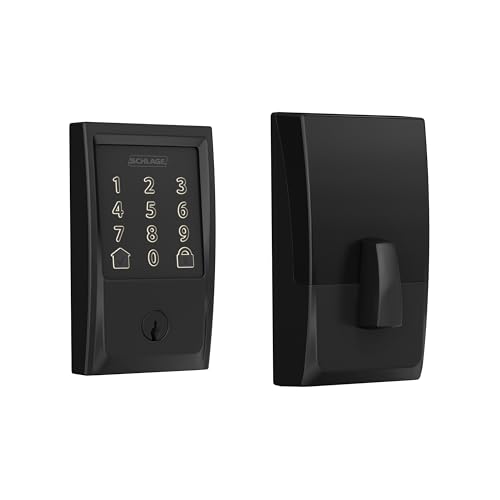
The Schlage Encode earns the top position because the supplied listing directly names Ring compatibility instead of leaving that connection to guesswork. Its built-in Wi-Fi also avoids the separate Z-Wave hub requirement attached to the Kwikset HomeConnect 620. For a household that wants remote lock control, status monitoring, and Ring-related smart-home convenience without adding another bridge, that combination is unusually practical.
Access management is well covered. The Schlage Home app supports up to 100 access codes, lock history, customizable notifications, and control of multiple locks. A physical key remains available for backup, while the touchscreen, auto-lock settings, and one-touch exterior locking cover the daily moments when someone is carrying groceries or rushing out the door. The lock fits doors from 1-3/8 to 1-3/4 inches thick and supports 2-3/8 or 2-3/4-inch backsets, so measuring the existing door is still part of the job.
Pros
- Listing specifically identifies Ring compatibility.
- Built-in Wi-Fi supports remote control without a separately listed lock hub.
- Supports up to 100 customizable access codes.
- Includes a physical backup key and low-battery alerts.
- Fits two common deadbolt backsets and standard door thicknesses listed.
Cons
- Its door-thickness range is narrower than some alternatives.
- Remote features depend on the Schlage app, Wi-Fi, and account setup.
This is the clearest choice for readers who want Ring relevance first and a conventional deadbolt replacement rather than an experimental access system. The BHMA security, durability, and finish certification cited in the listing adds useful product information, but it should not be treated as a guarantee against every form of forced entry. Check door thickness and backset before ordering, especially on older doors where the existing strike alignment may need attention.
To buy this product, click here.
2. Kwikset HomeConnect 620 — Best for Ring Alarm

The Kwikset HomeConnect 620 is the most direct pick for a Ring Alarm installation because the listing specifically says it can be controlled and monitored through the Ring Alarm system and app. It communicates over Z-Wave 700 Long Range, which makes the required Ring Alarm smart hub a central part of the setup. This is a different approach from the Schlage Encode. The Kwikset is attractive for someone who already has the Ring hub and wants the lock to sit inside that alarm system rather than operate beside it.
Its access-code capacity is a standout detail. Up to 250 user codes can be customized, edited, or deleted, which gives a busy household, rental property, or extended family more room than many keypad locks. The lock also includes SmartKey Security, auto-lock intervals from 30 seconds to 10 minutes, four AA batteries, and compatibility with doors from 1-3/8 to 2 inches thick. The trade-off is straightforward: buyers without a compatible hub must add one before the Ring features can work.
Pros
- Specifically identified as compatible with Ring Alarm.
- Supports up to 250 customizable user codes.
- Uses Z-Wave 700 Long Range with S2 security described in the listing.
- Fits the supplied 1-3/8 to 2-inch door-thickness range.
- Includes four AA batteries and SmartKey re-keying capability.
Cons
- Requires a Ring Alarm smart hub for the Ring integration.
- Does not list fingerprint or app control as standalone entry methods.
Choose this model if Ring Alarm is already the organizing system for your entry sensors and security routines. It makes less sense as a first purchase for someone who wants a hub-free lock. Confirm that the existing deadbolt uses one of the listed backsets, 2-3/8 or 2-3/4 inches, and plan the Z-Wave pairing before beginning installation.
To buy this product, click here.
3. Wyze Auto-Lock Bolt v2 — Best for Fingerprint Entry

Fingerprint access is the headline reason to look at the Wyze Auto-Lock Bolt v2. The listing describes a fingerprint scanner, an anti-peep keypad, app control, and physical keys, giving residents several ways through the door when a phone is buried in a pocket or hands are full. Its built-in Wi-Fi enables remote lock management through the Wyze app, but the product description does not identify Ring integration. That distinction keeps it below the two Ring-specific choices.
The lock uses eight AA batteries and claims up to eight months of operation, with a USB-C port for emergency power from a power bank if the batteries run out. The tempered-glass scanner cover is described as scratch and smudge resistant, while the listing identifies BHMA2 and IP53 ratings. Those details help explain its intended front-door use, but they do not establish compatibility with every exposed installation. A reader moving from Ring should also expect to manage this lock through Wyze rather than assume it will appear in Ring.
Pros
- Provides fingerprint, app, keypad, and physical-key entry.
- Built-in Wi-Fi supports remote management through the Wyze app.
- USB-C emergency power input offers a backup when batteries are depleted.
- Includes an anti-peep keypad and smudge-resistant tempered-glass surface.
- Listing identifies BHMA2 and IP53 protection ratings.
Cons
- Ring or Ring Alarm compatibility is not identified in the product description.
- Eight AA batteries are required, and the stated runtime is an estimate.
This lock suits a door where quick biometric entry matters more than keeping every control inside Ring. It is especially interesting for households where different people prefer a finger, code, app, or key. Readers committed to Ring routines should treat it as a separate smart-lock ecosystem and verify the door preparation details before purchase, since the product description does not spell out every backset or thickness requirement.
To buy this product, click here.
4. eufy Security Smart Lock C220 — Best for Multiple Entry Methods

The eufy C220 gives a front door several entry paths: fingerprint, eufy app, keypad, physical key, Apple Watch, and Alexa or Google voice control. Built-in Wi-Fi permits remote app control without a bridge, while an existing eufy doorbell can be added to routines inside the eufy Security app. That is useful for someone who wants a coherent eufy setup, though the product information does not identify Ring compatibility or direct Ring Alarm control.
Installation is described as a 15-minute process without drilling, and the lock can fit bores under 54 mm by removing the spacer. The listing also identifies BHMA Grade 3 certification, IP53 protection, and an operating range from -22 to 158 degrees Fahrenheit. These are meaningful details for a front entry, but proper latch alignment and the actual door configuration still matter. The fingerprint feature and eight-AA battery arrangement make the C220 appealing for everyday family access, while the physical key gives the system a familiar fallback.
Pros
- Offers six listed entry methods, including fingerprint and physical key.
- Built-in Wi-Fi enables remote control without a bridge.
- Supports integration with other eufy devices through the eufy Security app.
- Listing identifies BHMA Grade 3 and IP53 protection.
- Supplied installation information includes compatibility with bores under 54 mm.
Cons
- Ring compatibility is not identified in the product description.
- Uses eight AA batteries, and battery life varies with usage.
The C220 is a sensible alternative for readers who value fingerprint entry and already use eufy products. It is less suitable for a Ring-first installation where lock status and control need to live in the Ring environment. Check the bore, deadbolt arrangement, and available clearance before ordering, since “standard deadbolt” does not guarantee a match for every door.
To buy this product, click here.
5. Philips Wi-Fi Smart Deadbolt — Best for Scheduled Codes

The Philips Wi-Fi Smart Deadbolt focuses on flexible access management without a separate hub. Its listing describes app, passcode, fingerprint, physical-key, Alexa, and Google Assistant entry, plus up to 100 custom passcodes and one-time or scheduled codes. That combination is useful for a cleaner, sitter, or delivery window, where handing over a permanent key creates more hassle. Ring support is not identified, so the lock should be viewed as a feature-rich alternative rather than a Ring-integrated selection.
The lock connects to a 2.4 GHz network and recommends keeping the router within 65 feet for better remote control. It fits doors from 1-3/8 to 2 inches thick, uses AA alkaline batteries, and has auto-lock settings from 10 to 180 seconds. The absence of a door sensor means auto-lock is based on the selected timer rather than confirmation that the door is fully closed. Away Mode, which limits unlocking to the master code, adds a useful travel setting.
Pros
- Supports fingerprint, keypad, app, physical-key, and voice entry.
- Offers up to 100 custom passcodes with one-time and scheduled options.
- Built-in Wi-Fi avoids the need for a separate lock hub.
- Fits the listed 1-3/8 to 2-inch door-thickness range.
- Includes Away Mode and adjustable auto-lock timing.
Cons
- Ring compatibility is not identified in the product description.
- The listing says it does not include a door sensor, so timed auto-lock cannot confirm closure.
This Philips model makes sense for buyers who hand out changing credentials and want several entry choices at the door. It may be the wrong fit for someone expecting Ring Alarm control or a lock that can detect whether the door is actually shut. Confirm the 2.4 GHz network arrangement, door thickness, and latch installation path before beginning the screwdriver work.
To buy this product, click here.
6. Philips WiFi Keypad Deadbolt with Handle — Best Complete Hardware Set
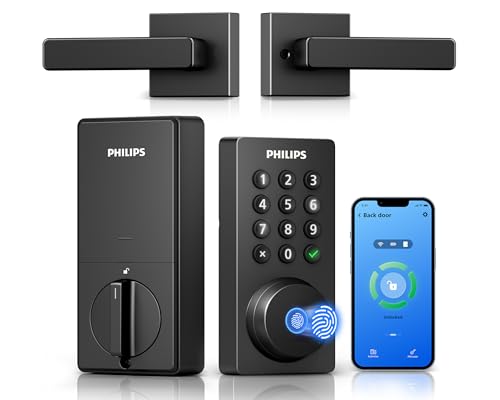
A lock replacement can become a small hardware project when the old lever, latch, and deadbolt finish no longer match. This Philips package addresses that situation by including a matching handle set with the Wi-Fi deadbolt. It provides fingerprint, keypad, app, voice, and physical-key entry, while the Philips Home Access app manages codes, access history, and remote lock status. The product description does not identify Ring support, so the complete hardware package is its main distinction.
The code system supports permanent, one-time, periodic, and recurring PINs, which gives it more flexibility than a keypad that simply stores a few permanent codes. The lock supports 2.4 GHz Wi-Fi, a stated six-month battery estimate, and auto-lock from zero to 180 seconds. Batteries are not included, and the listing specifies standard 1.5-volt alkaline cells. Door thickness must fall between 1-3/8 and 1-3/4 inches, and left-opening doors require a reset for the opening direction.
Pros
- Includes a matching door lever with the deadbolt.
- Supports permanent, one-time, periodic, and recurring PIN codes.
- Provides fingerprint, app, voice, keypad, and physical-key access.
- Offers remote status checking and access history through the app.
- Auto-lock can be configured from zero to 180 seconds.
Cons
- Ring compatibility is not identified in the product description.
- Batteries are not included, and the listed door range is limited to 1-3/8 to 1-3/4 inches.
This is a useful choice for a front-door upgrade where the handle needs replacing at the same time as the deadbolt. A reader who already owns a Ring system should plan on using the Philips app separately unless compatibility is confirmed for the exact setup. Pay attention to handing, wire placement, and screw tension during installation, since the listing specifically warns that overtightening can make operation difficult.
To buy this product, click here.
7. Philips WiFi Keypad Door Lock with Handle — Best for Satin Nickel Hardware

This Philips model is closely related in function to the preceding handle set, but its satin nickel finish creates a different hardware choice for a front entry. It supports fingerprint, keypad, app, voice, and physical-key unlocking, with access history and remote management through the Philips Home Access app. The listing also describes permanent, one-time, periodic, and recurring passcodes, which can be handy for a household that needs more than one kind of visitor access.
The product uses built-in 2.4 GHz Wi-Fi and does not require an extra bridge according to the listing. It fits doors from 1-3/8 to 1-3/4 inches thick and uses eight AA alkaline batteries, which are sold separately. Auto-lock can be set from zero to 180 seconds, and the handle set is included. Ring integration is not identified, so its place in this roundup comes from its complete lock-and-handle design and flexible entry system, not from direct Ring control.
Pros
- Includes a matching satin nickel handle set.
- Provides fingerprint, keypad, app, voice, and physical-key entry.
- Supports multiple passcode types for different access schedules.
- Offers built-in Wi-Fi with remote app management.
- Includes adjustable auto-lock timing from zero to 180 seconds.
Cons
- Ring compatibility is not identified in the product description.
- Requires eight AA alkaline batteries, which are not included.
Pick this version when the finish and complete handle replacement matter as much as the electronic functions. It can make a coordinated front-door upgrade easier, but it is less compelling for a Ring-only household that wants one central app. Check the door thickness and follow the activation and reset instructions before handing out codes, especially on a newly installed lock.
To buy this product, click here.
8. Veise VE017 Fingerprint Smart Door Lock — Best for Gateway-Based Access Management

The Veise VE017 is aimed at households or properties that need detailed credential control. Its KK Home app supports permanent, one-time, duration, and recurring codes, along with entry records and user-permission management. Fingerprint, app, keypad, fob card, code, and mechanical-key access are listed, while Alexa and Google voice control require the separately sold G1 gateway. That gateway also provides the remote locking and unlocking functions, an important distinction for buyers comparing it with built-in Wi-Fi locks.
Installation information is unusually broad in the listing. The lock fits doors from 1-3/8 to 2 inches thick, supports 1-1/2 or 2-1/8-inch lock holes, automatically detects left or right handing, and identifies IP55 protection and a listed operating range from -35 to 160 degrees Fahrenheit. Four AA alkaline batteries are required and not included. The product information also describes a USB-C emergency port, local credential storage, and a mechanical key, giving several fallback paths if the app or batteries become inconvenient.
Pros
- Supports one-time, duration, permanent, and recurring access codes.
- Offers fingerprint, fob, keypad, app, voice-ready, and mechanical-key entry.
- Fits the listed 1-3/8 to 2-inch door-thickness range.
- Includes USB-C emergency power and low-battery alerts.
- Lists IP55 protection and a wide operating-temperature range.
Cons
- Remote locking, unlocking, and voice functions require the separately sold G1 gateway.
- Ring compatibility is not identified in the product description.
This lock is a better match for credential-heavy access management than for a simple Ring-connected front door. A property manager can benefit from expiring and recurring codes, while a household may appreciate the fingerprint and physical-key choices. The gateway requirement should be treated as part of the purchase decision, not a minor add-on, because remote control is unavailable without it.
To buy this product, click here.
9. myQ Secure View 3-in-1 Smart Lock — Best for an Integrated Doorbell Camera

The myQ Secure View takes a different route by combining a smart deadbolt, video doorbell, and 2K HDR camera in one device. The built-in camera includes color night vision, two-way audio, and motion or doorbell alerts through the myQ app. Entry options include face access, fingerprint, PIN, app control, and a physical key. For a front door where the owner wants to see and speak with visitors from the same hardware, that consolidation is the defining feature.
The camera and lock combination also introduces extra dependencies. The listing says smart detection for people, faces, packages, vehicles, and custom zones requires a subscription. The rechargeable battery is described as lasting four to six months, and a spare battery is sold separately. A myQ Chime is also optional for in-home audio alerts. Ring compatibility is not identified, so this should not be chosen as a direct Ring substitute simply because it includes a camera and connected lock.
Pros
- Combines a smart lock and video doorbell in one device.
- Includes 2K HDR video, color night vision, and two-way audio.
- Offers face, fingerprint, PIN, app, and physical-key entry.
- Supports remote lock control and visitor alerts through the myQ app.
- Uses a removable rechargeable battery.
Cons
- Several smart-detection functions require a subscription.
- Ring compatibility is not identified, and the myQ Chime is sold separately.
This is the right kind of alternative for a reader who wants fewer devices around the entrance and accepts the myQ ecosystem. It is a poor match for someone seeking a straightforward Ring Alarm lock integration or the longer replaceable-battery intervals claimed by several deadbolt-only models. Review the camera placement, battery routine, subscription requirements, and door compatibility carefully before choosing an all-in-one design.
To buy this product, click here.
Buying Guide
Start With Direct Ring or Ring Alarm Compatibility
The product description clearly identifies direct Ring relevance for the Schlage Encode and Ring Alarm compatibility for the Kwikset HomeConnect 620. The other models may work well inside their own apps, but their listings do not establish Ring control. That difference matters if the goal is to lock, unlock, or check status from the same security environment as a Ring installation.
Understand the Hub Requirement
The Kwikset uses Z-Wave and requires a Ring Alarm smart hub for the integration. The Schlage uses built-in Wi-Fi, while the Veise requires a separately sold G1 gateway for remote control and voice features. A lock that appears connected on the product page may still need a hub, gateway, account, or app before its remote functions become available.
Measure the Door Before Ordering
Door thickness and deadbolt preparation vary across this group. The Schlage listing specifies 1-3/8 to 1-3/4-inch doors with 2-3/8 or 2-3/4-inch backsets. The Kwikset and Veise extend to 2-inch doors, while several Philips handle sets list a 1-3/8 to 1-3/4-inch range. Measure the door, backset, bore, and existing latch rather than assuming a “standard” front door will fit every model.
Match Entry Methods to Daily Use
A keypad is useful for family members and visitors who do not want an app. Fingerprint entry can speed up a morning exit, while a physical key or emergency power port provides a fallback when batteries fail. The Schlage and Kwikset emphasize Ring-oriented control and codes. Wyze, eufy, Philips, and Veise add biometric access. Choose the method that will actually be used, then confirm the backup method before installation.
Compare Access Codes, Not Just Code Counts
The Kwikset lists up to 250 user codes, and the Schlage lists up to 100. The Philips models support permanent, one-time, periodic, or recurring codes, while the Veise lists permanent, one-time, duration, and recurring options. A high number of stored codes is useful, but scheduled expiration and revocation can matter more for cleaners, sitters, or short-term visitors.
Plan for Battery and Emergency Access
Battery arrangements range from four AA cells in the Schlage and Kwikset to eight AA cells in several fingerprint models. The myQ uses a rechargeable battery and lists a four-to-six-month estimate, with a spare battery sold separately. Wyze and Veise list USB-C emergency power, while several locks include physical keys. Keep the emergency method accessible, and treat advertised runtimes as estimates that vary with use.
Separate Camera Features From Lock Integration
The myQ Secure View includes a camera, video doorbell, and lock in one device, but a built-in camera does not establish Ring compatibility. Likewise, Alexa or Google Assistant support does not automatically mean Ring Alarm support. For this search, the exact ecosystem connection deserves more weight than the number of devices or voice assistants mentioned in a listing.
Best Smart Locks for Ring FAQ
Which smart lock in this roundup works most directly with Ring?
The Schlage Encode listing specifically identifies Ring compatibility and also provides built-in Wi-Fi, app control, access codes, notifications, and a physical backup key. The Kwikset HomeConnect 620 is specifically compatible with Ring Alarm, but it requires a Ring Alarm smart hub because it uses Z-Wave.
Does every Wi-Fi smart lock here work with Ring?
No. Wi-Fi describes the lock’s network connection, not its smart-home ecosystem. The product description identifies Ring relevance for Schlage and Kwikset, but it does not establish Ring support for the Wyze, eufy, Philips, Veise, or myQ models.
Can I use the Kwikset HomeConnect 620 without a Ring Alarm hub?
The lock can provide keypad entry and auto-lock functions, but the listed Ring Alarm control and status features require a Ring Alarm smart hub. It is not presented as a hub-free Wi-Fi lock.
Do these locks fit any front door?
No. Door thickness, backset, bore, latch alignment, handing, and existing hardware affect installation. The Schlage, Kwikset, Philips, and Veise listings provide different compatibility ranges. Measure the existing door and compare each dimension with the exact product information before ordering.
Which choices include a physical key?
The Schlage Encode includes one physical backup key. The Wyze, eufy, Philips Wi-Fi deadbolt, Veise, and myQ listings also identify physical-key entry. The exact key arrangement and installation compatibility still need to be checked for the selected model.
Are fingerprint locks automatically better for security?
No entry method is universally best. Fingerprint access can be convenient, but a lock still depends on proper installation, battery management, account protection, and a usable backup method. A keypad with controlled codes may suit a busy household better than biometric entry, particularly if several visitors need temporary access.
Do the Philips locks require a separate hub?
The Philips models in this roundup list built-in Wi-Fi and direct app connection without an extra bridge. They use 2.4 GHz Wi-Fi, and the product description gives network-distance guidance. This does not establish Ring compatibility, so they should be treated as Philips app-based locks.
Does the myQ lock replace a Ring video doorbell?
The myQ Secure View includes its own 2K HDR camera, video doorbell functions, color night vision, and two-way audio. It is a separate myQ product, though, and the product description does not identify Ring integration. Buyers should compare the preferred camera ecosystem before replacing an existing doorbell.
Final Verdict
The Schlage Encode Smart WiFi Deadbolt is the strongest overall choice for Best Smart Locks for Ring because its product information directly identifies Ring compatibility and pairs that feature with built-in Wi-Fi, remote management, customizable access codes, notifications, auto-lock, and a physical key. It is the most balanced route for a household that wants a familiar deadbolt with a path into a Ring-centered setup.
The Kwikset HomeConnect 620 becomes the better choice for an existing Ring Alarm system that already has the required smart hub. Its Z-Wave connection and large code capacity suit households managing many users. Readers who care more about fingerprint entry should look at the eufy, Wyze, Philips, or Veise alternatives, while the myQ model is aimed at combining the lock and video doorbell in one device. Before ordering any of the nine, verify the door dimensions, required hub or gateway, battery plan, and the exact app or ecosystem you expect to use.
