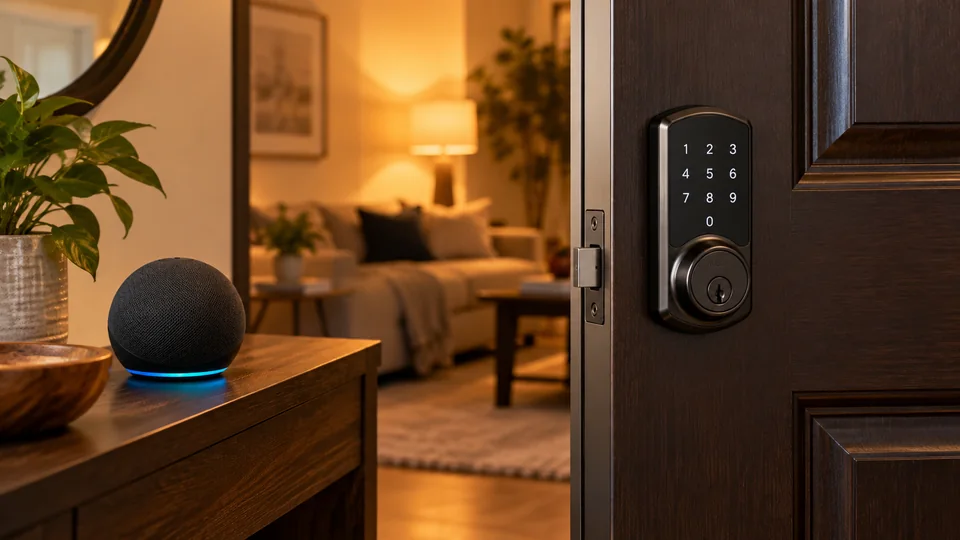
Standing at the front door with grocery bags cutting into your fingers is exactly the sort of moment that makes Alexa-compatible smart locks appealing. A voice command can lock the door, check its status, or help manage access without digging through a pocket for keys. The better models add keypad entry, fingerprints, app control, temporary codes, and remote access, so the right choice depends on how your household actually uses the door.
Alexa compatibility alone does not tell the whole story. Some locks connect directly over 2.4 GHz Wi-Fi, while others offer a gateway or Matter over Thread option. A lock may support Alexa voice commands yet require its app for user management, and voice unlocking may involve account setup and network dependence. Door thickness, bore size, backset, battery type, physical-key backup, weather protection, and whether a hub is required can matter more than a long feature list.
Quick Answer
Best Overall: The ULTRALOQ Bolt SE offers a particularly broad Alexa-friendly package, with built-in Wi-Fi, fingerprint entry, scheduled codes, app control, mechanical keys, and Matter over Thread support. A compatible Thread Border Router is required for its Matter setup.
Best Established Wi-Fi Option: The Schlage Encode Smart WiFi Deadbolt is a strong choice for buyers who want direct Wi-Fi access, Alexa control, up to 100 access codes, a physical key, and clearly stated door measurements.
Best for Fingerprint Entry: The eufy Security Smart Lock C220 combines fingerprint, keypad, app, physical-key, Apple Watch, and Alexa or Google voice access without requiring a separate bridge.
Best Smart Locks for Alexa Comparison Table
| Product | Best For | Entry Methods | Connectivity |
|---|---|---|---|
| ULTRALOQ Bolt SE | Broad smart-home compatibility | Fingerprint, code, app, key, voice | Wi-Fi, Matter over Thread |
| Schlage Encode Smart WiFi Deadbolt | Established Wi-Fi operation | Code, app, key, voice | Built-in Wi-Fi |
| eufy Security Smart Lock C220 | Fingerprint and Alexa access | Fingerprint, code, app, key, Apple Watch, voice | Built-in Wi-Fi |
| Philips Wi-Fi Smart Deadbolt | Multiple user entry methods | Fingerprint, code, app, key, voice | Built-in 2.4 GHz Wi-Fi |
| Wyze Palm Lock | Contactless biometric entry | Palm, code, app, key, voice | Wi-Fi |
| Veise VE027-K | High entry-method variety | Fingerprint, code, card, app, key, voice | Built-in 2.4 GHz Wi-Fi |
| Philips WiFi Keypad Lock | Physical-button keypad entry | Code, app, key, voice | Built-in Wi-Fi |
| Veise VE017 | Fingerprint and managed codes | Fingerprint, code, card, app, key, voice | Gateway required for remote Alexa features |
| WiFi Smart Lock HomeKey | Alexa plus Apple Home Key | Home Key, fingerprint, code, app, voice | Built-in Wi-Fi |
Each review below looks beyond Alexa compatibility, with attention to installation, entry choices, remote access, battery considerations, and the trade-offs that can affect daily use.
1. ULTRALOQ Bolt SE — Best Overall

The ULTRALOQ Bolt SE earns the top position because it gives Alexa users several ways to manage a front door without making the lock dependent on one entry method. Fingerprint ID, passcodes, smartphone control, web access, shared eKeys, voice control, and two mechanical keys cover the everyday moments that tend to trip people up. A child can use a code, a family member can use a fingerprint, and a service provider can receive a scheduled credential.
Its built-in Wi-Fi supports remote locking and access management without a separate hub for the standard app connection. The listing also documents Matter over Thread support, though that route requires a compatible Thread Border Router. That distinction matters: buyers who already have the necessary Matter equipment can explore broader smart-home routines, while everyone else can use the built-in Wi-Fi features. The lock supports up to 50 fingerprints and 50 passcodes, automatic locking, activity history, and low-battery alerts.
Pros
- Works with Alexa, Google Assistant, and Siri voice control.
- Built-in Wi-Fi enables remote app access without a hub.
- Offers fingerprint, code, app, eKey, voice, and mechanical-key entry.
- Documents Matter over Thread support for compatible setups.
- Includes automatic locking, access history, and low-battery alerts.
Cons
- Matter over Thread functions require a compatible Thread Border Router.
- A door sensor is not included.
This is the most complete match for a household that wants Alexa today but may also use other smart-home platforms later. The main trade-off is setup complexity if Matter is part of the plan. Buyers wanting a straightforward Wi-Fi installation can use the built-in connection, while those expecting every ecosystem feature to work without additional equipment should check their controller first. The lock fits doors from 1-3/8 to 2 inches thick, but alignment and existing deadbolt compatibility still deserve attention before ordering.
To buy this product, click here.
2. Schlage Encode Smart WiFi Deadbolt — Best for Clear Wi-Fi Operation
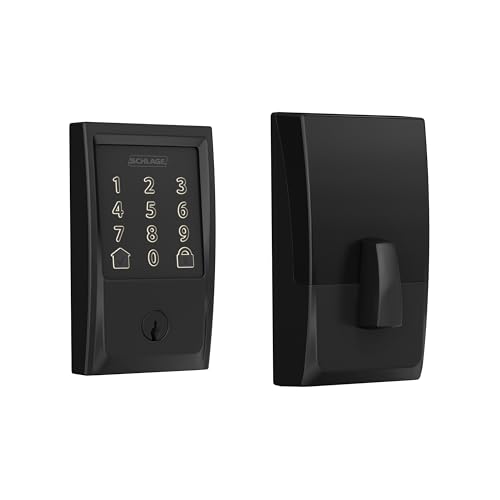
The Schlage Encode takes a simpler route than the Matter-capable ULTRALOQ. Its built-in Wi-Fi connects the deadbolt to the Schlage Home app for remote locking, unlocking, notifications, history, and access-code management. Alexa and Google Home support add hands-free control when paired with the relevant app and voice-enabled device. For someone who wants a recognized deadbolt format and a direct Wi-Fi connection, that straightforward structure can be reassuring.
Its touchscreen supports up to 100 access codes, which gives a busy household or small rental operation room to assign credentials without sharing one permanent PIN. The listing also specifies a customizable forced-entry and door-movement alarm, auto-lock timing, a physical backup key, and a fingerprint-resistant touchscreen. Installation details are unusually clear, with support for 1-3/8 to 1-3/4-inch doors and 2-3/8 or 2-3/4-inch backset configurations.
Pros
- Built-in Wi-Fi supports remote app access without a separate hub.
- Works with Alexa and Google Home.
- Supports up to 100 access codes and access history.
- Includes a physical backup key and customizable auto-lock.
- Provides stated door-thickness and backset requirements.
Cons
- Does not offer fingerprint entry.
- Claimed battery life is up to six months with typical use.
The Encode suits buyers who prefer codes and a physical key over biometric entry. Its published fit information also makes the pre-purchase measuring process less mysterious, though the existing deadbolt and door alignment still need to match. Choose another model if fingerprint access is central to your routine. Choose this one if a touchscreen keypad, remote code management, Alexa control, and a conventional key backup matter more than a long list of biometric options.
To buy this product, click here.
3. eufy Security Smart Lock C220 — Best for Fingerprint Access

The C220 is built around quick fingerprint entry, but Alexa control is only one part of its appeal. A user can open the door through the eufy Security app, keypad, physical key, Apple Watch, fingerprint sensor, or voice assistant. That collection is useful in a home where one person dislikes carrying keys, another prefers a PIN, and a visiting relative needs a method that does not require an account.
Remote access comes from built-in Wi-Fi, so the listing does not require a separate bridge for app control. The lock can also fit into an existing eufy setup, including routines with a eufy doorbell. Its published specifications include IP53 protection, BHMA Grade 3 certification, an operating range from -22°F to 158°F, and a stated battery estimate of up to eight months with eight AA batteries. Those details are useful reference points, but battery life will vary with use and conditions.
Pros
- Supports fingerprint, keypad, app, physical-key, Apple Watch, and voice entry.
- Built-in Wi-Fi enables remote control without a bridge.
- Integrates with the eufy Security ecosystem.
- Lists IP53 protection and BHMA Grade 3 certification.
- Includes unusual-attempt alerts and automatic locking.
Cons
- Uses eight AA batteries, which means more cells to replace.
- Alexa functions are part of a broader eufy app and account setup.
The C220 is a sensible fit for households already using eufy devices or anyone who wants fingerprint entry with direct Wi-Fi control. Its standard-deadbolt installation is described as a 15-minute process, and a spacer can be removed for bores under 54 mm. Still, measure the door and existing lock preparation rather than assuming every deadbolt is interchangeable. Buyers who want Matter or Thread should look elsewhere, since those capabilities are not identified in the product description.
To buy this product, click here.
4. Philips Wi-Fi Smart Deadbolt — Best for Flexible Household Entry

A front door gets used by people with different habits, and this Philips deadbolt accommodates that reality well. The listing supports app, passcode, fingerprint, physical-key, and Alexa or Google voice entry. Someone leaving for work can tap a finger, a guest can use a temporary code, and a homeowner can check or operate the lock remotely through the app.
The lock includes built-in Wi-Fi, but it is limited to 2.4 GHz networks and the listing recommends keeping the router within 65 feet. It can store up to 100 custom passcodes, issue one-time or scheduled codes, show access history, and send event notifications. Auto-lock can be set from 10 to 180 seconds, while Away Mode restricts unlocking to the master code. Those options are more meaningful for access control than a flashy keypad alone.
Pros
- Offers five entry methods, including Alexa voice control.
- Supports up to 100 custom passcodes.
- Provides one-time and scheduled code options.
- Includes remote access, notifications, history, and Away Mode.
- Fits listed door thicknesses from 1-3/8 to 2 inches.
Cons
- Requires 2.4 GHz Wi-Fi and uses AA alkaline batteries.
- No door sensor is included.
This Philips model fits a busy home that values choice more than ecosystem breadth. It does not list Matter, Thread, or a door sensor, and the router-distance guidance should be taken seriously during placement. The installation uses a screwdriver, but careful latch alignment and cable routing are required. It is a better match for buyers who want Alexa plus fingerprints and scheduled codes than for someone seeking a deeply integrated multi-platform smart-home lock.
To buy this product, click here.
5. Wyze Palm Lock — Best for Contactless Biometric Entry
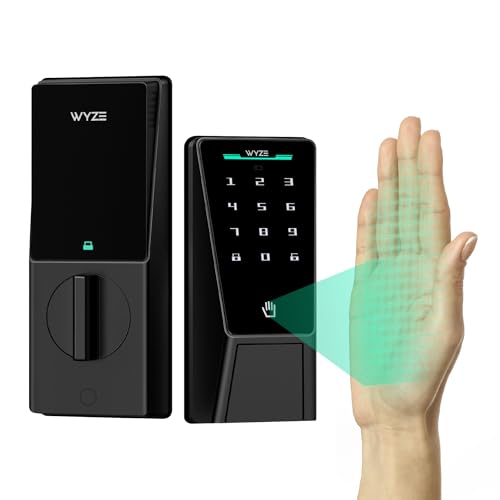
The Wyze Palm Lock takes a different path from fingerprint models. Its palm-vein reader is designed for contactless entry, so the user hovers a hand over the reader rather than touching a sensor. That can appeal to people who dislike touching a shared keypad or whose daily routine involves carrying bags, packages, or tools to the door.
Alexa and Google voice control work alongside Wi-Fi app access, illuminated keypad codes, and a mechanical key. The lock also includes a dual-battery arrangement, with a main battery backed by a secondary battery, plus USB-C emergency power through a power bank if both batteries are depleted. A gyroscope is used for door-position-aware auto-locking, while tamper and ajar alarms add useful notifications around access and door status.
Pros
- Uses contactless palm-vein recognition for entry.
- Works with Alexa and Google Assistant.
- Includes keypad codes, mechanical-key access, and app control.
- Offers a secondary battery and USB-C emergency power option.
- Lists tamper and ajar alarms, IP53 protection, and BHMA Grade 3 certification.
Cons
- Palm-vein entry is a specialized method that may require a short adjustment period.
- Its main battery is listed for about six months, with the secondary battery intended as backup.
This lock is especially interesting for a household that wants hands-free biometric entry rather than another fingerprint reader. The emergency-power design also reduces the anxiety of a dark keypad and a depleted battery. Buyers who prefer a familiar fingerprint sensor or a simpler deadbolt may find the palm-reading approach unnecessary. The listing identifies IP53 weather resistance, but exposed installations still need sensible placement and regular battery awareness.
To buy this product, click here.
6. Veise VE027-K — Best for Entry-Method Variety

The VE027-K is aimed at households where one access method never seems to suit everybody. It supports fingerprint, IC card, PIN, app, physical key, voice, user authorization, and code sharing. Up to 20 fingerprints and 100 custom passcodes are listed, giving the lock enough room for regular household users, helpers, and occasional guests.
Its built-in 2.4 GHz Wi-Fi enables remote status checks, activity alerts, app management, and flexible digital keys. The app supports permanent, scheduled, one-time, and expiring credentials, which is more useful than simply counting how many PINs a lock stores. The listing also identifies a 10-to-180-second auto-lock range, IP65 weather protection, BHMA/ANSI Grade 3 standards, and compatibility with doors from 1-3/8 to 2 inches thick.
Pros
- Provides eight entry methods.
- Supports permanent, scheduled, one-time, and expiring digital keys.
- Built-in Wi-Fi allows remote app management without a listed hub.
- Offers fingerprint storage for up to 20 users and over 100 PIN capacity.
- Lists IP65 protection and automatic left-or-right door-hand detection.
Cons
- Uses eight AA batteries, which are not included.
- Its broad access system may be more elaborate than a small household needs.
The VE027-K makes sense for a front door with frequent comings and goings, especially where temporary or expiring codes are useful. Alexa support is documented, but buyers should still confirm how voice commands and remote functions are configured through the app. The product is a complete deadbolt set rather than a retrofit device, so existing door measurements remain critical. Its many entry options are valuable only when the household actually uses the management tools.
To buy this product, click here.
7. Philips WiFi Keypad Lock — Best for Physical-Button Keypad Entry

Some buyers simply prefer physical buttons over a touchscreen, especially when the door is used in bright sun, cold weather, or with wet hands. This Philips lock takes that approach while retaining Alexa and Google voice control, app access, physical-key entry, and remote management. The listing describes four entry methods and a handle-equipped deadbolt format.
Its app supports up to 100 custom passwords, including permanent, one-time, and timed credentials. That gives a cleaner way to let in a cleaner, guest, tenant, or family member without handing out the household PIN. Built-in Wi-Fi supports event history, notifications, and remote operation. The lock fits listed cross-bores of 1-1/2 or 2-1/8 inches and door thicknesses from 1-3/8 to 2 inches.
Pros
- Uses physical buttons rather than a touchscreen keypad.
- Supports Alexa and Google Assistant voice control.
- Offers permanent, one-time, and timed passwords.
- Includes app notifications, event history, and remote control.
- Lists IP54 protection and an operating range from -31°F to 150°F.
Cons
- Eight AA batteries are required and are not included.
- It does not offer fingerprint entry.
This is a useful choice for someone who wants a familiar tactile keypad and does not need biometric access. The listing claims up to nine months of battery life in one place and describes up to six months with frequent daily use elsewhere, so treat runtime as an estimate rather than a promise. Confirm the bore and door thickness before purchase, then plan for the physical-button layout to be the primary entry experience.
To buy this product, click here.
8. Veise VE017 — Best for Managed Fingerprint Access

The VE017 stands out for its user-management tools. Through the KK Home app, administrators can authorize users, change permissions, pause access, delete credentials, and review activity logs. Fingerprints, fobs, passcodes, app access, mechanical keys, and shared codes give the lock a broad set of alternatives for a front door that serves several people.
Alexa and Google voice control are supported through the Veise G1 Gateway, which is sold separately. That requirement changes the buying decision. Local keypad and fingerprint use can still suit everyday entry, but remote control, remote logs, and voice integration depend on adding the gateway. The lock lists anti-peep PIN entry, Away Mode, an emergency USB-C port, four AA batteries, IP55 protection, and compatibility with 1-3/8 to 2-inch doors.
Pros
- Supports fingerprint, app, code, fob card, key, and voice entry.
- Offers permanent, one-time, duration, and recurring password modes.
- Provides user permissions, activity records, and access revocation.
- Includes an emergency USB-C power port.
- Lists IP55 protection and automatic door-hand detection.
Cons
- The Veise G1 Gateway is required for remote access and Alexa voice control.
- The gateway is sold separately.
This model is strongest for buyers who are willing to build around the gateway and want detailed credential control. It is less suitable for someone expecting Alexa to work immediately from the lock alone. The stated installation process uses a screwdriver, but proper latch alignment is necessary for the electronic mechanism to operate correctly. Its fingerprint and code-management features are compelling, provided the added gateway fits the planned setup.
To buy this product, click here.
9. WiFi Smart Lock HomeKey — Best for Alexa and Apple Home Key

Alexa users who also rely heavily on Apple devices may appreciate this lock’s unusually broad platform coverage. The listing explicitly describes Apple Home Key support, allowing an iPhone or Apple Watch to be used through Apple Wallet, while Alexa and Google Home support add voice-based control. Fingerprint, anti-peep code, app, and auto-lock functions round out the access choices.
Built-in Wi-Fi provides remote operation without a separate hub according to the listing. The exterior portion is identified as IP65-rated, and the lock is described as suitable for doors from 1-3/8 to 2-1/8 inches thick with common 1-1/2 or 2-1/8-inch bore sizes and 2-3/8 or 2-3/4-inch backsets. Those measurements make this a potentially flexible replacement, but they still need to match the actual door before ordering.
Pros
- Explicitly supports Apple Home Key through iPhone or Apple Watch.
- Works with Alexa, Google Home, and Apple Home.
- Combines Wi-Fi remote access with fingerprint and keypad entry.
- Lists local fingerprint storage and anti-peep password entry.
- Provides IP65 exterior protection and broad stated door dimensions.
Cons
- Apple Home Key usefulness depends on a compatible Apple device and setup.
- The listing does not provide the same level of access-code capacity detail as several competing models.
This is the right kind of specialist pick for a mixed Alexa and Apple household. The Home Key feature is clearly different from ordinary Apple Home compatibility, while Alexa remains available for voice routines and status control. Buyers who use only Alexa may prefer the simpler ULTRALOQ or Schlage options. Buyers selecting this model should verify the exact Apple setup, door dimensions, and app requirements before replacing an existing deadbolt.
To buy this product, click here.
Buying Guide
Confirm What Alexa Can Actually Do
Alexa compatibility means the lock can connect to Amazon’s voice ecosystem, but the available commands and setup steps can differ. A lock may support locking, unlocking, and status checks through voice while using its own app for codes, fingerprints, history, and notifications. Voice unlocking also depends on a properly configured Alexa account and a stable network, so treat it as one access method rather than the only way into the home.
Measure the Door Before Choosing a Deadbolt
Most of these products are replacement deadbolts, not universal covers that fit every existing lock. Check door thickness, bore diameter, backset, latch alignment, and space around the interior side. The Schlage model lists 1-3/8 to 1-3/4-inch doors and two backset options, while several other models list doors up to 2 inches or slightly more. Those figures are product-specific, so do not transfer one lock’s measurements to another.
Decide Whether You Need a Gateway
Built-in Wi-Fi can provide remote app access without an added hub, as for the ULTRALOQ’s standard Wi-Fi connection, the Schlage, eufy C220, and several Philips models. The Veise VE017 is different because its remote access and Alexa functions require the separately sold G1 Gateway. ULTRALOQ’s Matter over Thread path also requires a compatible Thread Border Router. Check the exact connection path before assuming a lock is ready for voice control out of the box.
Compare Credential Management, Not Just Entry Count
A long list of entry methods sounds appealing, but the useful question is how access is assigned and removed. Scheduled, one-time, expiring, and recurring codes are helpful for cleaners, guests, and service providers. The VE027-K and VE017 provide particularly detailed code-management options, while the Schlage and Philips models offer high code capacity. A household with only two regular users may gain more from a simple physical key backup than from eight separate credential types.
Choose the Right Biometric Method
Fingerprint locks place the sensor near the keypad and suit people who want quick physical entry without a PIN. The Wyze Palm Lock uses contactless palm-vein recognition instead, which changes the interaction and may be preferable for users who dislike touching shared surfaces. Biometrics should supplement, rather than replace, a backup code, app, key, or emergency-power plan.
Plan for Battery Depletion
Battery estimates vary by model and usage. The Schlage uses four included AA batteries and lists up to six months with typical use, while other locks use four or eight AA cells and publish different estimates. The Wyze lock adds a secondary battery and USB-C emergency charging, and the Veise VE017 also lists an emergency USB-C port. A USB-C port is an emergency power input, not automatically a rechargeable battery system, so keep suitable batteries or a power bank available.
Separate Weather Ratings From Complete Outdoor Protection
IP53, IP54, IP55, IP65, and IPX4 ratings describe protection for the relevant product components, but they do not guarantee suitability for every exposed installation. A covered porch and an unprotected gate can present very different conditions. Review the listed temperature range and place the keypad where driving rain, standing water, and direct impact are less likely.
Best Smart Locks for Alexa FAQ
Do Alexa smart locks require Wi-Fi?
Alexa control generally requires the lock to communicate through a supported network or gateway, but the exact arrangement varies. Several models in this roundup use built-in 2.4 GHz Wi-Fi. The Veise VE017 requires its G1 Gateway for remote access and Alexa functions. A lock may still support local fingerprint, key, or keypad entry when the internet connection is unavailable, but remote voice commands can be affected.
Can Alexa unlock a smart lock by voice?
The products listed here identify Alexa voice control, including lock and unlock functions for several models. Voice unlocking may require enabling the manufacturer’s Alexa skill, signing into the relevant account, and configuring security settings. Keep a physical key, code, fingerprint, or app method available because a voice assistant should not be treated as the sole emergency entry method.
Are smart locks with built-in Wi-Fi better than locks that use a gateway?
Neither arrangement is automatically better. Built-in Wi-Fi can simplify installation because a separate gateway may not be needed for remote app access. A gateway-based system can suit households that already use the manufacturer’s bridge or want a particular connection method. The added device creates another setup and power consideration, as shown by the Veise VE017.
What happens if the smart lock battery dies?
The response depends on the model. Physical keys provide a direct backup on several locks, while some models offer an emergency USB-C power input for a power bank. A low-battery notification can provide advance warning, but it is still wise to replace batteries promptly and keep the correct battery type available. Emergency power input does not necessarily recharge the installed batteries.
Do all fingerprint smart locks work with every family member?
Fingerprint enrollment and capacity vary. The ULTRALOQ lists up to 50 fingerprints, the VE027-K lists up to 20, and other models provide different or less specific capacity information. Fingerprint access is also only one method, so a household should retain codes, app access, or physical keys for visitors and users whose fingerprints are not enrolled.
Can these locks fit any front door?
No. Most are intended for standard residential deadbolt preparations, but the required door thickness, bore, backset, latch alignment, and interior clearance differ. Some products identify specific dimensions, while compatibility with unusual doors, mortise hardware, sliding doors, or multipoint systems is not established here. Measure the existing installation before purchasing.
Is Matter the same as Alexa compatibility?
No. Alexa compatibility identifies support for Amazon’s voice ecosystem. Matter is an interoperability standard that can allow a compatible lock to work across supported smart-home platforms. The ULTRALOQ lists Matter over Thread as an option, but that connection requires a compatible Thread Border Router. A lock can support Alexa without supporting Matter, and Thread alone does not establish Matter compatibility.
Final Verdict
The ULTRALOQ Bolt SE is the strongest overall choice for this group because it combines Alexa support with built-in Wi-Fi, fingerprint access, code sharing, app control, mechanical keys, and a Matter over Thread option. That combination gives it room to serve a basic Alexa setup today while accommodating a broader smart-home configuration later. Its main qualification is that Matter over Thread requires compatible additional equipment, so buyers should distinguish that option from the lock’s standard Wi-Fi operation.
The Schlage Encode is a more focused alternative for buyers who want direct Wi-Fi access, a touchscreen, up to 100 codes, a physical key, and clearly stated door measurements. The eufy C220 is appealing for fingerprint entry and eufy ecosystem users, while the Wyze Palm Lock offers a distinctive contactless biometric experience with backup power provisions. Before ordering, match the lock to the door preparation, decide whether a gateway is acceptable, and choose an entry method your household will actually use. Alexa is useful, but the best lock is the one that remains practical when the phone, network, or batteries are unavailable.
