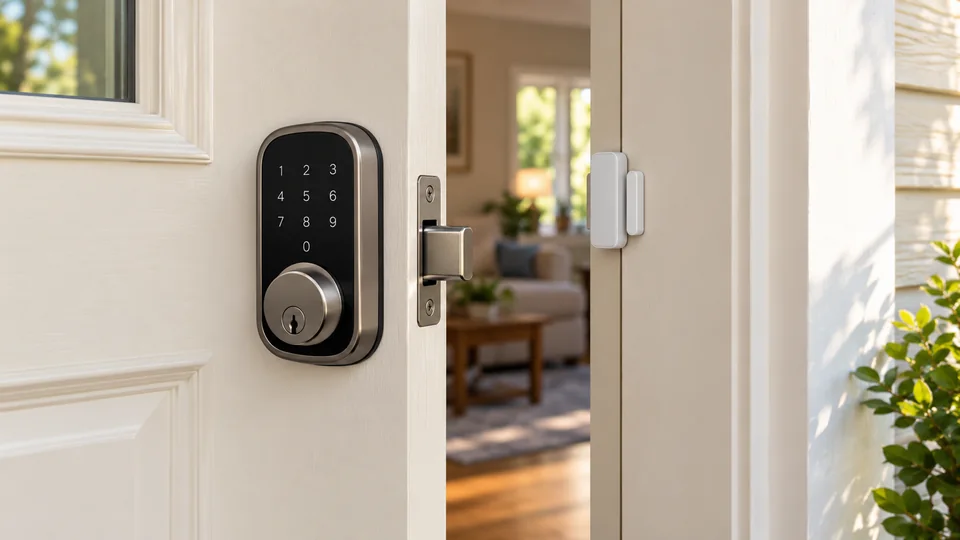
A smart lock with a door sensor answers two separate questions at the entryway: who can unlock the door, and whether the door is actually closed afterward. That distinction matters. A deadbolt may report that it is locked while the door itself remains slightly open, leaving the home less secure than the app status suggests. The strongest options pair electronic access with door-position alerts, auto-lock settings, or a sensor that confirms the entrance is closed.
Buyers often focus on fingerprint readers, code capacity, or Wi-Fi access and overlook the physical door. Deadbolt alignment, door thickness, router distance, battery type, and the difference between a built-in sensor and a separately required accessory can affect daily use more than a long feature list. A door sensor also does not replace proper installation. If the latch binds or the frame is misaligned, automatic locking can become unreliable regardless of the app.
The nine products below cover complete smart deadbolts, keypad and fingerprint handles, and one dedicated sensor add-on for compatible Lockly systems. The rankings give extra weight to door-status monitoring, remote access, credential management, installation information, and emergency entry options. The products differ considerably, so the right choice may depend on whether you need a front-door deadbolt, a complete handle set, or added monitoring for an existing Lockly setup.
Quick Answer
Best Overall: The ULTRALOQ U-Bolt Pro WiFi Smart Lock with Door Sensor offers the most complete combination of door-status alerts, fingerprint entry, remote access, guest credentials, physical keys, and direct Wi-Fi connectivity.
Best for Guest Codes: The ULTRALOQ U-Bolt WiFi Smart Lock with Door Sensor supports scheduled and one-time codes while retaining door alerts and remote management.
Best for Biometric Entry: The Wyze Palm Lock uses contactless palm-vein recognition and adds keypad, Wi-Fi, mechanical-key, and ajar-alert features.
Best Door-Status Add-On: The Lockly Wireless Sensors provide four door states for compatible Lockly locks, but they require a compatible lock and Secure Link Wi-Fi Hub and are not a standalone smart lock.
Best Smart Locks With Door Sensor Comparison Table
| Product | Best For | Door-Status Approach | Entry Methods |
|---|---|---|---|
| ULTRALOQ U-Bolt Pro WiFi | Best overall | Included door sensor and alerts | Fingerprint, code, app, auto unlock, key |
| ULTRALOQ U-Bolt WiFi | Guest access | Included sensor and open-door alerts | Code, app, eKey, auto unlock, key |
| Wyze Palm Lock | Contactless biometric access | Ajar detection and tamper alerts | Palm vein, keypad, app, voice, key |
| Philips WiFi Keypad Deadbolt | Complete handle replacement | App lock status and auto-lock | Fingerprint, code, app, voice |
| eufy Security Smart Lock C220 | eufy ecosystem users | App status and alarm functions | Fingerprint, keypad, app, key, voice |
| eufy Security Smart Lock C33 | Fingerprint handle entry | App notifications and event history | Fingerprint and app |
| Fingerprint Smart Door Handle | Multiple local credentials | Lock status through app | Fingerprint, code, card, app, key |
| Fingerprint Smart Door Knob | Interior doors | App access records | Fingerprint, app, key |
| Lockly Wireless Sensors | Compatible Lockly systems | Open, closed, locked, unlocked | Works with existing Lockly lock |
The detailed reviews explain how each product handles door status, installation, credentials, connectivity, and emergency access.
1. ULTRALOQ U-Bolt Pro WiFi Smart Lock With Door Sensor — Best Overall
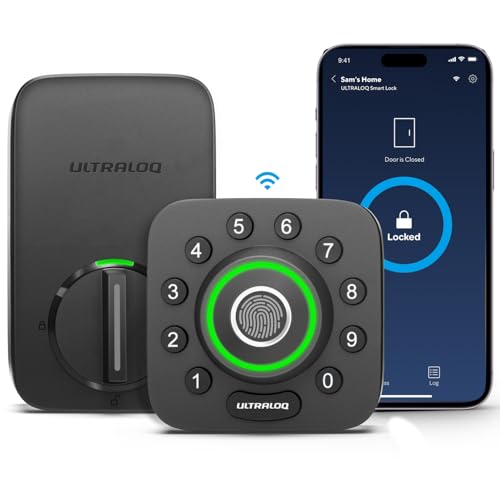
The U-Bolt Pro is the strongest match for shoppers who specifically want a smart lock and a door sensor in one purchase. Its sensor reports door status through the app, while the lock adds auto-lock, auto-unlock, open-door alerts, remote control, and entry logs. That combination is more useful than a lock that only reports whether its bolt moved. A quick glance at the app can help distinguish a locked door from a door that was never fully closed.
Access is flexible without becoming dependent on one credential. The listing identifies fingerprint storage for up to 100 fingerprints, up to 50 passcodes, smartphone control, eKeys, voice control, auto unlock, and two physical keys. Built-in Wi-Fi allows remote management without an extra bridge, although it supports 2.4 GHz Wi-Fi only. The lock is listed as ANSI Grade 1 and IP65 rated, and installation is intended for most standard left- or right-handed doors. Check the door configuration carefully, especially because the listing does not recommend it for metal doors.
Pros
- Includes a door sensor for open-door status and alerts.
- Offers fingerprint, passcode, app, eKey, voice, auto-unlock, and key entry.
- Built-in 2.4 GHz Wi-Fi supports remote control without an additional bridge.
- Stores up to 100 fingerprints and up to 50 passcodes according to the listing.
- Provides ANSI Grade 1 and IP65 ratings.
Cons
- Supports 2.4 GHz Wi-Fi only.
- The listing does not recommend installation on metal doors.
This is the best fit for a front entrance shared by several people, a rental that needs remotely managed access, or a household that wants both biometric entry and clear door-status information. Buyers who only need keypad access may find the additional fingerprint hardware unnecessary. Before ordering, verify the deadbolt, door thickness, and Wi-Fi placement rather than treating “standard door” as a universal guarantee.
To buy this product, click here.
2. ULTRALOQ U-Bolt WiFi Smart Lock With Door Sensor — Best for Scheduled Guest Access
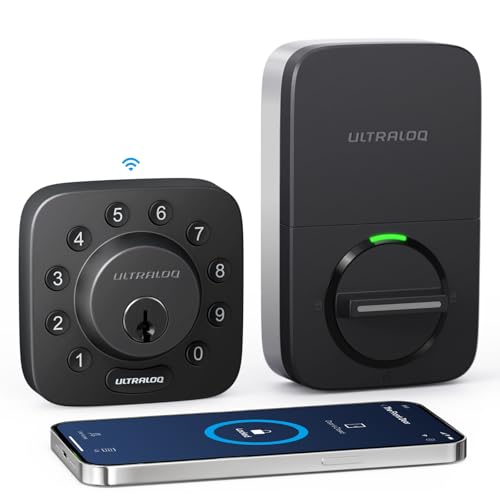
The standard U-Bolt WiFi keeps the central door-sensor advantage while simplifying the entry hardware compared with the Pro version. Its included sensor helps identify whether the door is open and can send alerts if it remains open. That matters for a rental cleaner arriving between stays or a family member leaving in a hurry, since the app can provide more context than a basic locked-or-unlocked notification.
Guest management is a major reason to choose this model. The listing supports up to 50 custom passcodes, including one-time and scheduled options, plus shared eKeys. Users can also unlock through the app, web portal, voice assistants, auto unlock, or physical keys. Built-in Wi-Fi means no extra bridge is required, but the router should be reasonably close and the connection is limited to 2.4 GHz. The lock fits listed door thicknesses from 1-3/8 to 1-3/4 inches and is described as ANSI/BHMA Grade 1 and IP65 rated.
Pros
- Includes a door sensor with open-door alerts.
- Supports one-time and scheduled passcodes for guests or service providers.
- Provides remote app access, entry logs, eKeys, and web-portal control.
- Includes physical keys and supports auto unlock.
- Lists ANSI/BHMA Grade 1 construction and IP65 weather resistance.
Cons
- Fingerprint entry is not listed for this version.
- Requires a stable 2.4 GHz Wi-Fi connection for remote features.
This model makes sense for short-term rentals, cleaners, guests, and households that need planned credentials more than fingerprint access. The Pro model ranks higher for biometric entry and a broader access set, while this version remains a focused choice for code-based management. Confirm the deadbolt fit and router distance before installation, and remember that app-based remote functions depend on network availability.
To buy this product, click here.
3. Wyze Palm Lock — Best for Contactless Biometric Entry
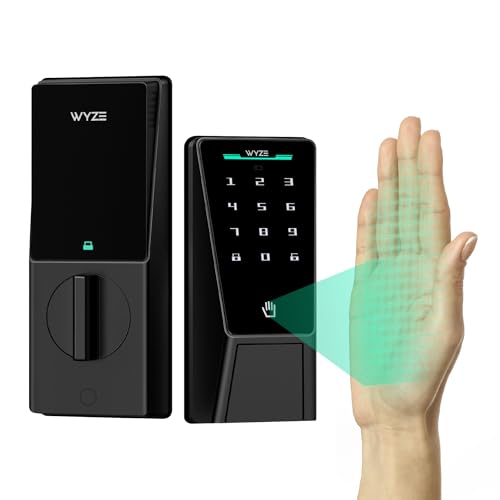
The Wyze Palm Lock takes a different route to biometric entry. Instead of asking users to touch a fingerprint reader, it reads the vein pattern beneath the palm when the hand hovers over the sensor. That contactless approach may appeal to households that want quick entry without touching a shared surface. It also retains a backlit keypad, mechanical key access, Wi-Fi control, and Alexa and Google Assistant support.
Its door-awareness features include a gyroscope that detects door movement and an ajar alarm that can chirp when the door is left open. The listing also describes tamper alerts after excessive incorrect attempts and up to 50 unique or one-time codes. A dual-battery design provides a main battery and a secondary battery, with USB-C emergency power available through a power bank if both are depleted. The product is listed as BHMA Grade 3 and IP53 weather-resistant. The available information does not identify a separate included door sensor, so its door-status approach differs from the ULTRALOQ models.
Pros
- Uses contactless palm-vein recognition for biometric entry.
- Includes keypad, Wi-Fi control, voice support, and mechanical-key backup.
- Provides ajar and tamper alerts according to the listing.
- Supports up to 50 unique or one-time access codes.
- Uses a dual-battery design with USB-C emergency power.
Cons
- The available information does not identify a separate included door sensor.
- Its IP53 rating is lower than the IP65 rating listed for the ULTRALOQ models.
Choose this lock if contactless palm access is the feature that will shape daily use. It is also a sensible fit for someone who wants several backup methods rather than a single biometric reader. Buyers who specifically need a door-position sensor should look first at the ULTRALOQ choices or add a compatible monitoring product where supported. Door fit and the practical placement of the lock still deserve careful checking before installation.
To buy this product, click here.
4. Philips WiFi Keypad Deadbolt With Handle — Best Complete Handle Set

A complete handle set can simplify a front-door refresh because the purchaser receives the deadbolt and matching lever together. Philips pairs that hardware with fingerprint entry, flexible PIN codes, app control, voice commands, and built-in 2.4 GHz Wi-Fi. The app supports permanent, one-time, periodic, and recurring codes, giving this lock a useful range for family members, housekeepers, or guests.
The app can show lock status and access history, while auto-lock can be set from zero to 180 seconds. The listing says auto-lock is off by default, so that setting requires deliberate activation after installation. Battery life is listed as up to six months, with standard alkaline batteries required and batteries excluded from the package. Door compatibility is listed for thicknesses from 1-3/8 to 1-3/4 inches, and the product is designed for right-opening doors by default, with a reset procedure for left-opening doors.
Pros
- Includes a matching handle set with the deadbolt.
- Supports fingerprint entry and permanent, one-time, periodic, and recurring codes.
- Offers remote app control, access history, and voice-assistant support.
- Allows adjustable auto-lock timing from zero to 180 seconds.
- Lists compatibility with doors from 1-3/8 to 1-3/4 inches thick.
Cons
- Batteries are not included.
- Auto-lock is off by default and the lock is designed for right-opening doors unless reset.
This Philips model suits a buyer replacing more than the deadbolt and wanting a coordinated handle included in the package. It ranks below the dedicated sensor-equipped ULTRALOQ locks because the product description describes app status and auto-lock rather than a separate door sensor. Check handing, door thickness, router distance, and wire placement during installation. Those details can determine whether the complete set is genuinely convenient.
To buy this product, click here.
5. eufy Security Smart Lock C220 — Best for eufy Integration

The C220 is a fingerprint deadbolt with built-in Wi-Fi and six listed entry methods. Users can unlock with a fingerprint, app, keypad, physical key, Apple Watch, or voice assistant. That range gives different household members a practical fallback, while the eufy app can manage remote access. The product can also join routines with a eufy doorbell, which may appeal to readers already using that ecosystem.
The listing claims up to eight months from eight AA batteries, with actual duration dependent on usage. It also lists a low-temperature operating range from -22 to 158 degrees Fahrenheit, IP53 protection, and BHMA Grade 3 certification. Installation is described as a 15-minute process for most standard deadbolts, with a bore under 54 mm supported by removing the spacer. The product description does not identify a dedicated door sensor, so app lock status and unusual-attempt alarms should not be treated as equivalent to door-position confirmation.
Pros
- Offers six listed entry methods, including fingerprint, keypad, app, key, Apple Watch, and voice.
- Includes built-in Wi-Fi for remote app control without a bridge.
- Works within the eufy ecosystem and can join doorbell routines.
- Lists up to eight months of battery life with eight AA batteries.
- Provides stated IP53 protection and a listed operating range from -22 to 158 degrees Fahrenheit.
Cons
- The available information does not identify a dedicated door-position sensor.
- Its listed BHMA Grade 3 rating is below the Grade 1 rating listed for the ULTRALOQ models.
The C220 is a strong alternative for a home already using eufy devices or for anyone who values several entry routes. It may be the wrong choice if the primary requirement is an included sensor that distinguishes an open door from a locked deadbolt. Check the existing deadbolt and bore dimensions, and treat the eight-month figure as a stated estimate rather than a guarantee for every usage pattern.
To buy this product, click here.
6. eufy Security Smart Lock C33 — Best for a Fingerprint Handle

The C33 combines a fingerprint reader with the grip of a door handle, which creates a different installation proposition from a conventional exterior deadbolt keypad. The listing describes app control, real-time notifications, and event history, along with integrated Wi-Fi for remote access. That arrangement can work well for a garage entry, side door, office, or basement entrance where a complete handle replacement is acceptable.
Power comes from eight AA batteries, and the product information emphasizes installation without drilling in about 15 minutes. It supports left- and right-hand doors, although the available details do not provide a complete list of door thickness, backset, or bore requirements. That missing hardware information makes careful compatibility checking particularly important. The listing also does not identify a separate door sensor, so its monitoring features should be understood as app notifications and access records rather than confirmed open-door detection.
Pros
- Combines fingerprint recognition with a handle-style lock design.
- Includes built-in Wi-Fi for remote app access.
- Provides real-time notifications and event history through the app.
- Supports left- and right-hand doors according to the listing.
- Is described as a no-drilling installation taking about 15 minutes.
Cons
- The available information does not identify a dedicated door sensor.
- Key door dimensions and hardware requirements are not clearly specified in the supplied details.
This model deserves attention when the handle format is more important than a door-position sensor. It can be a practical match for secondary entrances, offices, and utility areas, but shoppers should confirm the exact door preparation before ordering. If a front-door deadbolt and explicit door alerts are the priority, the first two ULTRALOQ models provide clearer evidence for that use.
To buy this product, click here.
7. Fingerprint Smart Door Handle With Keypad — Best for Multiple Local Credentials

This smart handle focuses on credential variety at the door. The listing identifies fingerprint, password, IC card, app, and mechanical-key entry, along with capacity for up to 100 fingerprints and 50 passwords. That mix can be useful for a home office, bedroom, or rental room where different people need different methods and a physical backup remains important.
The lock uses four AAA batteries and provides a low-battery alert plus USB-C emergency power from a power bank. The handle flips for left- or right-opening doors and supports listed door thicknesses from 1-3/8 to 2-1/8 inches, with specified backset and bore dimensions. Those details are more helpful than a vague “standard door” claim, but the product information does not describe Wi-Fi or a separate door sensor. App control should therefore be understood within the product’s stated system rather than as confirmed remote internet access.
Pros
- Provides fingerprint, password, IC card, app, and mechanical-key entry.
- Lists capacity for up to 100 fingerprints and 50 passwords.
- Includes USB-C emergency power and a low-battery alert.
- Supports left- and right-opening doors with a flip-up handle.
- Lists door thickness support from 1-3/8 to 2-1/8 inches.
Cons
- Wi-Fi remote access is not identified in the product description.
- A separate door sensor is not identified.
This handle suits an interior or residential door where local credentials matter more than cloud monitoring. Its emergency power and physical keys make battery planning less stressful, while the broad stated thickness range may help with some nonstandard doors. It is a weaker match for shoppers specifically seeking remote door-open alerts, so confirm the monitoring behavior before treating it as a full connected entry system.
To buy this product, click here.
8. Fingerprint Smart Door Knob — Best for Interior Door Privacy

The fingerprint smart knob is aimed primarily at bedrooms, offices, and other interior doors rather than a fully connected front-door entry system. It supports fingerprint and app access, mechanical keys, and several operating modes, including passage, normal, privacy, and silent modes. That gives a bedroom door a quieter, more personal control scheme than a large exterior deadbolt keypad.
The built-in rechargeable battery is listed for up to one year and charges through USB-C. App control operates within Bluetooth range, while remote control requires a separately purchased gateway. That distinction is crucial. A phone nearby can manage the lock, but the product should not be treated as Wi-Fi-enabled remote access without the additional gateway. The listing also says the knob is unsuitable for doors with weather strips, and it does not identify a separate door sensor.
Pros
- Offers fingerprint, app, and mechanical-key entry.
- Provides passage, normal, privacy, and silent operating modes.
- Uses a rechargeable battery with USB-C charging.
- Includes low-battery notifications through the app.
- Installs with a screwdriver according to the listing.
Cons
- Remote control requires a separately purchased gateway.
- It is not suitable for doors with weather strips and has no separate door sensor.
This is the most sensible choice here for an interior room where privacy and quiet operation matter. It is less suitable for an exposed front door or anyone expecting built-in Wi-Fi remote monitoring. Check the weather-strip restriction and the knob installation orientation before ordering, since a small fit issue can stop an interior lock from operating smoothly.
To buy this product, click here.
9. Lockly Wireless Sensors — Best Door-Status Add-On

The Lockly Wireless Sensors address the door-status part of this category more directly than most complete locks. In the Lockly Home app, they can report four states: open, closed, locked, and unlocked. That distinction gives an existing Lockly installation a clearer picture of what is happening at the entryway, particularly when a lock status alone cannot confirm that the door is physically shut.
This product is an add-on rather than a standalone smart lock. The listing requires a compatible Lockly smart lock and the latest version Secure Link Wi-Fi Hub, already paired with the lock. Installation uses adhesive mounting on the door and frame, followed by app pairing, with no drilling or wiring described. Compatibility must be confirmed for the exact Lockly system before purchase. The sensor therefore ranks last as a complete lock recommendation, while remaining a potentially useful choice for someone who already owns the required Lockly hardware.
Pros
- Reports open, closed, locked, and unlocked states.
- Installs wirelessly with adhesive mounting and app pairing.
- Uses the existing Lockly Home app rather than requiring a separate sensor app.
- Provides real-time status for compatible Lockly systems.
- Includes lifetime technical support according to the listing.
Cons
- It is not a standalone smart lock.
- Requires a compatible Lockly lock and Secure Link Wi-Fi Hub.
Choose this product only when the existing Lockly setup meets its compatibility requirements. It is the clearest option in this group for four-state door monitoring, but it cannot replace a deadbolt, keypad, or complete access system. Buyers starting from scratch should select a complete smart lock instead of assuming the sensor supplies entry control.
To buy this product, click here.
Buying Guide
Separate Bolt Status From Door Status
A lock can report that its bolt is extended without proving that the door is fully closed. The ULTRALOQ models explicitly include door sensors and open-door alerts, while the Lockly add-on identifies open, closed, locked, and unlocked states. Other products in this roundup describe app status, access history, or auto-lock without clearly identifying a separate door-position sensor. That distinction should guide the ranking if an open-door warning is the main reason for upgrading.
Check Your Existing Door Before Comparing Features
Smart-lock compatibility depends on more than having a standard residential door. Check the door thickness, deadbolt or latch configuration, bore, backset, handing, and available clearance. The ULTRALOQ U-Bolt WiFi lists support for doors from 1-3/8 to 1-3/4 inches, while the Philips model lists a similar range and requires attention to right- or left-opening setup. The handle products use different hardware, so a deadbolt replacement cannot automatically substitute for a complete handle assembly.
Match the Entry Method to the People Using the Door
Fingerprint access is convenient for regular users, while one-time or scheduled codes are more useful for guests, cleaners, and short-term visitors. The U-Bolt Pro combines fingerprints, codes, app access, eKeys, voice control, auto unlock, and physical keys. The standard U-Bolt emphasizes scheduled and one-time passcodes. A product with many methods is not automatically better if the household only needs a keypad and reliable key backup.
Read Wi-Fi and Gateway Requirements Carefully
Built-in Wi-Fi appears on the ULTRALOQ, Wyze, Philips, and eufy models listed here, but the exact network requirements differ. The ULTRALOQ products use 2.4 GHz Wi-Fi, while Philips lists a recommended router distance of 33 feet. The fingerprint smart knob uses Bluetooth-range app control and requires a separately purchased gateway for remote operation. Do not treat app control as proof of internet access, and do not assume a compatible hub is included unless the listing says so.
Plan for Batteries and Emergency Entry
Battery arrangements vary widely. The Wyze lock has a dual-battery design and USB-C emergency power. The Philips lock uses standard alkaline batteries that are not included. The eufy C220 uses eight AA batteries, while the interior fingerprint knob has a rechargeable battery. Physical keys provide a different backup from emergency USB power, so buyers should decide whether they want both forms of protection before installation.
Do Not Extend Weather Ratings Beyond Their Evidence
IP53 and IP65 ratings describe the protection identified for the product, but they should not be treated as a universal guarantee for every component or every exposed installation. The ULTRALOQ products have the strongest listed IP rating in this group, while the eufy and Wyze locks list IP53. Interior handles and knobs have different restrictions, including the fingerprint knob’s warning about weather strips. Confirm the intended location before placing an interior product on an exposed entrance.
Best Smart Locks With Door Sensor FAQ
What is the best smart lock with a door sensor?
The ULTRALOQ U-Bolt Pro WiFi is the strongest overall choice in this roundup because its listing identifies an included door sensor, open-door alerts, remote access, fingerprint entry, passcodes, eKeys, auto unlock, voice control, and physical keys. It also lists ANSI Grade 1 and IP65 ratings. Confirm that the door and network meet its requirements before ordering.
Does a smart lock sensor prove that the door is locked?
It depends on the product and sensor design. A door-position sensor can report whether the door is open or closed, while the lock itself reports whether the bolt is locked or unlocked. The Lockly Wireless Sensors are specifically listed as reporting four states, including open, closed, locked, and unlocked. A product that only shows lock status may not confirm that the door is physically shut.
Do smart locks with door sensors need Wi-Fi?
Wi-Fi is required for remote features on models that use built-in Wi-Fi, such as the ULTRALOQ, Wyze, Philips, and eufy options listed here. Local methods such as a physical key, fingerprint, or keypad may continue to serve a different function, but remote app access can depend on the network. The fingerprint smart knob uses Bluetooth-range app control and requires a separate gateway for remote control.
Can I install one of these locks on any front door?
No. Compatibility depends on the existing deadbolt or handle, door thickness, bore, backset, handing, frame alignment, and sometimes the material of the door. The ULTRALOQ Pro listing does not recommend metal doors, Philips identifies a default right-opening configuration, and the interior fingerprint knob is unsuitable for doors with weather strips. Check the exact measurements and installation requirements before purchase.
Are door sensors included with every product in this roundup?
No. The ULTRALOQ U-Bolt Pro and U-Bolt WiFi listings specifically identify door sensors. The Lockly Wireless Sensors are a separate add-on that requires compatible Lockly hardware and a Secure Link Wi-Fi Hub. The other products describe app status, access history, alarms, or auto-lock, but the product description does not identify a separate included door sensor for each one.
What happens if the smart lock battery dies?
The backup depends on the model. Wyze lists a dual-battery system and USB-C emergency charging, while several products include physical keys. The Philips lock requires standard alkaline batteries and does not include them. The eufy C220 uses eight AA batteries, and the fingerprint handle provides USB-C emergency power. Check whether emergency power is an input for temporary operation or normal battery charging, since those functions are different.
Are fingerprint smart locks more secure than keypad locks?
Neither method should be treated as universally superior from the product description alone. Fingerprint access can reduce the need to remember or share a code, while a keypad may be easier for guests and service providers. A strong choice depends on access habits, backup entry options, door compatibility, and account management. Avoid treating a biometric feature as a guarantee against forced entry or electronic attack.
Final Verdict
The ULTRALOQ U-Bolt Pro WiFi Smart Lock with Door Sensor is the strongest overall recommendation for this category. It directly addresses the central concern with an included door sensor and open-door alerts, then adds fingerprint entry, passcodes, eKeys, app control, auto unlock, voice support, physical keys, and built-in Wi-Fi. Its door and security information is also clearer than that of several alternatives. The standard ULTRALOQ U-Bolt WiFi is the better fit for buyers who care most about scheduled and one-time guest codes.
Wyze is the more distinctive biometric alternative because its palm-vein reader works without touching the sensor and its listing includes ajar alerts, dual batteries, and emergency USB-C power. Philips and the eufy models suit buyers looking for fingerprint handles or complete connected deadbolts, while the smaller fingerprint products make more sense for interior doors. The Lockly sensor is valuable for an existing compatible Lockly installation, but it is an add-on rather than a lock. Before ordering any option, verify the door hardware, network requirements, battery backup, and whether the product truly confirms the door position you need to monitor.
