A lock that secures itself after you leave sounds simple, yet the details behind that convenience matter. The products in this roundup combine electronic entry methods with automatic locking, remote control, or both. That makes them useful for busy households, rental doors, offices, and anyone who has ever driven halfway down the street and wondered whether the front door was locked. It is also important to separate automatic locking from automatic unlocking. The product listings document auto-lock timers, app unlocking, fingerprint entry, codes, keys, and voice control. They do not clearly document hands-free proximity or geofenced auto-unlock.
Door fit is where many attractive listings become poor purchases. A deadbolt replacement may require different preparation than a handle set, while a lock supporting Wi-Fi may need a stable 2.4GHz connection for remote operation. Some models include a physical key, emergency USB-C power, or both. Others depend on a separately sold gateway for remote access. Battery type, door thickness, bore-hole size, handing, and latch alignment can matter more than a long list of unlocking methods, especially when the lock will be installed on the main entrance rather than an interior office door.
The products below are ranked by how closely their features serve buyers seeking automatic locking and flexible electronic entry. Fingerprint access, app control, scheduled codes, remote management, physical-key backup, and installation requirements receive more weight than marketing language. The strongest choices suit different priorities, so a complete handle set, a rental-friendly access system, or a lock with emergency power may be more useful than the product with the longest feature list.
Quick Answer
- Best Overall: Philips Upgraded Wi-Fi Smart Lock with Handle combines a handle-mounted fingerprint reader, built-in Wi-Fi, temporary and scheduled codes, activity logs, and adjustable auto-lock timing.
- Best for Direct Wi-Fi Access: Philips WiFi Keypad Deadbolt with Handle includes the handle set and connects directly to 2.4GHz Wi-Fi without a separate hub.
- Best for Access Management: Veise VE018 offers fingerprint, app, keypad, card, fob, and key entry, along with scheduled codes and a separately sold gateway option.
- Best for Emergency Power: Wyze Auto-Lock Bolt v2 pairs built-in Wi-Fi with fingerprint entry, backup keys, and USB-C power from a power bank when the batteries are depleted.
The products called “auto unlock” here primarily provide automatic locking, with separate app, fingerprint, code, card, voice, or key entry. Check the product’s exact access behavior before ordering if hands-free unlocking is your main requirement.
Best Smart Locks With Auto Unlock Comparison Table
| Product | Best For | Lock Type | Entry Methods | Connectivity |
|---|---|---|---|---|
| Philips Upgraded Wi-Fi Smart Lock | Overall balance | Handle and deadbolt | Fingerprint, app, code, voice, key | 2.4GHz Wi-Fi |
| Philips WiFi Keypad Deadbolt With Handle | Complete front-door replacement | Deadbolt and handle | Fingerprint, app, code, voice | 2.4GHz Wi-Fi |
| Veise VE018 | Multiple credentials | Keypad handle lock | Fingerprint, app, card, fob, code, key | Bluetooth, optional G1 gateway |
| Wyze Auto-Lock Bolt v2 | Emergency power backup | Deadbolt | Fingerprint, app, code, key | Built-in Wi-Fi |
| Built-in WiFi Smart Door Lock With Handle | Rental and multi-user access | Handle lock | Card, app, code, voice, key | Built-in Wi-Fi |
| Veise VE06-H | Large code capacity | Handle and deadbolt | App, code, fob, key, thumb turn | Optional G2 gateway |
| Philips Wi-Fi Smart Deadbolt | Remote entry and Away Mode | Deadbolt | Fingerprint, app, code, voice, key | 2.4GHz Wi-Fi |
| TMEZON Smart Lock With Handle | Card and fingerprint entry | Handle lock | Fingerprint, app, card, code, key | Bluetooth app |
| Veise VE017 | Fingerprint deadbolt entry | Deadbolt | Fingerprint, app, card, fob, code, key | Bluetooth, optional G1 gateway |
For a closer look at fit, entry methods, connectivity, and the limits of each auto-lock system, the individual reviews provide the details that a comparison table cannot show.
1. Philips Upgraded Wi-Fi Smart Lock With Handle — Best Overall

The strongest all-around match for this search is the Philips Upgraded Wi-Fi Smart Lock With Handle because its automatic locking functions sit alongside several practical ways to enter. The listing describes a fingerprint reader built into the handle, so a user can place a thumb on the grip, authenticate, and turn the handle in one motion. That arrangement is more natural than reaching for a separate scanner, especially when carrying groceries or guiding a child through the doorway. It also supports app, password, voice, and physical-key entry, giving the household alternatives when a fingerprint is inconvenient.
Built-in 2.4GHz Wi-Fi enables remote locking and unlocking through the Philips HomeAccess app without a separate hub. The product information also lists up to 100 passcodes, including permanent, scheduled, and temporary codes, plus access logs and low-battery alerts. Auto-lock can be set from 5 to 180 seconds, while Passage Mode can keep the door unlocked for periods of frequent traffic. These details make the lock suitable for a main entrance, small rental, or household with recurring visitors. The listing specifies a handle and deadbolt configuration, so buyers should verify that their existing door preparation and thickness match before ordering.
Pros
- Fingerprint reader is built into the handle for entry and turning in one motion.
- Built-in 2.4GHz Wi-Fi supports remote app control without a separate hub.
- Supports permanent, scheduled, temporary, and one-time access codes.
- Auto-lock timing can be adjusted from 5 to 180 seconds.
- Includes physical-key backup, privacy mode, passage mode, and access notifications.
Cons
- The listing does not document hands-free proximity or geofenced auto-unlock.
- It requires compatible door preparation, and the product information does not provide every backset or latch dimension.
This is the best fit for buyers who want automatic locking plus broad access management in a complete handle assembly. It is especially attractive for a busy entrance where fingerprints, scheduled codes, and app control cover different daily situations. Buyers seeking a retrofit device that preserves their existing exterior hardware should look elsewhere, since this is presented as a complete lock and handle configuration. Also verify the door measurements and 2.4GHz network placement before purchase, because a Wi-Fi feature is only useful if the lock can maintain a suitable connection.
To buy this product, click here.
2. Philips WiFi Keypad Deadbolt With Handle — Best Complete Front-Door Set

A matching handle set changes the installation question for a front-door upgrade. Rather than buying a keypad deadbolt and then hunting for a compatible lever, this Philips model includes both pieces in one package. The lock offers fingerprint, app, keypad, and voice entry, while the Philips Home Access app handles user codes, fingerprints, status checks, and access history. For a household where one person prefers a PIN and another reaches for a phone, that flexibility is useful without requiring separate hardware at the door.
The automatic locking range runs from 0 to 180 seconds, although the listing says the feature is off by default and must be enabled in the app. It connects directly to a 2.4GHz Wi-Fi network and does not require an additional hub. The product information lists permanent, one-time, periodic, and recurring PIN codes, which gives it a stronger access-management profile than a basic keypad lock. The supported door thickness is 1 3/8 to 1 3/4 inches, and the listing says it is set for right-opening doors by default, with a reset process for left-opening doors. Those details deserve attention before the screwdriver comes out.
Pros
- Includes a matching handle set with the smart deadbolt.
- Direct 2.4GHz Wi-Fi connection avoids a separate bridge.
- Supports permanent, one-time, periodic, and recurring PIN codes.
- Offers fingerprint, app, voice, and keypad entry.
- Provides adjustable auto-lock timing up to 180 seconds and low-battery alerts.
Cons
- Auto-lock must be enabled manually rather than operating by default.
- Door thickness and handing requirements limit compatibility with some entrances.
This Philips set makes sense for a front door that needs both a deadbolt and matching lever, particularly when remote control and recurring access codes matter. It may be less suitable for someone replacing only an existing deadbolt or looking for a hands-free unlocking feature. The listing gives useful door-thickness guidance, but buyers should still confirm their bore, latch, and strike alignment before ordering. Automatic locking can prevent a forgotten lock, but it does not remove the need for correct mechanical installation.
To buy this product, click here.
3. Veise VE018 Fingerprint Keypad Smart Door Knob Handle Lock — Best for Access Management

The VE018 stands out for the number of credential types it brings to a handle-style lock. The listing describes fingerprint, Bluetooth app, keypad, IC card, mechanical key, remote authorization, and password sharing. That mix can be helpful in a household where a phone is unreliable at the doorway, or in a small rental where different users receive different forms of access. The app can add or remove permissions, create access schedules, and display activity logs. Auto-lock timing is adjustable from 10 to 180 seconds, so the door can secure itself after a short exit or remain open longer during a busy arrival period.
Remote access and voice control require the separately sold Veise G1 gateway, which is an important distinction from the Philips models with built-in Wi-Fi. Without that gateway, the lock’s app functions should not be treated as equivalent to internet-based remote control. The listing also identifies local data storage, a USB-C emergency port, two backup keys, and support for four AA alkaline batteries. Its stated door range is 1 3/8 to 2 inches, with supported 1 1/2 or 2 1/8-inch lock-hole diameters. Check those measurements carefully, particularly if the lock is going on an older door or an interior opening with unusual preparation.
Pros
- Supports fingerprint, app, keypad, IC card, fob-style credentials, codes, and mechanical keys.
- Offers scheduled, permanent, duration, and one-time access codes.
- Auto-lock timing can be set from 10 to 180 seconds.
- Includes a USB-C emergency power port and two backup keys.
- Supports local access data storage and activity records according to the listing.
Cons
- Remote access and voice control require the separately sold Veise G1 gateway.
- The listing does not establish hands-free proximity auto-unlock.
The VE018 is a practical choice for access-heavy situations where cards, fingerprints, codes, and keys all have a place. It is less attractive if remote operation is essential and buying a gateway adds unwanted complexity. The advertised environmental and construction claims may appeal to exposed entrance installations, but fit remains the first checkpoint. Buyers should verify the hole diameter, door thickness, latch alignment, and app connection process before relying on the lock for a primary entrance.
To buy this product, click here.
4. Wyze Auto-Lock Bolt v2 — Best for Emergency Power

The Wyze Auto-Lock Bolt v2 addresses a moment every battery-powered lock owner dreads: standing outside with a dead lock. The listing says the lock uses eight AA batteries and includes a USB-C port that can accept power from a common power bank when the batteries are depleted. The USB-C port provides emergency power; it does not recharge the internal batteries. It also retains physical-key backup, so owners have two ways to handle a depleted power source.
Fingerprint entry, app control, codes, and keys cover the everyday access routine. Built-in Wi-Fi allows remote checking and management through the Wyze app, and the listing describes integration with a Wyze Video Doorbell for unlocking from a live feed. The fingerprint reader is described as learning from repeated touches, while the advertised battery estimate reaches up to eight months. Those claims come from the product information. The model is a deadbolt rather than a complete handle set, which may make it a better fit for a door that already has a separate lever.
Pros
- Provides fingerprint, app, code, and physical-key entry.
- Built-in Wi-Fi supports remote lock management through the Wyze app.
- USB-C emergency power can use a common power bank.
- Includes backup keys for a second emergency entry method.
- The deadbolt format can suit doors with a separate existing handle.
Cons
- It does not include a matching handle set.
- The listing documents auto-lock and app control, not hands-free proximity auto-unlock.
This is a sensible pick for a deadbolt replacement where emergency access matters as much as remote operation. The USB-C power option is especially relevant for a garage-adjacent entry or a household that does not want to keep spare batteries immediately at hand. Buyers who need a complete lever-and-deadbolt replacement will need a different configuration. Confirm the existing door preparation and the app ecosystem fit before purchase, since the Wyze features are most useful when the rest of the household already uses that platform.
To buy this product, click here.
5. Built-in WiFi Smart Door Lock With Handle — Best for Multi-User Access
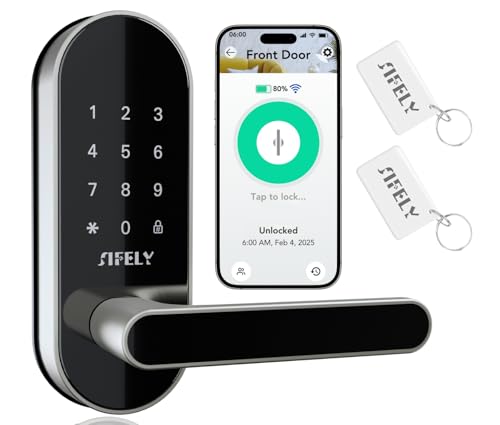
This handle lock focuses on broad credential support and direct remote access. The product information lists app, code, card, key, and smart-speaker entry, with built-in Wi-Fi and no gateway requirement for remote operation. It also lists capacity for up to 200 passcodes. That capacity is useful for a rental, office, or busy household where access changes over time, although a high code limit alone does not explain how every user is identified or how every credential is managed.
The listing describes a manager portal and auto-booking function that can send codes to guests and users. That gives this model a more specific rental-management angle than a basic keypad lock. It also includes auto-lock and a Type-C backup connection, while the stated battery estimate reaches up to six months. The product information does not clearly provide every door-thickness, backset, or bore dimension, so buyers should treat the broad installation language as a starting point rather than a guarantee of fit. A handle configuration also means the existing door preparation deserves close attention.
Pros
- Built-in Wi-Fi supports remote access without a separate gateway.
- Supports app, code, card, key, and voice-based entry.
- Lists capacity for up to 200 passcodes.
- Includes a manager portal and auto-booking feature for guest access.
- Provides Type-C emergency power support and automatic locking.
Cons
- The product information does not clearly identify all required door dimensions.
- It does not document fingerprint entry or hands-free proximity auto-unlock.
This lock suits buyers who need a handle assembly with Wi-Fi-based access administration and many possible passcodes. It is more compelling for managed access than for someone who simply wants a fingerprint reader at the front door. The lack of clearly listed installation dimensions is the main reason to slow down before ordering. Measure the existing door and confirm the handle arrangement, because a remote-access feature cannot compensate for a lock that does not align correctly with the door.
To buy this product, click here.
6. Veise VE06-H Smart Front Door Lock Handle Set — Best for Large Code Capacity

The VE06-H is built around a complete front-door handle and deadbolt arrangement, with app, code, fob, mechanical-key, and thumb-turn access. Its listing describes more than 250 user codes, including one-time, permanent, scheduled, and recurring options. That is a meaningful distinction for a home with cleaners, sitters, guests, or rotating occupants. Instead of passing around one permanent PIN, the owner can create different credentials and manage them through the app and website system.
Automatic locking, one-touch locking, privacy mode, passage mode, and low-battery alerts cover the daily operating details. Remote access and voice notifications require the separately sold Veise G2 gateway, so the lock is not a built-in-Wi-Fi product. Installation is also more specific than the phrase “fits most doors” might suggest. The listing calls for three pre-drilled door holes and asks buyers to check spacing, backset, cutout size, and door thickness from 1 3/8 to 2 inches. That makes measurement especially important for older doors or openings where the existing hardware does not follow a common layout.
Pros
- Includes a matching handle set with deadbolt hardware.
- Supports more than 250 user codes according to the listing.
- Offers one-time, permanent, scheduled, and recurring code types.
- Provides app records, eKey sharing, privacy mode, and passage mode.
- Fits a stated door-thickness range of 1 3/8 to 2 inches when the required preparation matches.
Cons
- Remote access and voice features require the separately sold G2 gateway.
- Installation requires three pre-drilled holes with compatible spacing.
The VE06-H is a strong match for access management on a complete entrance set, especially where many rotating codes matter more than fingerprint entry. It may be the wrong direction for a door that lacks the required three-hole preparation or for anyone who wants direct Wi-Fi operation without extra equipment. Its automatic locking features are useful, but the product information does not establish hands-free auto-unlock. Treat the gateway and door measurements as part of the total purchase decision rather than afterthoughts.
To buy this product, click here.
7. Philips Wi-Fi Smart Deadbolt — Best for Away Mode

Some owners want a lock that becomes more restrictive while they are traveling. This Philips deadbolt includes an Away Mode that disables all unlock methods except the master code, according to the listing. That setting is distinct from auto-lock. Auto-lock secures the door after a selected delay, while Away Mode changes which credentials can open it. Used together, those functions give the owner a way to manage ordinary departures and longer periods away from home.
The lock supports app, passcode, fingerprint, physical-key, and voice entry, with built-in Wi-Fi for remote operation and no extra hub listed as necessary. Up to 100 custom passcodes can be created, along with one-time or scheduled codes. Auto-lock timing is adjustable from 10 to 180 seconds. The listing supports doors from 1 3/8 to 2 inches thick and calls for careful cable and tailpiece routing during installation. It also specifically says the lock does not have a door sensor, so its status functions should not be interpreted as confirmation that the door itself is fully closed.
Pros
- Includes Away Mode that restricts unlocking to the master code.
- Built-in Wi-Fi supports remote app operation without a separate hub.
- Provides fingerprint, keypad, app, voice, and physical-key entry.
- Supports up to 100 custom passcodes and scheduled guest codes.
- Offers adjustable auto-lock timing from 10 to 180 seconds.
Cons
- The listing says it does not include a door sensor.
- It is a deadbolt rather than a complete handle replacement.
This model suits a front door where remote access and a travel-oriented restriction mode are useful. It is less appropriate for shoppers who need a coordinated lever set or a lock that can report whether the door slab itself is closed. The physical key provides a conventional fallback, while the 2.4GHz Wi-Fi connection handles remote functions. Verify network placement and door dimensions before installation, then enable auto-lock deliberately because the feature’s timing affects how the door behaves during everyday movement.
To buy this product, click here.
8. TMEZON Smart Lock With Handle — Best for Card and Fingerprint Entry

The TMEZON takes a different path from the Wi-Fi models. It uses a Tuya Bluetooth app rather than built-in Wi-Fi, and its five listed entry methods are fingerprint, passcode, app, IC card, and physical key. Four cards are included according to the product information, while the lock supports more cards and fingerprints for additional users. That combination can be handy for a bedroom, office, hotel-style room, or household where a card is easier to hand over than a phone or a permanent PIN.
Auto-lock can be set to five seconds after the door closes, and the interior handle includes an anti-lock function that limits unlocking to administrators according to the listing. The product information describes a no-drilling installation for standard left- and right-handed doors, though it does not provide the complete dimensional detail needed to confirm every installation. Because the app connection is Bluetooth rather than Wi-Fi, the lock should not be treated as an anywhere-access device. It is better suited to local entry management, with app control available within the supported connection range.
Pros
- Supports fingerprint, passcode, app, IC card, and physical-key entry.
- Includes four IC cards for immediate card-based access.
- Offers a short five-second auto-lock setting.
- Uses a Bluetooth Tuya app without a stated Wi-Fi requirement.
- Fits the handle-lock format and is described as suitable for several interior and residential applications.
Cons
- Bluetooth app control is not the same as remote Wi-Fi access from anywhere.
- The listing does not provide complete installation dimensions for confirming every door.
This TMEZON is a useful choice when cards and fingerprints are more convenient than cloud-connected remote access. A resident can carry a card, use a finger, or enter a code, while the five-second auto-lock setting handles a quick exit. Buyers seeking remote unlocking for guests while away should choose a Wi-Fi model instead. The no-drilling language is encouraging, but the door still needs to match the lock’s actual preparation, so measure before treating installation as straightforward.
To buy this product, click here.
9. Veise VE017 Fingerprint Smart Door Lock — Best for Fingerprint Deadbolt Entry

The VE017 places fingerprint access at the center of a deadbolt format while keeping several alternatives available. The listing describes fingerprint, app, authorized access, fob card, code, code sharing, mechanical-key, and optional voice-assistant access through a G1 gateway. Four password modes support one-time, duration, permanent, and recurring access. For a household that wants a fingerprint reader but still needs a code for a visitor or a key for an emergency, that range is practical.
Automatic locking can be configured from 0 to 180 seconds through the app. The lock uses four AA alkaline batteries, includes a USB-C emergency port, and is described as offering low-battery alerts. Remote unlocking, voice control, and remote monitoring require the separately sold gateway, so its basic app connection should not be confused with direct internet access. The stated door range is 1 3/8 to 2 inches, with 1 1/2 or 2 1/8-inch lock-hole compatibility. The listing also describes automatic handing detection and installation with a screwdriver, but latch alignment remains essential for any deadbolt.
Pros
- Combines fingerprint entry with code, app, fob card, and mechanical-key access.
- Supports one-time, duration, permanent, and recurring password modes.
- Offers adjustable auto-lock timing from 0 to 180 seconds.
- Includes a USB-C emergency power port and low-battery alerts.
- Supports a stated 1 3/8 to 2-inch door-thickness range when the lock-hole preparation matches.
Cons
- Remote access and voice features require the separately sold G1 gateway.
- The listing does not document hands-free proximity auto-unlock.
The VE017 works best for buyers who want biometric entry in a conventional deadbolt package and are comfortable adding a gateway if remote control becomes necessary. It offers a useful backup ladder, from fingerprint to code to physical key, but it does not provide the direct Wi-Fi simplicity of the Philips and Wyze options. Check the lock-hole diameter, door thickness, latch alignment, and gateway requirement before ordering. Automatic locking is adjustable, while the requested hands-free auto-unlock behavior is not clearly established by the product information.
To buy this product, click here.
Buying Guide
Separate Automatic Locking From Automatic Unlocking
The listings in this roundup document automatic locking, which means the bolt or latch can secure itself after a selected delay. That is different from automatic unlocking when a recognized phone approaches the door. App unlocking, fingerprint entry, voice commands, and scheduled codes still require a deliberate action unless the product explicitly states otherwise. If you want hands-free entry, look for clear documentation of proximity, geofencing, or another specific automatic-unlock method rather than assuming that “auto-lock” covers both directions.
Confirm the Existing Door Configuration
A deadbolt model may leave your existing lever in place, while a complete handle set replaces more of the door hardware. The Philips handle models, the Veise VE06-H, and the generic Wi-Fi handle lock require attention to the handle and latch arrangement. The VE06-H listing specifically calls for three pre-drilled holes with compatible spacing. Other products list door thickness and lock-hole ranges. Measure the door thickness, bore-hole diameter, backset, latch position, and strike alignment before ordering. A broad statement such as “fits most standard doors” is not a substitute for matching measurements.
Choose Wi-Fi or Local Bluetooth Based on the Job
Built-in Wi-Fi is useful for remote locking, remote unlocking, status checks, and notifications while away from home. The Philips models, Wyze lock, and generic handle lock list direct Wi-Fi connectivity. Bluetooth models such as the TMEZON are better understood as local app-controlled locks unless additional remote equipment is documented. Veise models in this roundup require a separately sold G1 or G2 gateway for remote access and voice functions. Factor the gateway into installation and ownership plans rather than assuming the lock itself connects to the internet.
Match Access Credentials to the People Using the Door
Fingerprint entry is quick for regular users, while PIN codes are easier to share with cleaners, relatives, or guests. Cards and fobs can be useful where users should receive a physical credential without learning a code. The Philips Upgraded model lists up to 100 passcodes and several scheduling types. The VE06-H lists more than 250 codes, and the generic Wi-Fi handle lock lists up to 200. Code capacity is only part of the picture. Check whether the product supports temporary, recurring, scheduled, or one-time credentials, and whether access can be revoked through the app.
Check the Emergency Entry Plan
A battery-powered lock should have a clear backup plan. Physical keys appear on several models, while the Wyze lock and Veise models list USB-C emergency power. Emergency power generally means temporarily supplying power so the lock can be opened. It does not automatically mean the batteries recharge inside the lock. Keep the required key, a compatible power bank, or replacement alkaline batteries available according to the product’s design. Also check whether batteries are included. Several listings specify that they are not.
Review the Installation and Handing Notes
Philips lists a right-opening default on one handle model and provides a reset process for left-opening doors. Other products describe automatic handing detection or compatibility with both left- and right-handed doors. These phrases address different installation behavior, so they should not be treated as interchangeable. Route cables carefully, avoid overtightening, and make sure the latch moves freely before enabling auto-lock. A lock that is slightly misaligned can become harder to operate once the motor begins securing the door on a timer.
Check the Smart-Home Scope
Alexa and Google Assistant support appears on several products, but the exact functions may depend on the app, account, network, and gateway. Voice compatibility does not establish support for Apple Home, Apple Home Key, Matter, Thread, or Home Assistant. None of those technologies should be assumed from a general smart-home statement. If a particular ecosystem is essential, confirm that the exact model supports it and identify whether a gateway or additional controller is required.
Best Smart Locks With Auto Unlock FAQ
Do these smart locks automatically unlock when I arrive?
The product description does not clearly document hands-free proximity or geofenced auto-unlock for these models. They document automatic locking plus deliberate entry methods such as fingerprints, codes, app commands, voice commands, cards, fobs, or physical keys. If arrival-based unlocking is essential, look for an exact statement about that capability for the precise model and configuration.
What does auto-lock mean on a smart lock?
Auto-lock means the lock secures itself after a selected delay or after a specified door event, depending on the model. The Philips Upgraded model lists a 5 to 180-second range, while several Philips and Veise products list ranges reaching 180 seconds. TMEZON lists a five-second setting. The timer should be chosen carefully so the door does not lock before everyone has finished entering or exiting.
Do these locks need Wi-Fi to open the door?
Not necessarily. Many listed models provide local entry through a fingerprint, keypad, card, fob, or physical key. Wi-Fi is mainly relevant to remote app control, notifications, and some voice functions. TMEZON uses Bluetooth app control rather than Wi-Fi, while Veise remote features require a separately sold gateway. Check the product’s local methods before assuming an internet outage will prevent every type of entry.
Are batteries included with these smart locks?
Several listings say batteries are not included. The Philips products call for alkaline batteries, the Veise products use AA alkaline batteries, and the Wyze listing says it includes eight AA batteries. Confirm the exact package contents before installation. Rechargeable or lithium batteries should not be substituted where the product information specifically calls for standard alkaline cells.
Can I use a smart lock on any front door?
No. Compatibility depends on door thickness, bore-hole size, latch and strike alignment, backset, handing, existing handle preparation, and the lock’s physical configuration. The VE06-H requires three compatible pre-drilled holes, while several deadbolts list specific thickness and hole ranges. Measure the door before ordering and do not assume that a standard residential description guarantees fit.
Do Veise locks provide remote access without extra equipment?
The Veise VE017 and VE018 listings state that remote access, monitoring, and voice functions require a separately sold G1 gateway. The VE06-H listing identifies a separately sold G2 gateway for its remote and smart-home functions. The locks may still provide local entry through their other methods, but the gateway requirement matters if remote control is a deciding feature.
Is USB-C on a smart lock the same as rechargeable power?
No. On the Wyze and Veise models, the USB-C connection is described as emergency power or a way to provide temporary power when the batteries are depleted. That does not establish that the internal batteries recharge through the port. Treat it as an emergency-access feature unless the exact product documentation explicitly describes normal charging.
Final Verdict
The Philips Upgraded Wi-Fi Smart Lock With Handle is the strongest overall choice for this roundup because it brings together a handle-mounted fingerprint reader, built-in 2.4GHz Wi-Fi, adjustable auto-lock timing, physical-key backup, and several kinds of managed access codes. It is a particularly balanced option for a main entrance where one person wants fingerprint entry, another uses a PIN, and a property owner needs app records or temporary access. The door still has to match its configuration, and the listing does not establish hands-free auto-unlock, so those limits should remain part of the purchase decision.
The Philips WiFi Keypad Deadbolt With Handle is a strong alternative for a complete front-door hardware upgrade, while the Veise VE018 is more suitable for buyers who value cards, fobs, fingerprints, and detailed credential management. Wyze earns attention for its USB-C emergency power arrangement and built-in Wi-Fi. For every option, match the lock to the existing door, confirm whether a gateway is required, and treat automatic locking as separate from arrival-based unlocking. That small distinction can prevent an expensive mismatch between the feature you expect and the feature the lock actually provides.
