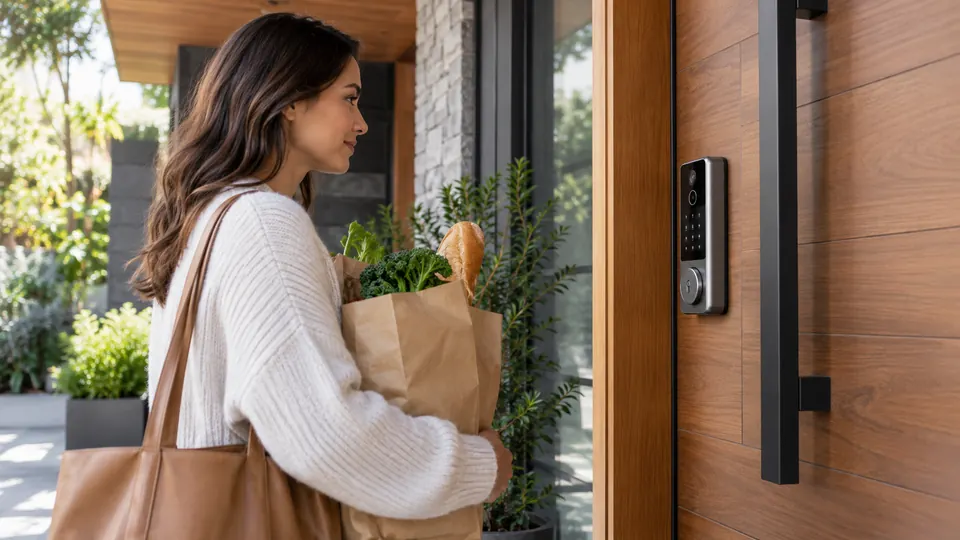
Walking up to your front door with both hands full makes facial recognition sound wonderfully simple. A camera or sensor sees you, confirms your identity, and the deadbolt opens without a key, phone, or code. The catch is that these locks differ substantially in how they install, how they handle backup entry, where biometric data is stored, and which smart home systems they support.
Facial recognition should be only one part of the decision. A lock also needs a suitable deadbolt or mortise setup, dependable power, a practical emergency-entry method, and access controls that fit the household. Some products add fingerprint or palm-vein entry, while others combine the lock with a video doorbell. A few support Apple Home Key or Matter, but general Apple Home or Wi-Fi compatibility does not automatically provide those features.
Quick Answer
- Best Overall: SwitchBot Lock Vision Pro combines 3D facial recognition with palm-vein and fingerprint entry, direct Wi-Fi, Matter, Apple Home, Google Home, Alexa, and Home Assistant support.
- Best for Apple Home Key: Lockly Visage Zeno adds facial recognition, fingerprint entry, Apple Home Key, a keypad, a physical key, and built-in Wi-Fi.
- Best for Integrated Video: eufy Security E40 combines face unlocking, a lever-handle lock, a 2K camera, and a doorbell in one weather-rated device.
- Best for Solar Power: Lockin Veno Solar Face uses an integrated solar panel and rechargeable battery, while retaining PIN, app, voice assistant, and mechanical-key access.
Best Smart Locks With Facial Recognition Comparison Table
| Product | Best For | Lock Format | Facial Recognition | Connectivity |
|---|---|---|---|---|
| SwitchBot Lock Vision Pro | Broad ecosystem support | Deadbolt | 3D face, palm vein, fingerprint | Wi-Fi, Matter |
| Lockly Visage Zeno | Apple Home Key users | Deadbolt | Face and fingerprint | Built-in Wi-Fi |
| Lockin Veno Solar Face | Reduced battery charging | Deadbolt | 3D face | Wi-Fi, Matter |
| eufy Security E40 | Lock and doorbell integration | Lever-handle lock | Face | App-based operation |
| myQ Secure View | Video-first entry monitoring | Smart deadbolt | Face and fingerprint | myQ app |
| 3D Facial Recognition Smart Door Lock | Multiple biometric methods | Complete door lock | Face, palm vein, fingerprint | Wi-Fi, Tuya app |
| TianfuSpanda 3D Face Recognition Lock | Mortise-style all-in-one entry | Mortise lock body | Face and fingerprint | Wi-Fi, Tuya app |
| Smart Door Lock With 3D Face Recognition | Video intercom and temporary codes | Mortise lock body | Face and fingerprint | Tuya app |
| Lockly Visage Zeno Series | Longer stated battery setup | Deadbolt | Face and fingerprint | Built-in Wi-Fi |
The detailed reviews below explain where each lock fits, what its facial-recognition system is paired with, and which installation or connectivity details deserve a closer look.
1. SwitchBot Lock Vision Pro — Best Overall

The SwitchBot Lock Vision Pro is the most complete match for households that want facial recognition without giving up other practical ways to enter. Its 3D face system works alongside palm-vein and fingerprint recognition, so a person carrying groceries can approach the door while another household member uses a finger or NFC card. The listing also describes local biometric storage with AES-128 encryption, which gives privacy-conscious buyers a clearer explanation of how those credentials are handled than many competing listings provide.
Its wider smart home support gives this model a meaningful lead. Direct Wi-Fi connection avoids a separate bridge, while Matter support extends compatibility to Apple Home, Alexa, Google, and Home Assistant. The lock also supports PINs, a physical key, Bluetooth geofencing, and remote app control. Installation is aimed at replacing an existing deadbolt, with stated compatibility for 35 to 55 mm doors, 60 or 70 mm backsets, and specified cross-bore sizes. Check those dimensions carefully, because this is a replacement deadbolt, not a universal fit for every door.
Pros
- Combines 3D facial recognition, palm-vein recognition, and fingerprint entry.
- Supports Wi-Fi, Matter, Apple Home, Alexa, Google, and Home Assistant.
- Offers seven entry methods, including NFC, PIN, app, and physical key access.
- Uses a 10,000mAh battery with a stated runtime of up to 12 months, plus a CR123A backup arrangement.
- Includes automatic locking sensors and a USB-C emergency power port.
Cons
- Requires compatible existing deadbolt dimensions and uses the included SwitchBot lock cylinder.
- The broadest smart home functions may still depend on the relevant app, controller, or ecosystem setup.
This is the strongest choice for a household that wants facial recognition as one option among many rather than as a single point of dependence. Its broad platform support also makes it easier to fit into a mixed-device home. Buyers with an unusual mortise lock, sliding door, or incompatible deadbolt preparation should skip the assumption that a simple replacement will work. For a standard compatible deadbolt, the combination of biometrics, Matter, emergency access, and direct Wi-Fi is unusually well balanced.
To buy this product, click here.
2. Lockly Visage Zeno Smart Lock — Best for Apple Home Key

Apple Home Key is the defining reason to choose this Lockly model. The listing explicitly describes unlocking with an iPhone or Apple Watch, giving Apple households an alternative to face recognition, fingerprint entry, or the PIN Genie keypad. That range matters in real life. A guest may receive app access, a child may use a fingerprint, and a person arriving after dark may prefer the face sensor rather than searching for a phone.
Dual infrared sensors are described as supporting facial recognition in different lighting, including nighttime conditions. The product also includes a physical key and built-in Wi-Fi, so remote lock management does not require a separately listed bridge. Installation is presented as a short DIY process for right- or left-swing doors between 1 3/8 and 3 1/8 inches thick. Those dimensions are useful, but the existing deadbolt preparation still deserves a careful check before purchase.
Pros
- Explicitly supports Apple Home Key through an iPhone or Apple Watch.
- Combines facial recognition, fingerprint access, PIN Genie, app control, voice assistants, and a physical key.
- Dual infrared sensors are listed for face recognition in low-light conditions.
- Built-in Wi-Fi supports remote control without a separately identified bridge.
- Supports a broad stated door-thickness range for right- and left-swing doors.
Cons
- The listing does not provide the same battery-capacity detail as the related model with two 10,000mAh batteries.
- Apple Home Key features still depend on compatible Apple devices and the user’s Apple Home setup.
Choose this version when Apple Home Key is central to the buying decision and the door fits the range. It is also a strong choice for homes that need several backup methods instead of relying on facial recognition every time. Buyers who want a longer stated battery specification or who have a mortise lock should examine the installation details carefully, since this is presented as a deadbolt replacement rather than a universal door-lock assembly.
To buy this product, click here.
3. Lockin Veno Solar Face Smart Lock — Best for Solar-Assisted Power

Battery management is the headline feature here. The Lockin Veno places a solar panel and an integrated 37Wh battery in the lock, with the listing describing charging from daily light and continued charging in cloudy or rainy conditions under specified light levels. That approach could reduce the regular ritual of removing a battery pack from a busy entry door, though actual results will depend on the light available at the installation location.
The facial-recognition system is paired with PIN entry, app control, voice-assistant access, and a mechanical key. The listing describes recognition for up to 50 users and a stated operating distance of up to 23 inches, along with resistance to photo, video, and mask spoofing claims. Built-in Wi-Fi, remote access, temporary passcodes, alerts, and Matter-based connections to Apple Home, Alexa, and Google Home make this more than a standalone biometric deadbolt.
Pros
- Integrates a solar panel with a 37Wh rechargeable battery.
- Offers facial recognition plus PIN, app, voice assistant, and mechanical-key entry.
- Includes built-in Wi-Fi for remote control, alerts, and temporary passcodes.
- Lists compatibility with Apple Home through Matter, Alexa, and Google Home.
- Provides USB-C backup power for an emergency power boost.
Cons
- Solar performance depends on the light reaching the installed lock location.
- The listing does not clearly provide standard door-thickness or backset information in the supplied specifications.
This model suits a front entrance where battery access is inconvenient and the exterior receives useful ambient light. Its physical-key backup helps offset the uncertainty that comes with any solar-assisted power claim. Before ordering, confirm the door and deadbolt fit because the solar feature cannot compensate for incompatible hardware. Buyers who prefer a clearly installation range may find Lockly or SwitchBot easier to evaluate.
To buy this product, click here.
4. eufy Security E40 Facial Recognition Smart Lock — Best Integrated Lever Lock

The E40 takes a different hardware route from the deadbolt-heavy choices above. It uses a lever-handle format and combines the lock with a 2K camera and doorbell. That can be appealing at a front entry where seeing a delivery driver and opening the door are part of the same routine. The listing describes a 135-degree head-to-toe view, which gives the camera a broader monitoring role than a lock that only handles entry credentials.
Facial recognition is supported alongside the integrated video system, and the listing describes local storage of face data. The stated detection range is 1.3 to 3.3 feet, with support for users between 3.9 and 7.2 feet tall. Installation is described as requiring no drilling for most compatible doors, but the compatibility limits are important: the lock is intended for standard US and Canadian single-cylinder deadbolts and is not listed for mortise locks, round faceplates, or non-standard faceplates.
Pros
- Combines a lever-handle lock, face unlocking, doorbell, and 2K camera.
- Lists local storage for facial-recognition data.
- Provides a 135-degree head-to-toe camera view for visitors and deliveries.
- Supports a rechargeable 15,000mAh battery and an automatic backup battery.
- Lists IP65 protection and an operating range from -22 to 158 degrees Fahrenheit.
Cons
- Not suitable for mortise locks, round faceplates, or other non-standard faceplates.
- The product description does not list the same broad smart home ecosystem support as SwitchBot or Lockly.
The E40 belongs near the top for buyers who want an integrated front-door camera and a genuine lever-handle format. It makes less sense for someone replacing a conventional deadbolt who does not need video at the lock. Confirming the existing faceplate and door preparation is crucial, since the no-drilling installation claim applies to most compatible doors rather than every entrance.
To buy this product, click here.
5. myQ Secure View Smart Lock — Best for Video-First Entry

The myQ Secure View is built around the idea that the lock, camera, and doorbell should share one housing. Its 2K HDR camera, wide-angle view, color night vision, two-way audio, motion alerts, and doorbell notifications give it a clear role at a busy entryway. Facial recognition is one of five listed entry methods, alongside fingerprint access, PIN, app control, and a physical key.
That combination may be handy for a household that wants to see a visitor before deciding how to respond. The removable rechargeable battery is listed with a stated runtime of four to six months, and a spare battery is available separately. Some smart detection features, including alerts for people, faces, packages, vehicles, and custom zones, require a subscription. The product information also lists myQ Smart Secure features that require a subscription, so buyers should separate the basic lock and camera functions from the optional monitoring layer.
Pros
- Combines a smart deadbolt, video doorbell, and 2K HDR camera.
- Supports face access, fingerprint, PIN, app, and physical-key entry.
- Includes color night vision and two-way audio for visitor interaction.
- Uses a removable rechargeable battery for easier charging.
- Offers remote lock control and visitor notifications through the myQ app.
Cons
- Several smart detection and Smart Secure features require a subscription.
- The product description does not specify the full door-preparation range.
This lock makes sense for an entrance where visitor video is nearly as important as biometric access. It is less compelling for buyers who want a simple face-unlock deadbolt without an ongoing service layer. Check the subscription details before purchase and confirm that the intended door preparation matches the installation hardware, since the listing emphasizes the integrated electronics more clearly than the mechanical fit.
To buy this product, click here.
6. 3D Facial Recognition Smart Door Lock — Best for Multiple Biometric Options

This model is aimed at households where different people prefer different forms of contactless entry. Facial recognition, palm-vein recognition, and fingerprint access sit alongside PIN codes, IC cards, keys, the Tuya app, and two-way voice communication. Palm-vein access may be especially attractive to someone who dislikes touching a sensor, while a PIN or key remains available for guests and backup use.
The built-in screen and infrared night-vision camera give the lock a more appliance-like presence than a conventional keypad deadbolt. Remote app control includes user management, temporary passwords, and notifications for visitors or failed attempts, according to the listing. A 4,200mAh rechargeable battery and USB or Type-C emergency power are also listed. The product information does not clearly identify the complete door-thickness or mortise requirements, so installation confirmation should happen before ordering.
Pros
- Offers facial, palm-vein, and fingerprint recognition in one lock.
- Includes PIN, IC card, mechanical-key, app, and voice communication options.
- Provides a screen and infrared night-vision camera at the door.
- Supports temporary passwords, remote unlocking, user management, and alerts.
- Includes a rechargeable battery with emergency USB or Type-C power support.
Cons
- The product description does not clearly specify the door preparation or thickness range.
- The large number of access methods may require more setup and credential management than a simpler deadbolt.
Pick this lock for a household that values choice above minimalist hardware. It gives family members several ways to enter, and the screen can help users see who is outside before opening. Buyers with a standard deadbolt seeking a straightforward replacement may prefer SwitchBot or Lockly, especially where dimensions and ecosystem compatibility matter more than the number of biometric methods.
To buy this product, click here.
7. TianfuSpanda 3D Face Recognition Door Lock — Best Mortise-Style All-in-One Option

The TianfuSpanda is a complete-looking door system rather than a simple interior smart-lock motor. Its listed functions include facial recognition, fingerprint entry, IC card access, passwords, temporary passwords, app control, a physical key, a camera, a smart cat-eye, and a doorbell. An indoor 1080p color screen lets occupants view the outside, which could be useful for children or older family members who prefer a visual check before opening.
The lock uses a 4,200mAh rechargeable battery and includes an outdoor charging port. The listing says the lock can still open about 100 times after a low-battery warning. Built-in Wi-Fi and Tuya app control are listed without a separate bridge. Installation is the main caution. The listing warns that the mortise is not suitable for standard doors, some screws may require cutting, and the product should not be installed outdoors because it is not waterproof.
Pros
- Combines facial recognition, fingerprint, IC card, PIN, app, temporary-password, and key entry.
- Includes a camera, smart cat-eye, doorbell, and indoor 1080p color screen.
- Provides built-in Wi-Fi and Tuya app remote control without a separately listed bridge.
- Uses a rechargeable 4,200mAh battery with an outdoor charging port.
- Offers a complete mortise-style lock body for buyers seeking more than a deadbolt add-on.
Cons
- The listing warns that installation is difficult and may require cutting screws.
- It is not waterproof and should not be installed outdoors.
This option belongs on a shortlist for an interior or protected entrance where the mortise format is suitable and the installer can handle a more involved replacement. It is a poor match for a standard deadbolt retrofit or an exposed exterior door. Confirm the mortise dimensions and installation method before purchase, since its broad access feature list does not remove the physical requirements of the door.
To buy this product, click here.
8. Smart Door Lock With 3D Face Recognition and Camera — Best for Video Intercom

Video intercom is the clearest reason to choose this model. The integrated camera, night vision, doorbell, motion alerts, and two-way communication allow a resident to speak with a delivery driver or visitor through the phone. Facial recognition is joined by fingerprint, password, IC card, mechanical key, Tuya app control, and temporary codes, giving the lock a practical mix of household and guest access methods.
Automatic locking after the door closes is also listed, along with a rechargeable battery, low-battery alert, and Type-C emergency power port. The lock body is described as an aluminum-alloy assembly with a 6068 mortise body, and the listing gives a 35 to 100 mm door-thickness range with standard preparation. Still, the installation warning is unusually direct. The mortise may not suit standard doors, some screws may need cutting, and the product is not waterproof, so it should not be placed outdoors.
Pros
- Combines 3D facial recognition with fingerprint, password, card, key, app, and temporary-code entry.
- Includes a camera, night vision, doorbell, motion alerts, and two-way intercom.
- Provides automatic locking after the door closes.
- Lists compatibility with Tuya app control, voice commands, and smart routines.
- Includes a Type-C emergency power port and low-battery warning.
Cons
- The listing warns of difficult installation and possible screw cutting.
- It is not waterproof and should not be installed outdoors.
This is best suited to a protected entrance where remote conversation with visitors matters and a mortise-style installation is acceptable. It should be avoided for a quick, reversible deadbolt upgrade or an exposed porch installation. The stated door range is useful, but buyers still need to confirm the mortise preparation because door thickness alone does not establish a fit.
To buy this product, click here.
9. Lockly Visage Zeno Series Smart Lock — Best for Dual-Battery Capacity

This Lockly Visage Zeno Series version shares the core facial-recognition, fingerprint, keypad, app, voice assistant, Apple Home Key, and physical-key functions of the other Visage listing. Its meaningful distinction is the supplied battery description. The product information lists two 10,000mAh lithium batteries and a stated runtime of up to six months under normal use, with frequency affecting the result. That arrangement may appeal to a busy household that wants a clearly identified rechargeable setup.
The listing describes built-in Wi-Fi and a DIY installation for right- or left-swing doors from 1 3/8 to 2 inches thick. Facial data is described as encrypted and stored on the device, while dual infrared sensors are listed for use in different lighting conditions. The narrower stated door-thickness range compared with the other Visage listing is a real purchasing distinction, so buyers should match the exact model to the door rather than treating both product pages as interchangeable.
Pros
- Supports facial recognition and fingerprint entry alongside Apple Home Key.
- Includes PIN Genie, app, voice assistant, and physical-key access.
- Lists two 10,000mAh rechargeable batteries.
- Provides built-in Wi-Fi for remote management without a separately listed bridge.
- Includes dual infrared sensors and on-device facial-data storage claims.
Cons
- The stated door-thickness range is narrower than the other Visage listing.
- The six-month battery figure is a published estimate that varies with usage.
Choose this version when its specific installation range fits and the dual-battery description matters more than a wider door-thickness specification. It gives Apple households the same strong alternative-entry story as the other Visage model, but model matching is critical. Buyers who need a broader fit or a longer stated battery interval may prefer SwitchBot, provided their deadbolt dimensions are compatible.
To buy this product, click here.
Buying Guide
Match Facial Recognition to Real Entry Habits
Face unlocking is most useful when approaching the door naturally, such as arriving with groceries, a child, or a package. It should not be the only entry method. A physical key, PIN, fingerprint, palm vein, app, or card gives the household a fallback when lighting, positioning, battery power, or user preference makes facial recognition inconvenient. SwitchBot and Lockly offer especially broad alternatives, while the mortise-style models add cards and temporary credentials.
Confirm the Lock Format Before Ordering
A replacement deadbolt, lever-handle lock, and mortise assembly are different installation projects. SwitchBot, Lockly, Lockin, and myQ are presented as deadbolt-oriented products. The eufy E40 uses a lever-handle format with stated restrictions around faceplates and mortise locks. The TianfuSpanda and Tuya intercom models use mortise-style hardware and include warnings about difficult installation. A door-thickness number alone cannot confirm compatibility. Check the existing lock body, backset, bore, faceplate, and strike arrangement.
Separate Smart Home Support From Facial Recognition
Smart home compatibility can change the buying decision, but the terms are not interchangeable. SwitchBot explicitly lists Matter over Wi-Fi along with Apple Home, Alexa, Google, and Home Assistant. Lockly explicitly lists Apple Home Key, which is more specific than general Apple Home support. Lockin lists Apple Home through Matter, Alexa, and Google Home. The Tuya models identify Tuya app control and smart routines, but the product description does not establish the same broad platform support.
Look Closely at Backup Power
A rechargeable battery still needs a charging plan. SwitchBot lists a USB-C port and a CR123A backup arrangement. Lockin adds solar assistance and USB-C backup. myQ uses a removable battery, while several mortise-style models provide emergency USB or Type-C power. A solar panel may reduce charging frequency, but it depends on available light. Emergency power input also does not necessarily mean the internal battery is being recharged through that port.
Decide Whether Video Belongs in the Lock
Integrated cameras can simplify a front-door setup, but they also add monitoring features, power demands, privacy questions, and possible subscription requirements. The eufy E40, myQ Secure View, TianfuSpanda, and Tuya intercom model combine locking with video or doorbell functions. myQ specifically lists subscription requirements for several smart detection features. If visitor video is incidental rather than central, a simpler deadbolt with facial recognition may be easier to install and manage.
Review Access Management, Not Only Biometric Features
A lock for a household may need permanent users, temporary guests, PINs, cards, and remote revocation. Lockin lists temporary passcodes, while the 3D facial lock, TianfuSpanda, and Tuya intercom model list temporary passwords or temporary codes. This is different from merely storing several fingerprints or face profiles. If cleaners, relatives, delivery workers, or short-term guests need access, check how credentials are created, shared, expired, and removed.
Be Careful With Security Marketing
Facial recognition does not automatically prove superior physical security, and a long list of unlocking methods does not replace a properly fitted lock. The product listings describe features such as encrypted or locally stored biometric data for several models, but those descriptions are not a guarantee against every attack. Use a compatible deadbolt or mortise assembly, protect the associated account, install the strike hardware correctly, and keep access permissions current.
Best Smart Locks With Facial Recognition FAQ
Do facial-recognition smart locks still need a physical key?
Not always, but a physical key is a useful fallback. Lockin Veno, both Lockly Visage models, SwitchBot, myQ, and the listed mortise-style products include or describe mechanical-key access. A key can help if the battery is depleted or the electronic functions are unavailable. Check the exact product listing because backup methods differ between models.
Does Apple Home support mean Apple Home Key support?
No. Apple Home integration and Apple Home Key are separate features. The Lockly Visage listings explicitly describe Apple Home Key access with an iPhone or Apple Watch. Lockin lists Apple Home through Matter, while SwitchBot lists Apple Home and Matter. Those descriptions should not be treated as identical to the specific Home Key feature unless the product information says so.
Can these locks be installed on any front door?
No. Compatibility depends on the existing lock type and door preparation. Deadbolt models may require specific thickness, backset, cross-bore, or cylinder dimensions. The eufy E40 excludes mortise and certain non-standard faceplates. The TianfuSpanda and Tuya intercom products warn that their mortise assemblies may not suit standard doors. Confirm the mechanical configuration before ordering.
Do facial-recognition locks work without Wi-Fi?
The product description does not establish identical offline behavior for every model. Some locks provide local biometric or physical entry methods, while app-based remote control requires connectivity. A Wi-Fi outage is different from a depleted battery. Before purchase, confirm which local methods remain available if the internet or app service is unavailable.
Which lock offers the most alternatives to face unlocking?
SwitchBot lists face, palm vein, fingerprint, NFC, PIN, app, and physical-key access. Lockly lists face, fingerprint, Apple Home Key, keypad, app, voice assistant, and physical-key entry. Several mortise-style models add IC cards, temporary passwords, and intercom functions. More methods can help a mixed household, but they also create more credentials to manage.
Are integrated cameras worth choosing?
They can be useful if the front entry needs visitor video, two-way communication, or delivery monitoring. The eufy E40, myQ Secure View, TianfuSpanda, and Tuya intercom model combine camera-related features with facial access. Buyers should account for battery use, app requirements, privacy preferences, and subscription features. A camera is less useful if the primary goal is simply keyless entry.
What should I do if the lock runs out of power?
Use the fallback for the exact model. Several products include a physical key, while others list USB-C or Type-C emergency power. SwitchBot lists a CR123A backup arrangement, and Lockin includes solar assistance plus USB-C backup. Keep the emergency method accessible and test the mechanical key or external power procedure before relying on the lock for daily entry.
Final Verdict
The SwitchBot Lock Vision Pro is the strongest overall choice in this group because facial recognition is supported by palm-vein and fingerprint entry, PINs, NFC, app control, a physical key, direct Wi-Fi, and Matter compatibility. Its stated deadbolt dimensions still need to match the door, but the combination of access flexibility, ecosystem coverage, battery planning, and emergency options gives it the broadest fit for a typical compatible entrance.
Lockly Visage Zeno is the better direction for buyers who specifically want Apple Home Key, while Lockin Veno is compelling for a location where solar-assisted power could reduce charging interruptions. The eufy E40 suits a compatible lever-style door where integrated video matters, and the myQ Secure View focuses on a lock, camera, and doorbell in one device. The mortise-style products offer more specialized installation and broader local entry methods, but their door restrictions deserve extra attention. Match the facial system to the household’s habits, then verify the mechanical fit, backup power, ecosystem requirements, and access-management features before ordering.
