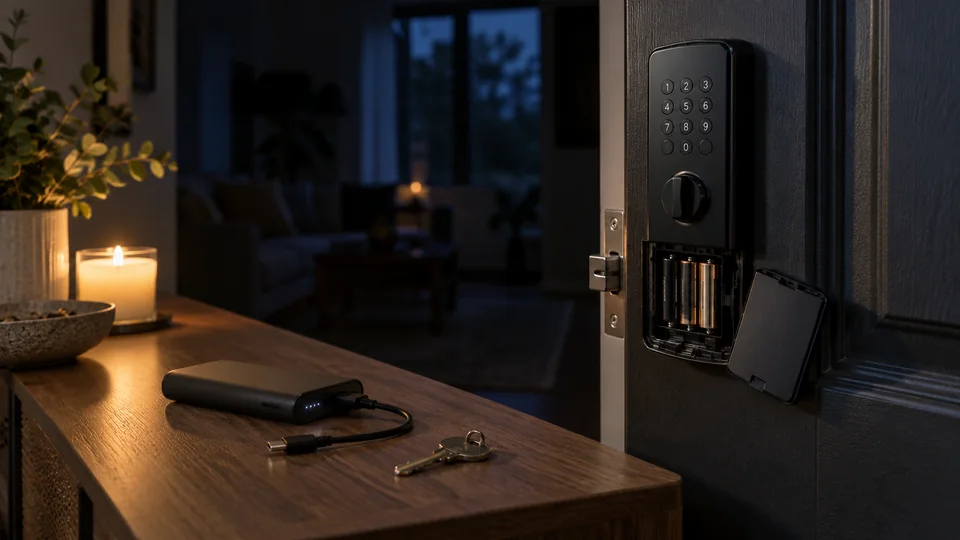
If a smart lock loses its own battery power, it usually stays in its current mechanical position. A locked deadbolt generally remains locked, while an unlocked one remains unlocked. The keypad, fingerprint reader, motor, wireless radio, and app-controlled functions may stop working until power is restored. Entry then depends on the lock’s supported backup method, such as a physical key, external emergency power, or battery replacement.
A household power outage is different. Most residential smart locks run on internal batteries, so their keypads and other local access methods may continue working. However, an outage can shut down the home’s Wi-Fi router, modem, hub, gateway, Matter controller, or Thread border router. Remote access, notifications, and automations may become unavailable while local PIN, fingerprint, NFC, Bluetooth, or key access continues, depending on the model.
Battery Depletion and a Household Power Outage Have Different Effects
| Power event | What commonly continues working | What may stop working |
|---|---|---|
| Smart lock batteries are depleted | Physical-key entry or another mechanical override, if provided | Keypad, fingerprint reader, motor, wireless communication, status reporting, and electronic credentials |
| Household electricity fails | Battery-powered local entry methods | Wi-Fi, internet service, powered hubs, remote control, cloud notifications, and some automations |
| Internet service fails, but household power remains on | Mechanical entry and many local electronic access methods | Cloud-mediated remote control, remote code management, and off-site notifications |
| A hub, bridge, or controller loses power | Direct lock access supported independently by the lock | Features routed through that device, which may include remote control or smart home automations |
These are common patterns rather than universal rules. The lock’s hardware, communication protocol, configuration, and manufacturer implementation determine which features remain available.
Does a Dead Smart Lock Automatically Unlock?
Most battery-powered residential smart deadbolts do not retract their bolts merely because the batteries die. The deadbolt is a physical mechanism, while the battery powers the controller and actuator that move it. Removing electrical power generally leaves the mechanism where it was.
This distinction also applies to many retrofit smart locks. A retrofit unit commonly turns compatible existing deadbolt hardware from the interior. If its battery is depleted, the exterior key cylinder may still operate, provided the installation retained that cylinder and the model supports normal keyed entry.
Smart lever locks, mortise locks, multipoint systems, and wired access-control hardware can behave differently. Some commercial electronic locking systems are specifically configured as fail-safe or fail-secure devices:
- Fail-safe hardware unlocks when electrical power is removed, often to support a particular egress or life-safety design.
- Fail-secure hardware remains locked from the entry side when power is removed, while approved interior egress may still be available.
Those terms should not be applied automatically to an ordinary battery-powered residential smart lock. Commercial doors, shared-building entrances, fire-rated openings, and emergency exits may have specialized hardware and regulatory requirements.
Which Features Stop After the Lock’s Batteries Die?
Complete battery depletion can disable any feature that requires the lock’s electronics. Depending on the product, affected functions may include:
- PIN entry through a keypad
- Fingerprint recognition
- NFC or RFID credential reading
- Apple Home Key or another digital credential
- Bluetooth communication with a nearby phone
- Wi-Fi, Zigbee, Z-Wave, Thread, or Matter communication
- Remote locking and unlocking
- Auto-lock and auto-unlock
- Door-status reporting and access logs
- Audible alerts, lights, or low-battery warnings
- The motor or clutch used for electronic locking
A mobile phone having power does not solve a depleted lock battery. The lock still needs enough energy to recognize the phone’s credential and operate its mechanism.
Some locks preserve stored PINs, credentials, schedules, and settings in nonvolatile memory, but retention varies. Restoring power does not necessarily erase the configuration, yet the exact behavior should be confirmed in the model’s documentation.
Backup Entry Methods Vary by Lock
Physical-Key Override
A keyed smart lock may continue functioning as a conventional mechanical lock after its batteries are exhausted. Insert the correct key and operate the cylinder according to the manufacturer’s instructions.
Keyless appearance does not guarantee the absence of a key cylinder. Some locks conceal the cylinder behind a cover. Conversely, some products have no physical-key backup at all. Keeping a backup key inside the locked property provides little help during an exterior lockout, so plan where an authorized spare will be stored.
External Emergency Power
Certain smart locks have exterior contacts or a USB port that can receive temporary power. The user supplies the documented power source, wakes the lock, and authenticates with an existing PIN, fingerprint, card, or app credential.
Emergency power is not necessarily battery charging. On some models, the connection powers the electronics only long enough to unlock the door. It may not recharge or bypass an internal battery pack permanently. Port type, voltage, power source, and operating procedure are model-specific, so follow the exact manual rather than experimenting with adapters.
Replacing or Recharging the Battery
If the battery compartment is accessible from the secure side of the door, replacement may require entry through another door or use of a backup method first. Once inside, install the battery type specified by the manufacturer or recharge the approved battery pack.
Do not assume alkaline cells, primary lithium cells, and rechargeable cells are interchangeable. Their voltage characteristics and discharge behavior differ, and some manufacturers restrict which chemistry may be used. Replace a complete set together when the instructions call for it, and avoid mixing old and new cells.
Authorized Secondary Entry
A side door, garage entry door, building manager, property owner, or authorized locksmith may provide another recovery route. Avoid prying, drilling, or forcing the smart lock. Such actions can damage the door and hardware without reliably restoring access.
What Continues Working During a Blackout?
A battery-powered smart lock can usually perform its local electronic functions during a household blackout while its batteries retain sufficient charge. A keypad code, fingerprint, local digital credential, or mechanical key may still work. Exact availability depends on the lock.
Connected functions may fail because supporting equipment uses household electricity:
- A Wi-Fi lock may lose its connection when the router turns off.
- A Bluetooth lock may still communicate directly with a nearby phone, while remote access through a powered bridge becomes unavailable.
- A Zigbee or Z-Wave lock may lose smart home control if its compatible hub has no backup power.
- A Matter lock using Thread may lose ecosystem control if required controllers or Thread network equipment go offline.
- Cloud notifications may stop when the modem, router, or internet service is unavailable.
The lock can remain mechanically secure while appearing offline in an app. An offline status does not by itself mean that the lock battery is dead or that the door has unlocked.
How to Regain Access Safely
- Check for signs of lock power. Touch the keypad, use the documented wake action, or try a known valid credential. Dim lights, weak sounds, delayed motor movement, or a low-battery message can indicate insufficient power. A completely unresponsive lock may have depleted batteries, poor battery contact, or another fault.
- Try the supported mechanical key. Use this option only if the lock includes a compatible key cylinder. Do not force a key that does not turn normally.
- Use documented emergency power. Connect only the power source specified for that exact model. Authenticate normally after the lock wakes.
- Check another authorized entrance. Once inside, keep the affected door open while replacing the batteries and testing the lock.
- Restore the correct battery supply. Follow the manual for battery chemistry, orientation, replacement, or charging.
- Test the mechanism with the door open. Lock and unlock it electronically several times. Confirm that the bolt or latch travels fully without binding before closing the door.
- Contact support or a qualified locksmith if recovery fails. Assistance is appropriate when the key cylinder binds, emergency power does not wake the lock, the motor cannot move the mechanism, or specialized mortise or multipoint hardware is involved.
A factory reset should not be the first response to power loss. Resetting can remove credentials, ownership settings, integrations, or calibration without correcting a depleted battery or misaligned deadbolt.
Why a Lock May Still Fail After Fresh Batteries Are Installed
New batteries do not rule out a mechanical or electrical problem. Work through simple checks before considering replacement or disassembly.
Incorrect Battery Type or Installation
Confirm the specified battery chemistry, correct polarity, clean contacts, and proper battery-cover fit. A rechargeable pack may also need sufficient charging time through its supported charger. Do not substitute a similarly shaped pack unless the manufacturer identifies it as compatible.
Deadbolt or Latch Resistance
A motor may stall when the bolt rubs against the strike plate or the door must be pushed or pulled before locking. Test with the door open. If the mechanism works freely while open but fails when closed, door or strike alignment is a more likely cause than battery failure.
Do not force the actuator. Door movement, loose hardware, installation tension, and frame alignment may require correction. A locksmith can evaluate persistent binding without weakening the door’s security.
Lost Calibration or Incomplete Startup
Some locks perform a handing, calibration, or position-detection process after installation or a power change. Use the model’s official instructions because procedures vary. Do not copy button sequences from a different model or generation.
Connectivity Has Not Recovered
The lock may resume local operation before its app shows it online. Check whether the router, hub, bridge, controller, or internet service is operating. Lock power, Bluetooth pairing, Wi-Fi association, hub connectivity, Matter commissioning, and cloud availability are separate parts of the connection path.
Hardware or Firmware Fault
If the lock remains unresponsive with an approved, fully powered battery supply and the mechanism moves freely, contact the manufacturer. Avoid opening sealed components or installing unofficial firmware. The manufacturer can identify supported diagnostics and determine whether service is required.
Preventing a Power-Related Lockout
- Respond to low-battery alerts rather than waiting for electronic entry to fail.
- Use the battery type listed in the lock’s current manual.
- Keep an authorized physical key accessible if the lock provides keyed backup.
- Know where the emergency power contacts or port are located and what power source they require.
- Test backup entry periodically without intentionally draining the batteries.
- Correct door alignment problems that make the motor work harder.
- Keep the manufacturer’s instructions available outside the locked property, such as in a secure digital account.
- For remote management, consider backup power for required networking equipment, while recognizing that an internet-provider outage can still interrupt cloud features.
- After replacing batteries, test locking and unlocking with the door open before relying on the lock.
Frequently Asked Questions
Can a smart lock trap someone inside when its batteries die?
Many residential smart locks retain manual interior operation, such as a thumb turn or lever, but designs differ. Electronic mortise locks and commercial access-control systems may have other egress arrangements. Never install or modify lock hardware in a way that obstructs required exit operation. Specialized or regulated doors should be evaluated using the hardware documentation and applicable local requirements.
Will a smart lock forget access codes after battery replacement?
Many products retain credentials during ordinary battery replacement, but this is model-specific. Battery replacement and factory reset are separate procedures. Consult the manual before resetting or deleting the lock from its app.
Can remote unlocking work during a power outage?
It may work if the lock, router, modem, required controller, and internet connection all have power. In a typical blackout, one or more of those supporting devices goes offline. Local entry may remain available while remote access does not.
Does an emergency USB-C port recharge the smart lock?
Not necessarily. Some USB-C ports provide temporary operating power, while others may charge an approved internal battery. The connector’s shape alone does not reveal its function. Follow the documentation for the exact lock.
Is a depleted smart lock battery a security failure?
Battery depletion is primarily an availability problem. It can prevent authorized electronic access and disable monitoring or notifications. The mechanical lock generally remains in its previous position, but security still depends on the door, frame, strike, lock hardware, installation, and available backup methods.
A smart lock losing power does not usually cause the door to unlock. The practical result depends on which power source failed. Dead lock batteries can disable electronic authentication and motor operation, while a household blackout more often interrupts routers, hubs, internet access, and remote features. Knowing the lock’s approved key override, emergency-power procedure, and battery requirements is the most reliable way to avoid being locked out.
