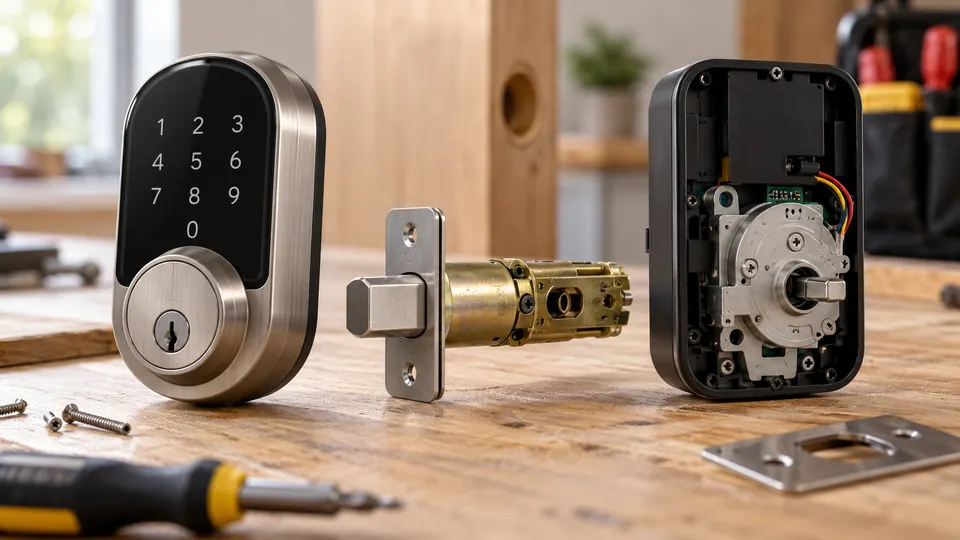
Smart locks combine a physical locking mechanism with an electronic controller, an authentication method, and, on connected models, wireless communication. When an authorized person enters a PIN, presents a fingerprint, taps a credential, or sends a command from an app, the electronics verify that request. A motor or clutch then moves the deadbolt, latch, or other locking hardware.
The exact process varies by lock type. A smart deadbolt, retrofit lock, smart lever lock, mortise lock, and keypad-only electronic lock can use different hardware and communication methods. The common principle is that electronic access authorizes an action, while the mechanical parts still secure the door.
The Main Parts of a Smart Lock
Most smart locks contain several functional components, although their arrangement differs by model.
- Mechanical locking hardware: This may be a deadbolt, latch, lever mechanism, mortise case, or another compatible assembly.
- Motor, actuator, or clutch: This moves the locking hardware or allows the exterior mechanism to operate after authentication.
- Electronic controller: This processes credentials, stores settings, manages the motor, and monitors the lock.
- Authentication system: This may include a keypad, fingerprint reader, mobile credential, physical key, NFC credential, or RFID card.
- Wireless radio: Depending on the model, the lock may use Bluetooth, Wi-Fi, Zigbee, Z-Wave, Thread, or another connection method.
- Power source: Many residential smart locks use batteries. Some use rechargeable battery packs or a wired power supply.
- Door-position sensor: Some models can report whether the door is open or closed, although this feature is not universal.
A keypad or fingerprint reader does not physically secure the door by itself. It sends an authorization result to the lock’s controller. The controller then tells the actuator to move the locking hardware if the credential is accepted.
How a Smart Lock Unlocks the Door
The unlocking sequence usually follows four stages:
- Credential presentation: The user enters a PIN, uses a fingerprint, taps a phone or card, presses a button in an app, or uses another supported method.
- Credential verification: The lock or an associated controller checks whether the credential is valid. Some credentials are stored directly on the lock. Others may be managed through an app, hub, or cloud service.
- Electronic authorization: If the credential meets the lock’s access rules, the controller activates the motor or clutch.
- Mechanical movement: The deadbolt retracts, the latch releases, or the lever mechanism becomes active.
Locking generally works in reverse. The motor extends the deadbolt, moves the latch, or engages the locking mechanism after a button press, app command, schedule, door-closing event, or automatic-lock setting.
Mechanical resistance can prevent a successful operation. A misaligned door, tight strike plate, warped frame, or excessive installation tension may cause the motor to struggle or stop. A valid electronic command cannot compensate for hardware that cannot move freely.
How Different Smart Lock Types Work
Smart Deadbolts
A smart deadbolt replaces or operates a deadbolt assembly. Some models replace the entire lock, while retrofit designs attach to the interior portion of an existing deadbolt and preserve some exterior hardware.
A full replacement may provide a new exterior keypad, cylinder, or reader. A retrofit lock may keep the existing outside key cylinder and use a motor on the inside to turn the thumb turn. Retrofit compatibility depends on the existing deadbolt, cylinder, interior clearance, door thickness, and the manufacturer’s adapter system.
Smart Lever Locks
A smart lever lock controls a lever-operated latch or an integrated lever assembly. It is not automatically a replacement for a deadbolt. The door preparation, latch position, exterior dimensions, and interior mechanism can differ substantially.
Some lever locks use a motor to retract the latch after authentication. Others control a clutch that permits the lever to operate. A smart lever lock may suit an interior or passage-style application better than a deadbolt-based entry door, depending on the design and the security requirements of the opening.
Smart Mortise and Multipoint Locks
Mortise locks contain a larger lock case inside a pocket cut into the door. Multipoint systems engage several points along the door edge. These mechanisms require compatible hardware and are rarely interchangeable with a standard residential smart deadbolt.
Specialized doors may require a lock made for the existing mortise case or multipoint system. A standard-looking exterior does not guarantee standard internal hardware.
Electronic Keypad Locks
A keypad lock may be electronic without being a connected smart lock. It can verify PINs and operate a motor locally but lack Wi-Fi, Bluetooth, app control, remote management, or smart home integration.
A connected keypad lock adds communication features, which may allow app-based setup, notifications, remote control, or user management. The available functions depend on the model and its connection arrangement.
How Smart Locks Recognize Authorized Users
Smart locks can support several access methods. Each method has a different operating process and different practical requirements.
- PIN codes: The keypad sends the entered numbers to the controller. The lock compares them with stored credentials and operates when the code is accepted. Some models support permanent, temporary, recurring, scheduled, or one-time codes.
- Fingerprints: A fingerprint reader captures characteristics of a finger and compares them with enrolled biometric data. A fingerprint reader does not eliminate the need for backup access, and its behavior can vary with moisture, dirt, injury, or sensor conditions.
- Smartphone credentials: A phone may communicate through Bluetooth, NFC, an app, or a platform-specific digital key. Nearby operation and remote operation are separate capabilities.
- NFC credentials: A compatible phone, card, tag, or wearable can transmit a short-range credential. NFC support alone does not establish Apple Home Key support.
- RFID cards and tags: RFID is a broad category of radio-frequency identification. A lock must support the relevant credential type and frequency. An RFID card is not automatically interchangeable with an NFC phone credential.
- Physical keys: Some smart locks retain a conventional key cylinder. Others use an emergency external power connection, a removable battery, or another recovery method instead.
Apple Home integration and Apple Home Key are separate features. Apple Home may allow a compatible lock to participate in supported app controls and automations. Apple Home Key is a digital-key function available only with compatible lock hardware, Apple devices, software, and configuration. UWB hands-free behavior, ordinary Bluetooth access, NFC access, and Apple Home Key should not be treated as the same feature.
How Smart Locks Connect
Wireless communication determines how a lock exchanges information with phones, hubs, controllers, or online services. It does not by itself determine every function the lock supports.
| Connection method | Typical role | Important limitation |
|---|---|---|
| Bluetooth | Nearby phone communication, setup, or local access | Bluetooth alone does not provide remote internet access |
| Wi-Fi | Connection to a local network and, on supported models, remote services | Wi-Fi access, internet access, and cloud control are separate dependencies |
| Zigbee | Low-power communication through a compatible mesh network and controller | A Zigbee radio does not guarantee compatibility with every hub or feature |
| Z-Wave | Low-power communication through a compatible controller and mesh network | Device support and available functions vary by controller and implementation |
| Thread | Low-power IP-based mesh networking | Thread does not automatically mean the device supports Matter |
| Matter | Interoperability standard for supported smart home devices | Matter does not guarantee identical features across every platform |
Bluetooth Operation
A Bluetooth smart lock can communicate directly with a nearby phone. This may support local unlocking, setup, or status checks. Remote access generally requires an additional gateway, hub, Wi-Fi connection, or manufacturer service arrangement.
Bluetooth proximity also does not automatically mean hands-free unlocking. The lock and its software must specifically support that behavior, and the phone must meet the relevant requirements.
Wi-Fi Operation
A Wi-Fi lock connects to a wireless network. Some models include Wi-Fi hardware, while others use a separate bridge or gateway. Remote commands may travel from an app through the manufacturer’s online service to the lock.
A Wi-Fi outage, internet outage, cloud-service outage, and battery failure are different events. PIN entry, fingerprint access, physical keys, or nearby Bluetooth control may continue during an internet interruption, depending on the model. Remote notifications and app commands may stop working until the network or service is restored.
Zigbee, Z-Wave, Thread, and Matter
Zigbee and Z-Wave are distinct wireless technologies that commonly rely on a compatible controller or hub. A lock may communicate locally through one of these networks, but the controller still needs to support that device and expose the desired functions.
Thread is a networking technology. Matter is an interoperability standard that can use supported network transports, including Thread in some implementations. A Thread border router connects a Thread network with other IP networks. A Matter controller manages Matter devices and commissioning. One physical product may perform several roles, but the roles remain technically different.
Matter can simplify multi-platform integration for supported features, but it does not guarantee that every app exposes every lock function. Fingerprint enrollment, temporary PIN management, access history, and manufacturer-specific settings may remain in the lock’s own app or may be unavailable through a particular platform.
Does a Smart Lock Need Wi-Fi?
No. A smart lock can use Bluetooth, Zigbee, Z-Wave, Thread, or a local keypad and still provide electronic access. Wi-Fi is mainly relevant to network communication and remote services.
A lock may work without Wi-Fi for local PIN entry, fingerprint access, physical-key entry, or nearby phone control. Remote unlocking, cloud notifications, off-site user management, and some integrations may require an internet connection, a hub, or a gateway. The exact offline behavior belongs to the individual model.
Smart Home Controllers and App Control
A smart home platform acts as an interface between the lock and other devices or services. Apple Home, Google Home, Alexa, Samsung SmartThings, and Home Assistant can expose different controls depending on the lock, protocol, integration, and platform.
Basic lock and unlock control does not prove that a platform supports every access-management feature. A platform may show lock status and send commands while leaving fingerprint enrollment, PIN scheduling, access logs, or firmware settings in the manufacturer’s app.
Home Assistant support also varies. A lock using Wi-Fi, Zigbee, Z-Wave, Thread, or Matter is not automatically fully supported. The integration may provide local control, cloud control, or a limited set of entities and services.
How Door Compatibility Affects Operation
The lock must match the door’s existing hardware or be installed with compatible replacement hardware. Relevant measurements and conditions can include:
- Door thickness
- Backset, which is the distance from the door edge to the center of the bore hole
- Bore-hole and latch-hole dimensions
- Latch or deadbolt dimensions
- Strike-plate position
- Interior clearance and installation depth
- Door handing and swing
- Frame alignment
- Existing cylinder, mortise case, or multipoint mechanism
- Door material and unusual construction
Door thickness is different from backset, and bore-hole diameter is different from the latch opening in the door edge. Matching one measurement does not establish complete compatibility.
Sliding doors, glass doors, narrow-stile doors, metal doors, security doors, gates, commercial openings, and multipoint doors may require specialized hardware. A standard bored-door deadbolt should not be assumed to fit these applications.
Power, Batteries, and Emergency Access
Battery-powered smart locks can continue operating during a household power outage because the lock has its own power source. A power failure may still disable the Wi-Fi router, hub, or internet service, which can affect remote features.
Battery life depends on the lock design, battery chemistry, motor activity, door alignment, wireless behavior, temperature, firmware, and usage pattern. Use the battery type specified for the exact model. Alkaline batteries, lithium primary batteries, and rechargeable lithium-ion packs are not automatically interchangeable.
Emergency access varies. A lock may provide a physical key cylinder, external contacts for temporary power, a USB-C emergency power connection, a removable battery, or another manufacturer-documented recovery method. An emergency power port does not necessarily recharge the installed batteries. Review the exact instructions before a lockout occurs.
Smart Lock Security
Smart lock security has several layers. Physical protection depends on the lock hardware, strike plate, door, frame, installation, and any documented mechanical testing. Electronic protection depends on authentication, account security, wireless communication, software, firmware maintenance, and access management.
A strong PIN policy does not correct a weak door frame. A well-installed deadbolt does not protect an account with a reused password. Fingerprint access adds convenience but does not remove the need for backup access or protect against every type of attack.
Practical security measures include:
- Use unique account credentials and enable multi-factor authentication where the service supports it.
- Give each regular user an individual credential instead of sharing one administrator code.
- Remove former users and temporary credentials when access is no longer needed.
- Install the lock according to the manufacturer’s instructions and verify smooth mechanical movement.
- Keep the mobile app, hub, and lock firmware updated through supported methods.
- Review access logs when the model provides them, while checking how those logs are stored and managed.
- Maintain a supported backup entry method and keep emergency procedures available.
Encryption can protect data in transit or during communication, but one encryption feature does not establish complete product security. Avoid treating marketing language as proof of a particular algorithm, certification, or level of attack resistance.
What Happens During a Failed Unlock?
A failed operation can result from several different conditions:
- The credential was entered incorrectly or is no longer active.
- The batteries are depleted or unsuitable for the lock.
- The motor cannot overcome mechanical resistance.
- The lock has lost its nearby Bluetooth, hub, Wi-Fi, Thread, or cloud connection.
- The phone app lacks the required permission or account authorization.
- The door or frame has shifted and the bolt no longer aligns with the strike.
Start with safe, reversible checks. Confirm that the credential is correct, inspect the battery condition, and test the door with the door open if the manufacturer permits that procedure. If the lock operates with the door open but fails when closed, alignment or frame resistance deserves attention. Avoid forcing the motor or disassembling the lock without model-specific instructions.
Factory resets can remove credentials and configuration, so they should not be the first response to every connection problem. Use the manufacturer’s support documentation when the issue involves programming, reset procedures, firmware, or hardware failure.
How to Think About Smart Lock Operation
A smart lock is a coordinated system rather than a single electronic feature. The credential identifies or authorizes a user, the controller decides whether to accept the request, the motor or clutch performs the action, and the mechanical hardware secures the door. Wireless protocols and smart home platforms add communication and management options, but they do not replace compatible door hardware.
For reliable operation, verify the lock type, door measurements, supported access methods, connectivity requirements, battery instructions, emergency entry method, and software features for the exact model. Those details determine what the lock can do locally, what requires a hub or internet connection, and how the system behaves when power or connectivity is unavailable.
