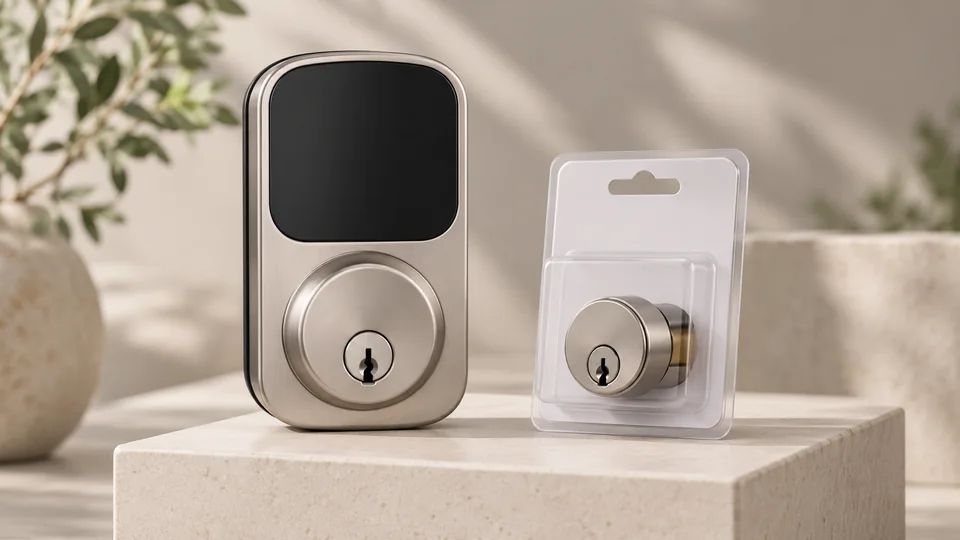
A smart lock can make a front door easier to manage, but the phrase “can be rekeyed” changes the buying decision. A lock with a physical key cylinder may let you keep familiar keys, yet that does not prove the cylinder accepts a standard rekeying kit or matches your existing key. The product description for these models documents backup keys on several locks, but it does not clearly confirm user-rekeyable cylinders for any of them.
That distinction matters during a replacement. A homeowner moving into a new house may want one key for the front, back, and garage doors. A landlord may need to change the mechanical key without replacing the electronic lock. A renter may want to preserve the original hardware altogether. Those situations call for different designs, and a fingerprint reader, app, or keypad cannot substitute for mechanical rekeying compatibility.
This guide therefore ranks nine complete smart locks by the strength of their access methods, physical-key backup, connectivity, installation information, and practical fit. Treat rekeyability as a final verification step before ordering. The product information does not establish that any selected model can be rekeyed, so buyers should confirm cylinder compatibility with the manufacturer or a qualified locksmith.
Quick Answer
Best Overall: ULTRALOQ Bolt SE offers the broadest combination of fingerprint entry, codes, app control, mechanical keys, Wi-Fi, and Matter over Thread. Its listing still does not confirm that the key cylinder can be rekeyed.
Best Fingerprint Alternative: Wyze Auto-Lock Bolt v2 combines fingerprint entry, built-in Wi-Fi, backup keys, and USB-C emergency power.
Best for Access Management: Philips Upgraded Wi-Fi Smart Lock lists up to 100 passcodes, scheduled and temporary access, event logs, and a physical key.
Best for a Mechanical Key Backup: eufy Security Smart Lock C220 includes a physical-key entry method alongside fingerprint, keypad, app, Apple Watch, and voice access.
Best Smart Locks That Can Be Rekeyed Comparison Table
| Product | Best For | Key Backup | Primary Access Methods |
|---|---|---|---|
| ULTRALOQ Bolt SE | Broad smart-home access | Two mechanical keys | Fingerprint, code, app, voice |
| Wyze Auto-Lock Bolt v2 | Fingerprint entry with emergency power | Backup keys | Fingerprint, code, app, key |
| eufy Security Smart Lock C220 | Fingerprint and eufy users | Physical key | Fingerprint, keypad, app, voice |
| Veise VE018 | Multiple credentials and long claimed battery life | Two backup keys | Fingerprint, keypad, app, fob |
| eufy Security Smart Lock C30 | Physical-button keypad entry | Physical key | Keypad, app, voice, key |
| Philips Upgraded Wi-Fi Smart Lock | Large code lists and access logs | Physical key | Fingerprint, code, app, voice, key |
| DESLOC B200 | Fingerprint entry with optional gateway | Physical keys | Fingerprint, PIN, app, fob, key |
| Philips Smart Lock | Physical-button keypad users | Physical key | Keypad, app, voice, key |
| TMEZON Smart Lock | Cards and interior applications | Two physical keys | Fingerprint, code, card, app, key |
The detailed reviews explain what each lock documents, where its mechanical key matters, and which limitations deserve attention before purchase.
1. ULTRALOQ Bolt SE — Best Overall

The ULTRALOQ Bolt SE is the strongest general recommendation because its listing covers the widest range of access scenarios without dropping the traditional key. Fingerprint entry, up to 50 passcodes, app operation, web access, shared eKeys, voice control, and two mechanical keys give a household plenty of ways through the door. That flexibility is useful on a rushed morning when a thumb is faster than a phone, or during a service visit when a temporary code is easier than handing over a key.
Its connectivity is more complicated than the feature list first suggests. Built-in 2.4 GHz Wi-Fi supports remote management without a hub, while Matter over Thread access requires a compatible Thread Border Router. The listing also describes Apple Home, Alexa, Google Assistant, and Siri support, but buyers should verify which functions operate through each platform. The claimed battery life is up to 18 months through Thread, while the lock also provides auto-lock and low-battery alerts. None of the product description confirms that its mechanical cylinder can be rekeyed.
Pros
- Supports fingerprint, passcode, app, web, eKey, voice, and mechanical-key entry.
- Stores up to 50 fingerprints and 50 access codes according to the listing.
- Built-in Wi-Fi enables remote management without a separate Wi-Fi bridge.
- Documents Matter over Thread support with a required compatible border router.
- Includes two mechanical keys and low-battery notifications.
Cons
- Matter over Thread features require additional compatible equipment.
- The listing does not confirm that the mechanical cylinder can be rekeyed.
This is the best starting point for buyers who want modern access control and a physical-key fallback. It makes less sense for someone whose main requirement is preserving an existing house key, since the available information does not establish cylinder compatibility or rekeying. Confirm the lock preparation and ask about rekeying before installation.
To buy this product, click here.
2. Wyze Auto-Lock Bolt v2 — Best Fingerprint Alternative

Wyze focuses on the moment most people notice a smart lock: arriving with both hands full and getting inside without searching for keys. Its fingerprint scanner, keypad, app, and backup keys create a practical set of choices, while built-in Wi-Fi allows remote lock management through the Wyze app. The listing also describes a scratch- and smudge-resistant tempered-glass surface, which should help keep the touch area readable after repeated use.
The USB-C emergency port is especially relevant to a lock with eight AA batteries. If the batteries run down, a power bank can provide temporary power for entry, while the physical keys remain available. The listing claims up to eight months of battery life and describes optional interaction with a Wyze Video Doorbell. That doorbell pairing may suit a household that already uses Wyze, but it does not establish compatibility with other ecosystems. Rekeying is not documented.
Pros
- Offers fingerprint, keypad, app, and physical-key entry.
- Built-in Wi-Fi supports remote lock management through the Wyze app.
- USB-C emergency power can use a common power bank.
- Tempered glass is described as resistant to scratches and smudges.
- Listing states up to eight months of battery life with eight AA batteries.
Cons
- The available information does not confirm rekeyable mechanical hardware.
- Broader smart-home compatibility beyond the Wyze environment is not documented.
Choose this model for fast biometric entry and a useful emergency-power option. It is a weaker fit for a buyer whose first question is whether an existing key can be retained or changed, because the supplied specifications stop at “backup keys.” Ask whether those keys operate a standard rekeyable cylinder before ordering.
To buy this product, click here.
3. eufy Security Smart Lock C220 — Best for Fingerprint and Physical-Key Access

The C220 gives fingerprint access a prominent role while keeping several familiar alternatives close at hand. The listing identifies six unlocking methods: fingerprint, eufy app, keypad, physical key, Apple Watch, and voice assistant. That mix can feel natural in a busy home. A resident may use a fingerprint at the doorstep, a family member may prefer a code, and a backup key remains available if the electronic side is unavailable.
Built-in Wi-Fi enables remote control without a bridge, and the listing describes integration with the eufy Security ecosystem, including routines with a eufy doorbell. It also lists up to eight months of battery life from eight AA batteries, IP53 protection, and BHMA Grade 3 certification. The product information says it fits most standard deadbolts and bores under 54 mm after removing the spacer, but exact door preparation still needs checking. It does not state that the key cylinder can be rekeyed.
Pros
- Documents six entry methods, including fingerprint and physical key.
- Built-in Wi-Fi provides remote app control without a bridge.
- Works within the eufy Security ecosystem and supports listed voice assistants.
- Listing identifies IP53 protection and BHMA Grade 3 certification.
- Provides a bore-size consideration for standard deadbolt installation.
Cons
- Rekeying capability is not specified in the product description.
- Its broader ecosystem benefits are most relevant to households already using eufy products.
The C220 is a sensible choice for a front door where biometric access and a physical key are both important. It should be skipped by anyone seeking a clearly retrofit cylinder or a guaranteed match for an existing key. The listing gives useful installation guidance, but it does not answer the rekeying question.
To buy this product, click here.
4. Veise VE018 — Best for Credential Variety

The VE018 is built around a large menu of credentials. Fingerprint, app, touchscreen keypad, IC card, fob, remote authorization, password sharing, and mechanical keys are all listed, giving it clear appeal for homes with varied routines or small rental-style applications. Its app can manage users, access schedules, codes, cards, fingerprints, and activity history, so the lock offers more administrative control than a keypad that merely accepts one permanent code.
The hardware information is unusually specific about installation. The lock is listed for doors from 1-3/8 to 2 inches thick with a 2-1/8-inch hole, and it includes a Type-C emergency port plus two backup keys. The listing also states up to 16 months of battery life from four AA batteries, though that remains a manufacturer claim that depends on use. ANSI Grade 3, BHMA, local storage, and 128-bit AES are listed, but none of this confirms a rekeyable cylinder.
Pros
- Supports fingerprint, keypad, app, IC card, fob, password, and key entry.
- Provides user management, schedules, access history, and credential removal through the app.
- Lists compatibility with doors from 1-3/8 to 2 inches thick.
- Includes a Type-C emergency power port and two backup keys.
- Offers passage and mute modes for different operating routines.
Cons
- The listing does not confirm that the mechanical cylinder can be rekeyed.
- Remote control and voice functions require the separately sold Veise G1 Gateway.
This model suits buyers who care more about credential administration than a minimalist keypad. It can be useful for cleaners, visitors, or changing household access, but the gateway requirement matters if remote management is central to the plan. Verify rekeying separately rather than assuming the two included keys represent a standard interchangeable cylinder.
To buy this product, click here.
5. eufy Security Smart Lock C30 — Best for Physical-Button Keypad Entry

The C30 takes a more straightforward route than fingerprint-equipped models. Its entry methods are keypad, app, voice assistant, and physical key, with physical buttons rather than a touchscreen. That can be appealing at a front door where gloves, wet fingers, or a simple tactile interface make a difference. The lock also supports customizable auto-lock timing and can pair with a eufy doorbell.
Built-in Wi-Fi provides remote access without a bridge, while the listing states up to five months from four AA batteries. IP53 protection and BHMA Grade 3 certification are listed for the lock, and the installation is described as a roughly 15-minute replacement for most standard deadbolts without drilling. Those claims still require a check of the existing door hardware. The product information confirms a physical key but says nothing about rekeying.
Pros
- Uses physical keypad buttons instead of a touchscreen.
- Provides app, voice, keypad, and physical-key entry.
- Built-in Wi-Fi supports remote control without a bridge.
- Offers customizable auto-lock timing and no listed monthly fee.
- Documents IP53 protection and BHMA Grade 3 certification.
Cons
- Does not document fingerprint entry.
- Rekeying capability is not identified in the product description.
The C30 is a good fit for someone who wants a familiar button keypad and remote app control without biometric enrollment. It is less suitable for households that want fingerprint access or a clearly supported mechanical rekeying system. Before replacing an existing deadbolt, confirm that the current preparation matches the lock.
To buy this product, click here.
6. Philips Upgraded Wi-Fi Smart Lock — Best for Access-Code Management

The standout feature here is the depth of its access-management listing. The lock supports up to 100 passcodes, with permanent, scheduled, temporary, and offline one-time options described. That is more useful than simply knowing a lock can store several codes. A household can assign separate credentials, a cleaner can receive a scheduled code, and a short-term visitor can receive a time-limited option while the app records activity.
Fingerprint entry is built into the handle, so the user places a thumb on the grip and turns in one motion. App, voice, password, and physical-key access are also listed, along with real-time alerts, passage mode, privacy mode, auto-lock, and low-battery notifications. The listing does not provide door dimensions for this exact model in the product description, and it does not confirm mechanical rekeying. That missing detail matters more than the long feature list for this search intent.
Pros
- Lists up to 100 passcodes with permanent, scheduled, temporary, and one-time options.
- Combines fingerprint-on-handle entry with app, voice, keypad, and key access.
- Built-in Wi-Fi supports remote control and activity notifications without a hub.
- Includes passage mode, privacy mode, and adjustable auto-lock.
- Supports event logs and low-battery alerts through the app.
Cons
- The product description does not establish cylinder rekeying compatibility.
- Exact door preparation dimensions are not clearly supplied for this model.
This is the better choice for a property where changing and tracking user credentials matters more than preserving an existing key. It is a weaker purchase for a buyer who needs a known rekeyable cylinder or precise door-fit confirmation before ordering. Request both details before committing to installation.
To buy this product, click here.
7. DESLOC B200 — Best for Optional Gateway Expansion

The DESLOC B200 covers everyday entry with fingerprint, PIN, app, eKey, key fob, physical key, and optional voice control. Its Bluetooth connection works with the TTLock app nearby, while the separately sold G2 Gateway is required for the listed Alexa and Google Assistant functions. That division is worth noticing. A buyer who only needs local management may not need the gateway, while someone expecting remote access should budget for the additional hardware and verify the gateway’s supported functions.
The listing identifies four AA batteries, a claimed runtime of up to 12 months, low-battery indication, and USB-C emergency power. It also lists IP54 water resistance, operation from -22°F to 158°F, and BHMA Grade 3 compliance. Fingerprint enrollment supports up to 50 fingerprints according to the listing. The product is described as fitting most standard US doors, but exact dimensions are not provided here, and rekeying is not documented.
Pros
- Offers fingerprint, PIN, app, eKey, fob, physical-key, and optional voice access.
- Supports up to 50 stored fingerprints according to the listing.
- Provides USB-C emergency power and a low-battery indicator.
- Lists IP54 water resistance and a broad operating-temperature range.
- Supports scheduled or temporary access codes through the TTLock app.
Cons
- The G2 Gateway is required for the listed voice-control functions and is sold separately.
- The product information does not confirm a rekeyable mechanical cylinder.
The B200 fits a buyer who wants many local entry choices and may add remote smart-home control later. It should not be treated as a confirmed rekeyable replacement without more information. The optional gateway also means the purchase decision includes connectivity planning, not only the lock itself.
To buy this product, click here.
8. Philips Smart Lock — Best for Simple Keypad Access

This Philips deadbolt keeps its access model simple: physical buttons, passcodes, app control, voice control, and a physical key. The listing says users can create up to 100 custom passwords, including permanent, one-time, and timed credentials. For a front door used by family, cleaners, or occasional visitors, that is a practical arrangement that avoids passing around a physical key.
Built-in Wi-Fi supports remote operation through the Philips Home Access app, including permissions, notifications, and event history. The listing states that the lock uses eight AA batteries and may operate for up to six months under specified use, with low-battery alerts. IP54 protection and an operating range from -31°F to 150°F are also listed. Physical buttons may appeal to users who dislike touchscreens, but the product information does not identify exact door dimensions or rekeying capability.
Pros
- Uses physical buttons for keypad entry.
- Supports permanent, one-time, and timed passwords.
- Built-in Wi-Fi enables app-based remote control without a listed bridge.
- Includes physical-key entry and voice control with listed assistants.
- Provides low-battery alerts, auto-lock, and failed-password alarm prompts.
Cons
- Fingerprint entry is not listed for this model.
- Rekeying and exact door-preparation compatibility are not documented.
This Philips model suits buyers who want remote code management without fingerprint hardware. It is a poor match for someone selecting a lock primarily around an existing key system, since the available details do not confirm that the key cylinder can be changed. Confirm the mechanical design and door fit before purchase.
To buy this product, click here.
9. TMEZON Smart Lock — Best for Card-Based Entry

The TMEZON adds IC-card access to the usual fingerprint, passcode, app, and physical-key choices. That can be handy for a bedroom, office, hotel-style room, or shared interior space where a card is easier to issue than a PIN. The listing says four cards are included and that the lock can support up to 100 cards and more than 50 fingerprints.
This is a Bluetooth Tuya lock, not a Wi-Fi model. The app can manage users, share e-codes, review logs, and provide alerts nearby, but the product description does not establish remote internet access. The listing describes auto-lock, anti-peeping passwords, left- and right-handed compatibility, and screwdriver installation for standard doors. Two physical keys are included, yet there is no statement that the cylinder can be rekeyed. Its intended interior applications also make it less suitable as a direct front-door recommendation.
Pros
- Supports fingerprint, passcode, app, IC-card, and physical-key entry.
- Includes four IC cards and lists support for additional cards.
- Tuya Bluetooth app provides nearby user and access-log management.
- Offers anti-peeping password entry and adjustable auto-lock.
- Designed for left- or right-handed standard-door installation according to the listing.
Cons
- The product description does not establish Wi-Fi or remote internet control.
- Rekeying capability is not documented, and the listed applications emphasize interior doors.
The TMEZON belongs near the bottom because its card system is useful but its application and Bluetooth-only description are narrower. It may work well for an interior office or bedroom where cards are convenient. It is a questionable choice for a main entrance requiring rekeying, remote control, or confirmed outdoor suitability.
To buy this product, click here.
Buying Guide
Confirm What “Rekeyable” Means Before Ordering
Rekeying normally means changing the mechanical cylinder so a new key operates the lock while the hardware remains installed. A listing that says “backup keys” only confirms another entry method. It does not confirm a standard pin-tumbler cylinder, compatibility with a familiar keyway, or the ability to use a locksmith’s rekeying kit. Ask specifically whether the cylinder is rekeyable, which keyway it uses, and whether changing it affects the electronic operation.
Separate Physical-Key Backup From Emergency Power
A physical key and a USB-C emergency port solve different problems. A key provides mechanical entry if the batteries or electronics fail. An emergency port temporarily powers some locks so the electronic system can be used. It does not automatically recharge the installed batteries or prove that the lock remains usable during every failure condition. Locks such as the Wyze and DESLOC list emergency power, while several others rely on their included keys.
Match the Lock to the Existing Door Preparation
Standard residential compatibility is not a universal guarantee. Check door thickness, bore size, deadbolt alignment, backset, strike placement, and whether the replacement is a complete assembly or a retrofit. The Philips 4200 listing identifies a 1-3/8 to 1-3/4-inch door range for its handle-equipped versions. The Veise listing identifies a 1-3/8 to 2-inch range and a 2-1/8-inch hole. Those details are useful, but they do not confirm every other dimension.
Decide Whether You Need Wi-Fi, Bluetooth, or a Gateway
Built-in Wi-Fi generally supports remote app access through the internet, while Bluetooth app control is typically nearby unless an additional gateway is used. The TMEZON listing describes Tuya Bluetooth control and does not establish Wi-Fi remote access. DESLOC identifies Bluetooth app operation and a separately sold G2 Gateway for listed voice functions. Veise identifies a separately sold G1 Gateway for remote and voice features. Plan for the required equipment rather than assuming every smart-lock feature works from the lock alone.
Choose Access Methods for the People Who Use the Door
Fingerprint entry is convenient for regular household members, while codes are easier to share with visitors and service providers. Cards may suit offices or interior rooms. Physical keys remain useful for emergencies, but the product listings do not confirm rekeyability for the reviewed models. A lock with many methods can still be a poor fit if the one method you require, such as a rekeyable cylinder, is undocumented.
Read Battery Claims as Estimates
Battery-life figures vary with entry frequency, Wi-Fi activity, temperature, and configuration. The reviewed products list claimed runtimes ranging from several months to as much as 18 months. Look for low-battery alerts, a clear replacement process, emergency power, and a physical key. A lock that uses eight AA batteries may have a different replacement routine from one using four.
Best Smart Locks That Can Be Rekeyed FAQ
Can any of these smart locks be confirmed as rekeyable?
No. The product description identifies physical keys for several models, but it does not explicitly confirm that any cylinder accepts standard rekeying or matches an existing key. Contact the manufacturer or a locksmith before purchase if rekeying is the deciding requirement.
Does having backup keys mean a smart lock can be rekeyed?
No. Backup keys show that the lock has a mechanical entry method. Rekeying depends on the cylinder and keyway design. A lock may include keys that cannot be changed by the owner or may require a manufacturer-specific replacement cylinder.
Which reviewed locks include a physical key?
The ULTRALOQ Bolt SE lists two mechanical keys. Wyze, eufy C220, eufy C30, Philips Upgraded Wi-Fi Smart Lock, DESLOC B200, Philips Smart Lock, and TMEZON also list physical-key entry or backup keys. The exact rekeying procedure is not supplied for these products.
Can a locksmith rekey a smart lock after installation?
That depends on the lock’s cylinder, keyway, and construction. A locksmith may be able to rekey a compatible conventional cylinder, but a smart lock with a proprietary or non-serviceable cylinder may require a replacement part. Obtain the exact keyway and cylinder information before scheduling the work.
Are these locks retrofit models that preserve existing exterior hardware?
The supplied descriptions primarily present complete deadbolt or handle-equipped replacements. They do not clearly identify a dedicated retrofit design that preserves every existing exterior component. Check the installation instructions and hardware requirements for the exact model rather than assuming a replacement will fit over the current lock.
Which lock offers the strongest access management?
The Philips Upgraded Wi-Fi Smart Lock lists up to 100 passcodes, scheduled and temporary credentials, offline one-time passwords, event logs, and alerts. The ULTRALOQ Bolt SE also documents permanent, scheduled, and temporary eKeys or passcodes, along with activity history. Neither listing confirms mechanical rekeying.
Do all of these locks work remotely without extra equipment?
No. ULTRALOQ, Wyze, eufy C220, eufy C30, and several Philips models list built-in Wi-Fi. DESLOC and Veise identify gateways for expanded remote or voice functions, while TMEZON is described with Bluetooth app control and no Wi-Fi. Check the required hub or gateway before relying on remote entry.
Final Verdict
The ULTRALOQ Bolt SE is the strongest overall option in this group because it combines the broadest access mix with Wi-Fi, Matter over Thread support, app management, and two mechanical keys. Wyze is a strong alternative for fingerprint entry and emergency USB-C power. The eufy C220 makes sense for buyers who want fingerprint access, a physical key, and integration with an existing eufy setup. For scheduled and temporary codes, the Philips Upgraded Wi-Fi Smart Lock deserves attention.
The critical qualification is simple: none of the supplied product descriptions proves that its mechanical cylinder can be rekeyed. If changing the key is mandatory, do not choose based on fingerprint speed, battery claims, or the number of app features. Confirm the cylinder, keyway, rekeying process, and door compatibility first. If the manufacturer cannot provide that information, a smart lock with rekeyable hardware or a locksmith-approved cylinder may be a better fit than any model in this comparison.
